Black plate (257,1)
北米Model "A2520BE-A" EDITED: 2015/ 5/ 25
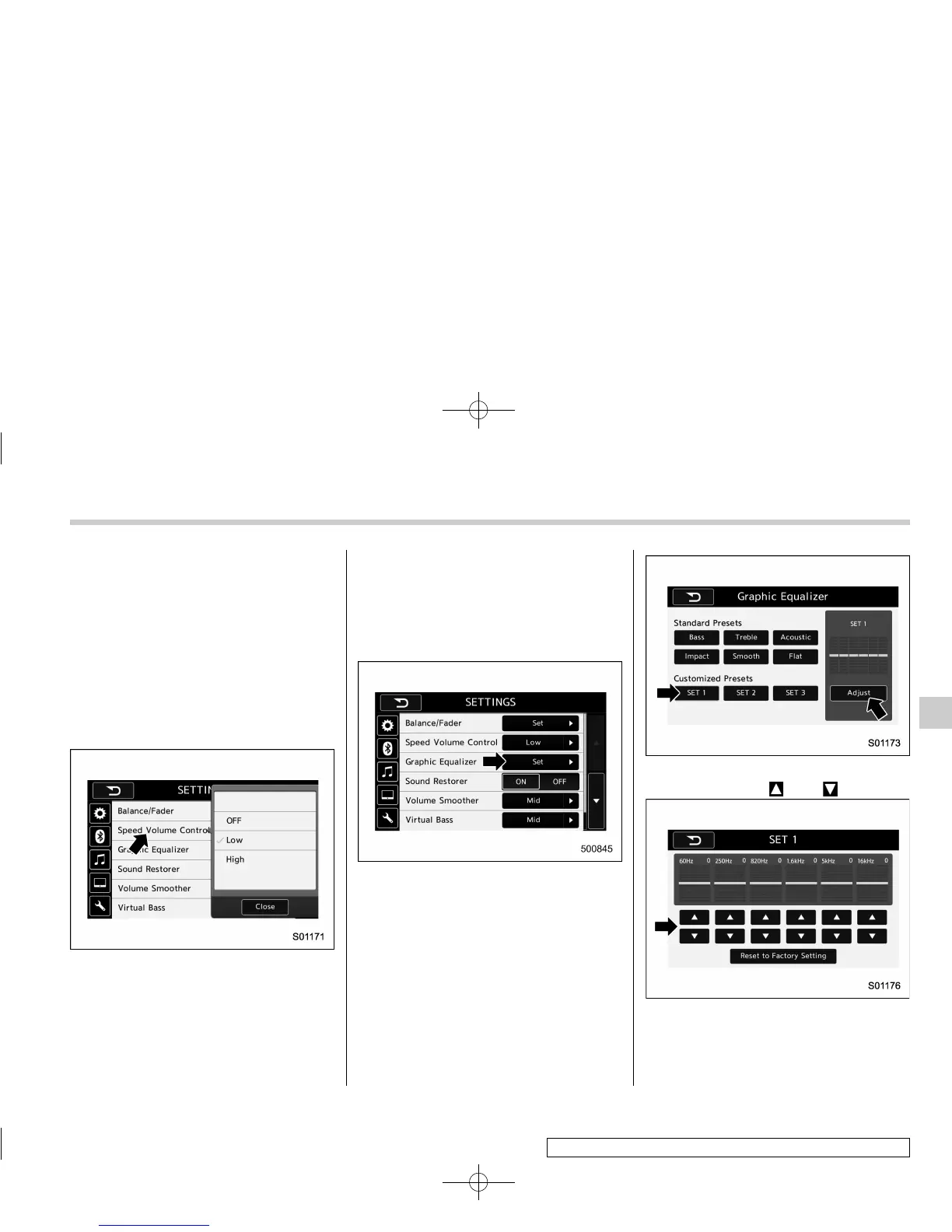
! “Speed Volume Control”
The system adjusts to the optimum
volume and tone quality according to
vehicle speed to compensate for in -
creased vehicle noise.
1. Touch the right side key of the “Speed
Volume Control” key.
2. Select the desired item. The “High”
key comes to have a bigger effect. When
the “OFF” key is selected, speed volume
control function is cancelled.
! “Graphic Equalizer”
You can adjust the sound quality by
increasing/decreasing the gain for each
frequency range.
1. Touch the “Set” key of the “Graphic
Equalizer” key.
2. In this mode, 6 preset equalizer
patterns (the “Bass”, “Treble”, “Acoustic”,
“Impact”, “Smooth” and “Flat” key) and 3
customized patterns (the “SET 1” - “SET
3” key) are available.
3. When customizing the equalizer pat-
tern, touch among “SET 1”, “SET 2” or
“SET 3” and then touch the “Adjust” key.
4. Adjust the level of each frequency
band by touching “
” or “ ” key.
Audio/Audio set
– CONTINUED –
5-23
5













 To Next Page