Black plate (285,1)
北米Model "A2520BE-A" EDITED: 2015/ 5/ 25
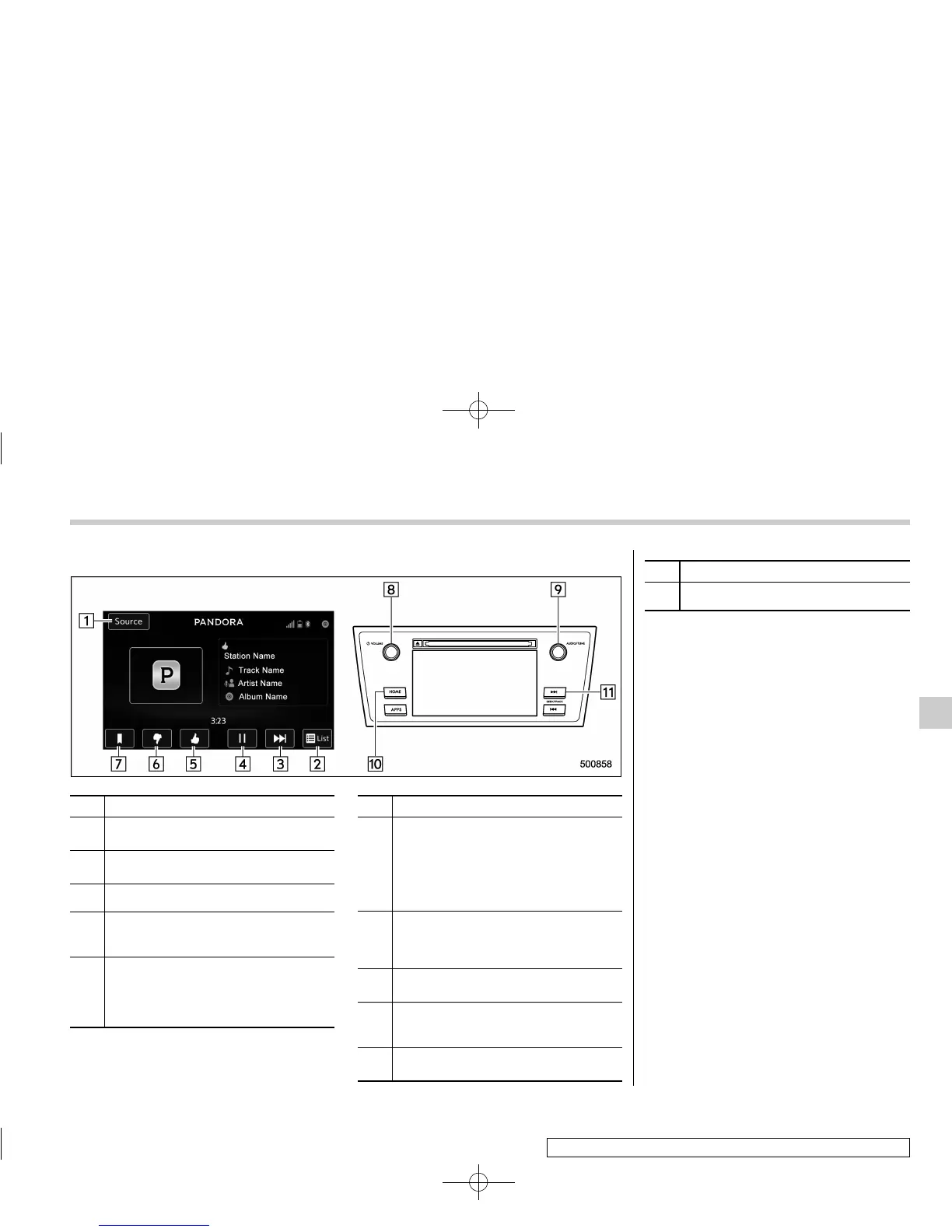
! Control screen and audio panel
No. Function
&
1
Select to display the audio source
selection screen.
&
2
Select to open the station list. Refer to
“Station list” F5-52.
&
3
Select to skip the current track.
&
4
The track pauses when touched during
playback and plays when touched
during pause.
&
5
Select to set thumbs up.
This gives a high rating to the current
song.
All other similar songs will be played
back more frequently.
No. Function
&
6
Select to set thumbs down.
This gives a low rating to the current
song.
All other similar songs will be played
back less frequently.
When you select thumbs down, the
current track is skipped.
&
7
During playback of a station, you can
use this key to bookmark a song or
artist. Refer to “Registering Bookmarks”
F5-52.
&
8
Turn to adjust volume.
Press to turn the audio system on/off.
&
9
Turn clockwise to skip to the next track.
Press to select an audio source. Refer
to “Selecting an audio source” F5-18.
&
10
Press to display the sound setting
screen. Refer to “Unit settings” F5-19.
No. Function
&
11
Press to skip to the next track/cover art.
! Connecting a smartphone
Connect the iPhone/iPod touch to the
USB port or connect the Android device
by using Bluetooth connection (SPP and
A2DP profile).
. For details about connecting an
iPhone/iPod touch: Refer to “Connecting
and disconnecting a USB memory/porta-
ble device” F5-17.
. For details about registering or con-
necting an Android device: Refer to
“Registering/connecting Bluetooth
®
de-
vice” F5-66.
! How to change the source
The Pandora operation screen can be
reached by the following methods:
. Connecting a Pandora device. Refer to
“Connecting a Bluetooth device” F5-69 or
“Connecting and disconnecting a USB
memory/portable device” F5-17.
. Select the “Pandora” key on the source
select screen. Refer to “Selecting an audio
source” F5-18.
. Select the “Pandora” key on the APPS
screen. Refer to “STARLINK” F5-26.
Audio/Audio set
– CONTINUED –
5-51
5













 To Next Page