RECEIVING A MESSAGE
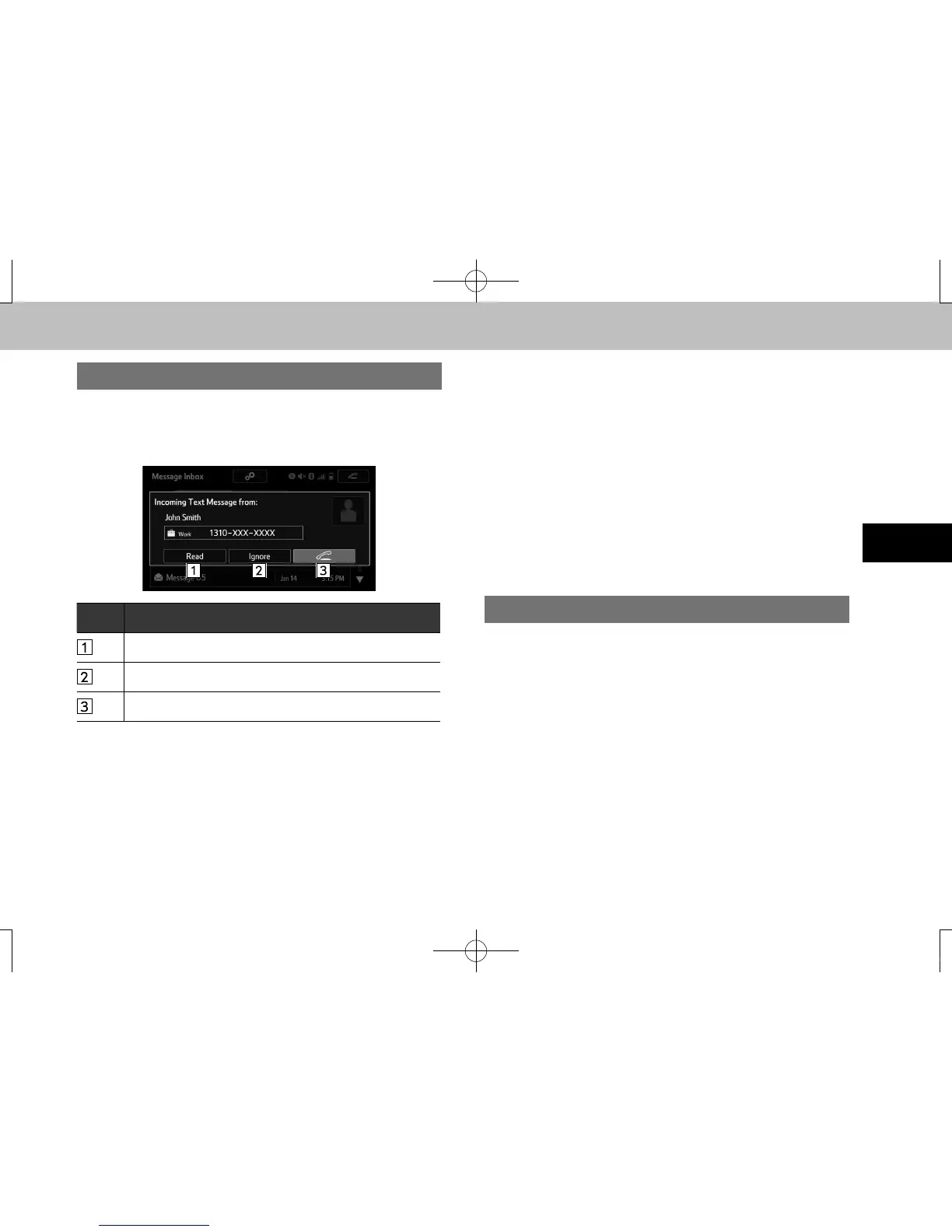
When an e-mail/SMS/MMS is received, the incoming
message screen pops up with sound and is ready to be
operated on the screen.
No. Function
Select to check the message.
Select to not open the message.
Select to call the message sender.
l Depending on the cellular phone used for receiving messages,
or its registration status with the system, some information may
not be displayed.
l The pop up screen is separately available for incoming e-mail
and SMS/MMS messages under the following conditions:
• “Incoming E-mail Display (Incoming E-mail Display)” is set to
“Full Screen (Full Screen)”. (→P.142)
• “E-mail Notication Popup (E-mail Notication Popup)” is set
to on. (→P.142)
• “Incoming SMS/MMS Display (Incoming SMS/MMS Display)”
is set to “Full Screen (Full Screen)”. (→P.142)
• “SMS/MMS Notication Popup (SMS/MMS Notication
Popup)” is set to on. (→P.142)
CHECKING MESSAGES
1. Display the message inbox screen. (→P.127)
2. Select the desired message from the list.
docstructure.indb 129 2016/03/30 11:16:00














 To Next Page