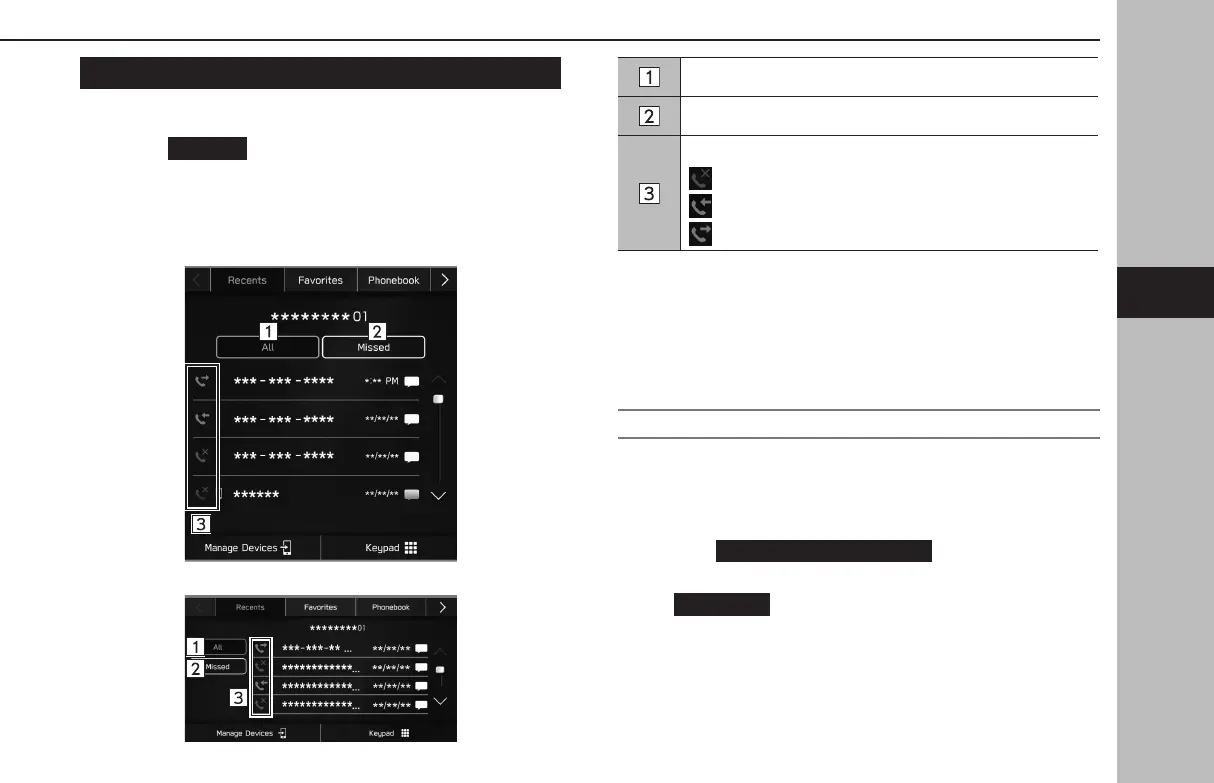
BY RECENT CALLS LIST
1.
Display the phone screen. (→P.96)
2.
Select
(Recents), and then select the desired
contact.
● The outgoing call scr
een is displayed.
X11.6-inch display system/11.6-inch display with Navi
system
XDual 7.0-inch display system
Select to display all latest call history items.
Select to display missed calls.
Displays the call type icons.
: Missed call
: Incoming call
: Outgoing call
l When a phone number registered in the contact list is received, the
name is displayed.
l International phone calls may not be made depending on the type of
cellular phone you have.
SORTING THE PHONEBOOK LIST
The order of the phonebook list can be sorted by rst name or
last name.
1.
Display the phone settings screen. (→P.77)
2.
Select
(Phonebook/Recent
Calls).
3.
→
(Sort Order)
4.
Select the desired sorting criteria.
PHONE OPERATION (HANDS-FREE SYSTEM FOR CELLULAR PHONES)
101
Phone
GB8_US.indb 101 2020/10/09 7:22:43














 To Next Page