Bluetooth SETTINGS
1.
Display the home screen. (→P.18, 40)
2.
Select
(Settings).
3.
→
(Phone)
4.
Select the items to be set.
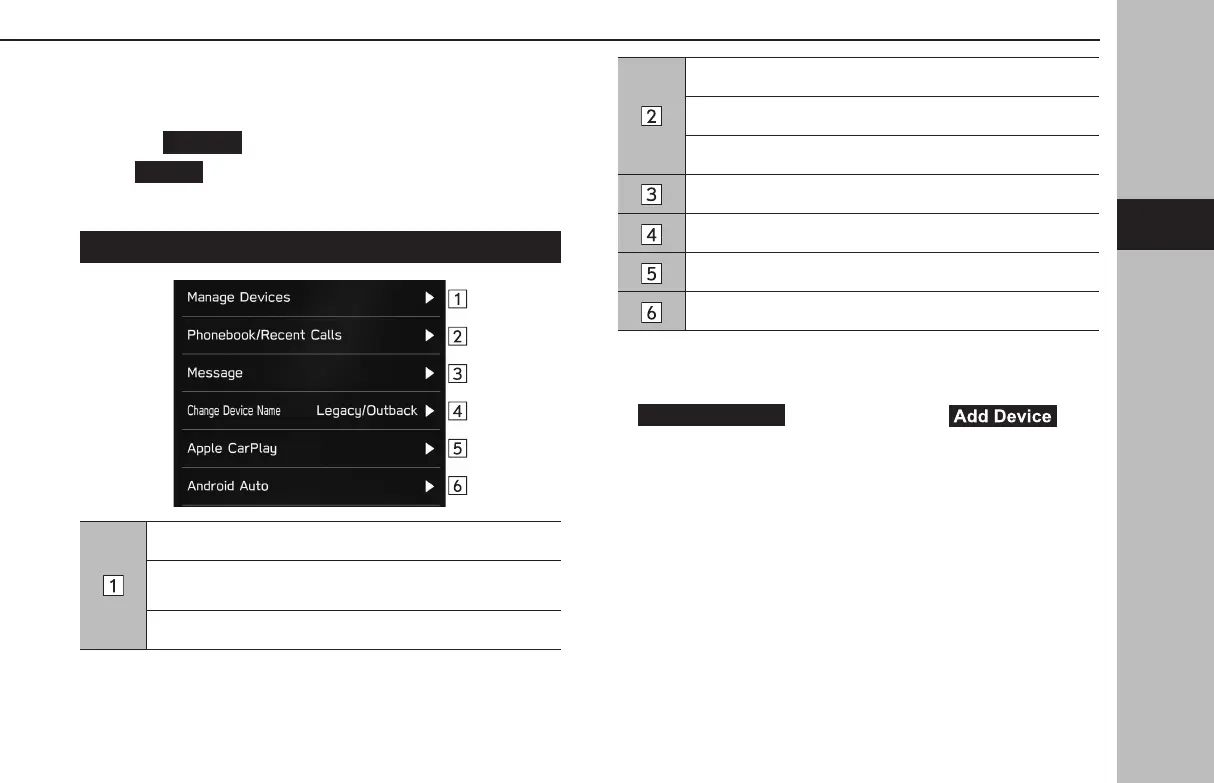
PHONE SETTINGS SCREEN
Registering a Bluetooth phone/device: →P.78
Connecting or disconnecting Bluetooth phones/devices:
→P.79
Deleting Bluetooth phones/devices: →P.81
Setting phonebook/recent calls download: →P.82
Sorting the recent calls list and contacts list: →P.101
Deleting all favorites list: →P.102
Setting the message: →P.107
Changing the device name
Setting Apple CarPlay: →P.122
Setting Android Auto: →P.125
l “Manage Devices” screen can also be displayed by selecting
(Manage Devices) or (Add
Device) on the phone screen (→P.96) or Bluetooth audio control
screen (→P.166).
Settings
77
Settings
GB8_US.indb 77 2020/10/09 7:22:31














 To Next Page