BASIC FUNCTION
25
1
Quick Guide (DUAL 7.0-INCH DISPLAY SYSTEM)
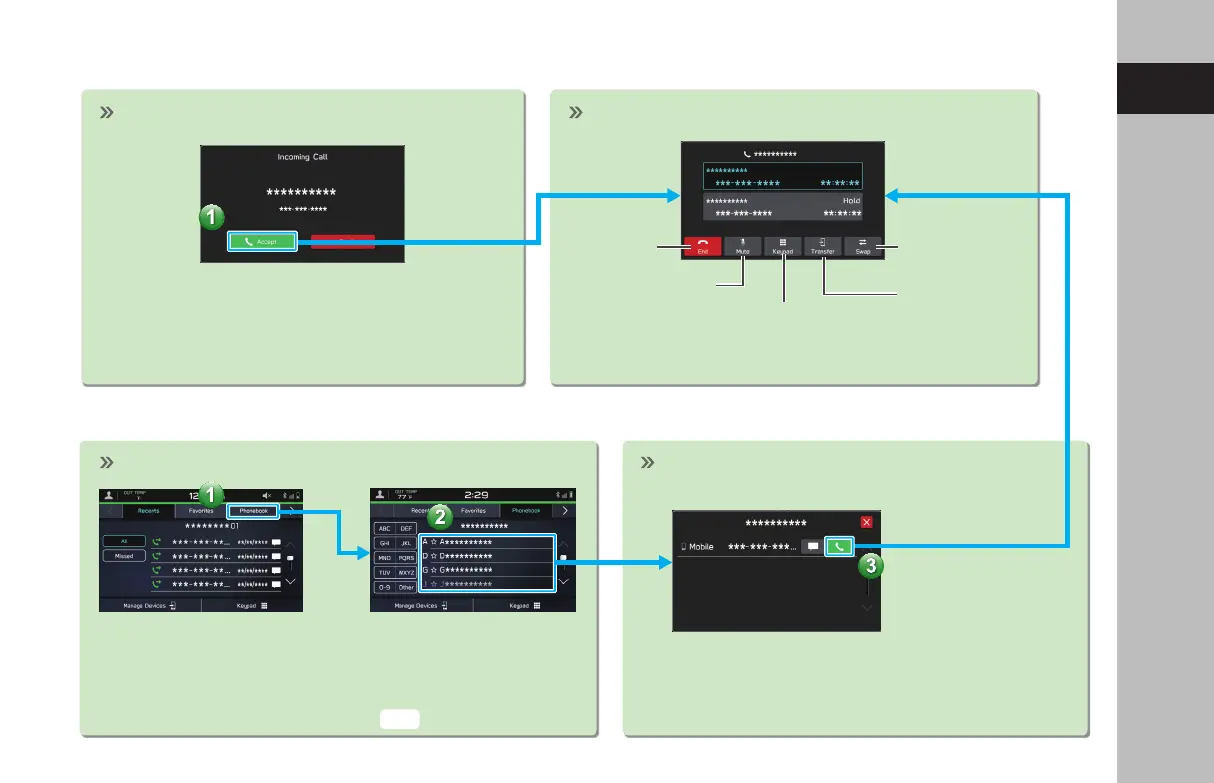
- Operation Flow: Receiving Calls and Using the Bluetooth Phone -
- Operation Flow: Placing Calls from the Phonebook -
Incoming call screen is displayed. In-call screen is displayed.
End call
Mute the connected
smartphone’s voice
Transfer call to
Bluetooth phone
Keypad
Switch to call
with other party
In-call screen display and operation may dier, or may
not be possible depending on the Bluetooth phone used.
Select call recipient from phonebook.
The notication setting on the Bluetooth phone may need to be
activated in order to download the phonebook. If the phonebook
download setting is o and a phonebook has not been downloaded,
a message will be displayed and the phonebook of the connected
Bluetooth phone can be downloaded.
Place call
Select number for making call.
P.82
GB8_US.indb 25 2020/10/09 7:22:07














 To Next Page