BASIC FUNCTION
42
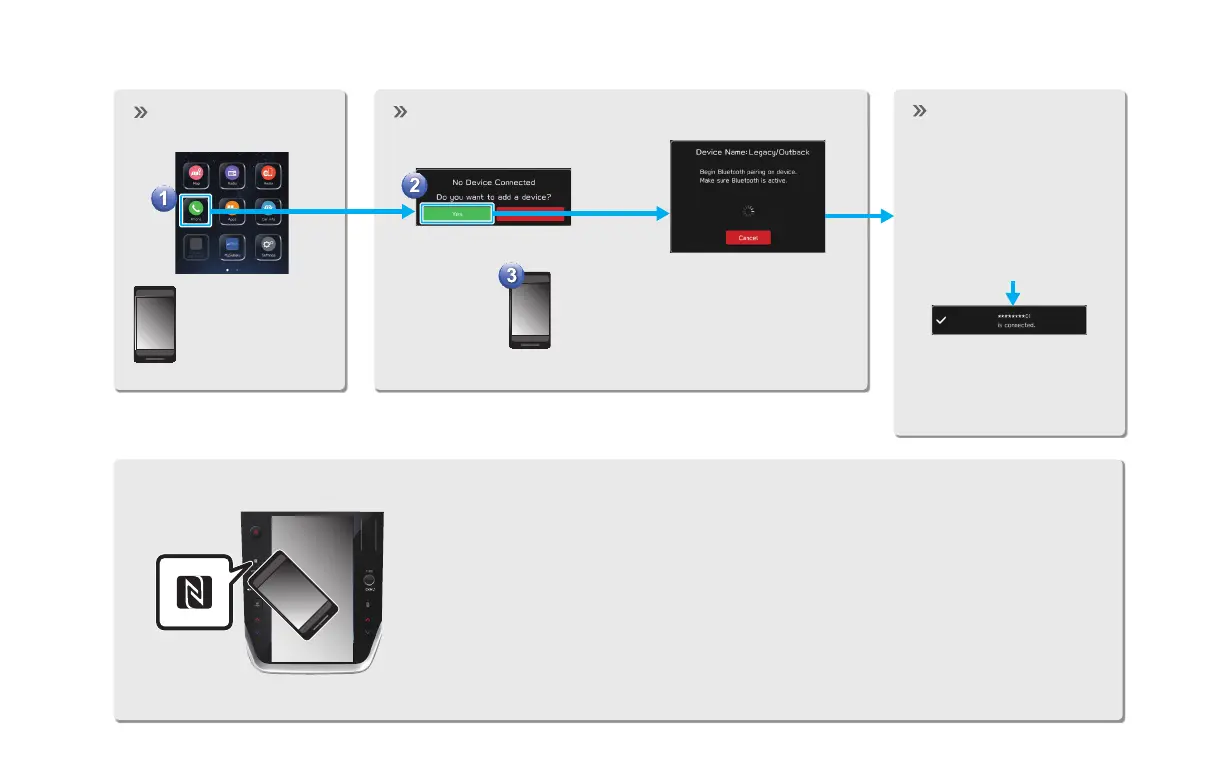
PAIRING THE SYSTEM WITH A Bluetooth PHONE/DEVICE
Display the phone
screen.
Prepare the
Bluetooth phone/
device to be
paired.
Operate the Bluetooth phone/device.
Turn the Bluetooth function of the
Bluetooth phone/device ON and
select the vehicle's device name.
Register the
Bluetooth phone/
device.
If unable to pair, check
whether your Bluetooth
phone/device is compatible
with the system.
If a conrmation message
appears asking whether to
transfer the phone’s contact
data to the system, select
the appropriate button.
When using an NFC compatible device, it is not necessary to perform the above
procedure.
Pairing can be performed by holding the device against the NFC logo of the
audio system with the NFC setting on.
GB8_US.indb 42 2020/10/09 7:22:17














 To Next Page