BASIC FUNCTION
47
1
Quick Guide (11.6-INCH DISPLAY SYSTEM/11.6-INCH DISPLAY WITH NAVI SYSTEM)
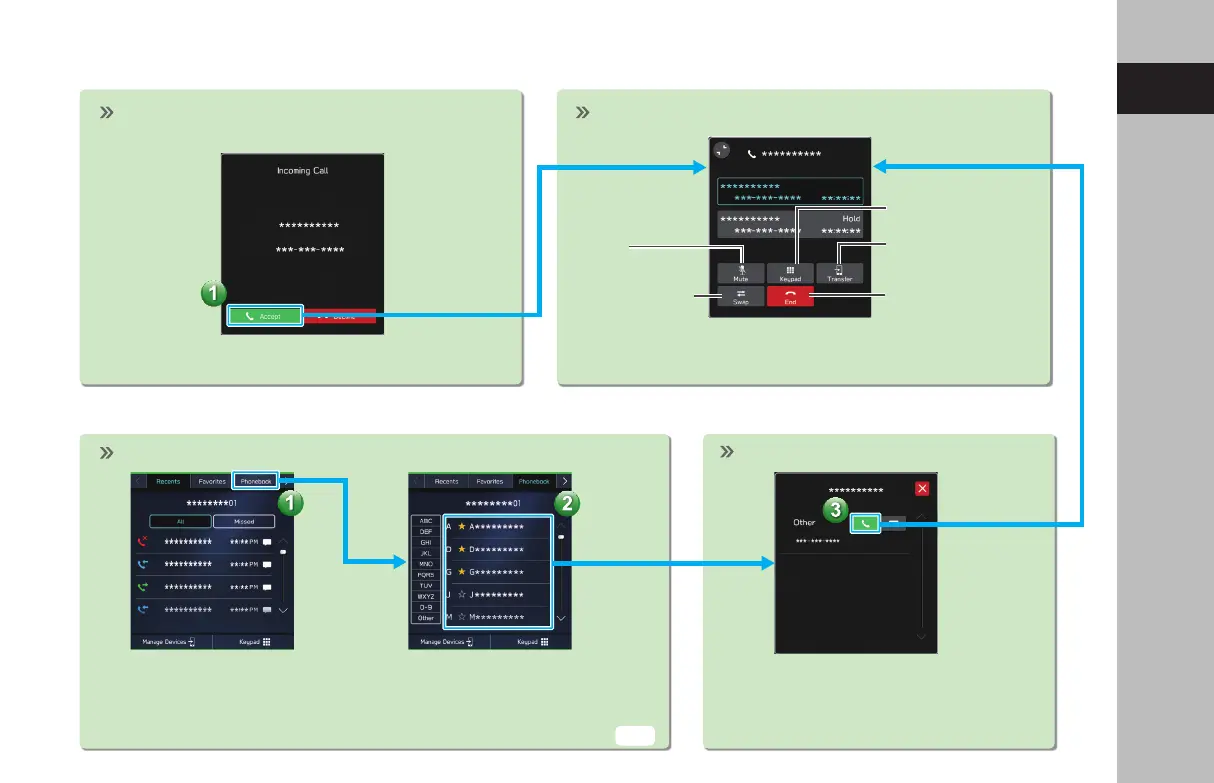
- Operation Flow: Receiving Calls and Using the Bluetooth Phone -
Incoming call screen is displayed. In-call screen is displayed.
End call
Mute the
connected
smartphone’s
voice
Transfer call to
Bluetooth phone
Keypad
Switch to call
with other party
In-call screen display and operation may dier, or may
not be possible depending on the Bluetooth phone used.
- Operation Flow: Placing Calls from the Phonebook -
Select call recipient from phonebook.
The notication setting on the Bluetooth phone may need to be activated in
order to download the phonebook. If the phonebook download setting is o
and a phonebook has not been downloaded, a message will be displayed and
the phonebook of the connected Bluetooth phone can be downloaded.
Select number for making call.
Place call
P.82
GB8_US.indb 47 2020/10/09 7:22:20














 To Next Page