BASIC FUNCTION
51
1
Quick Guide (11.6-INCH DISPLAY SYSTEM/11.6-INCH DISPLAY WITH NAVI SYSTEM)
- Operation Flow: Route Guidance -
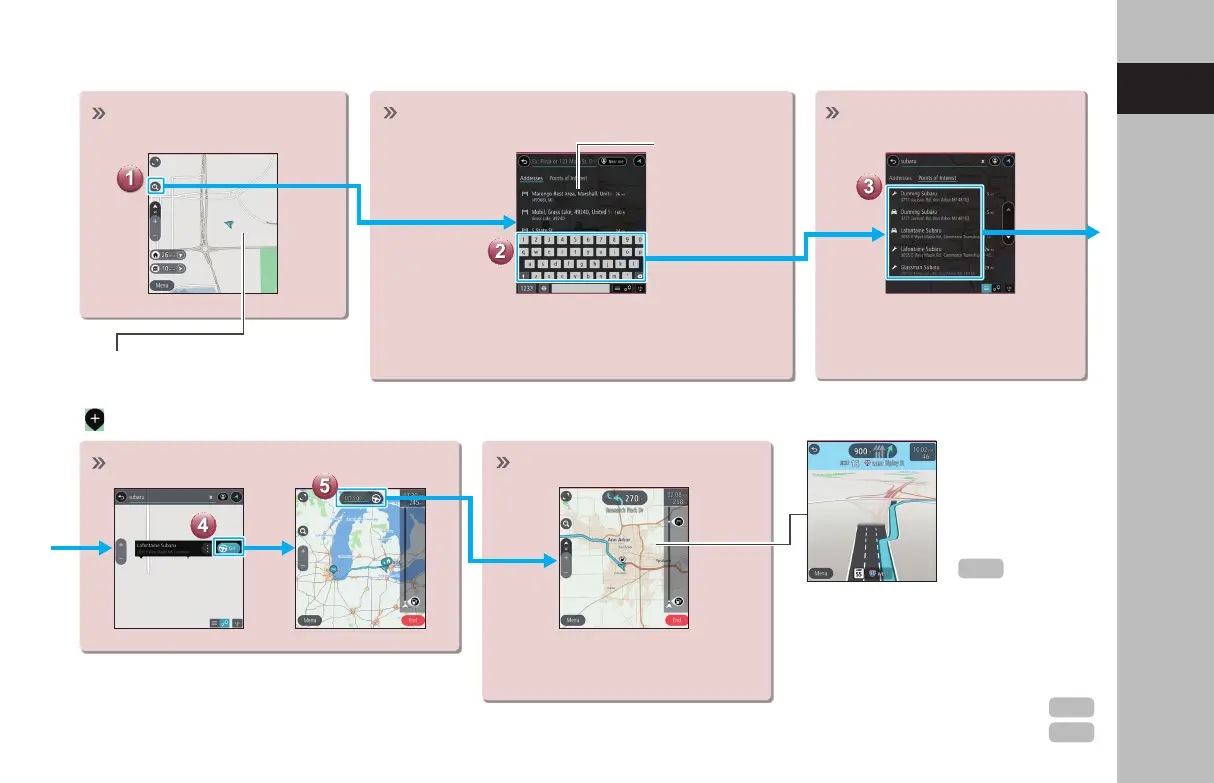
Display the destination
search menu.
Destinations can also be set directly
from the Map screen by selecting and
holding at the desired position until
is displayed.
Search for your destination.
Start a search by typing an address or category
(Points of Interest).
Predicted search
results will
automatically
appear as you
type.
Select your destination.
Destinations matching the
search words are displayed in
a list.
Start driving.
Route guidance starts.
The travel route is displayed,
and voice guidance starts.
The screen display
automatically
changes to
display travel lanes
at expressway
junctions, etc.
JUNCTION SCREEN
RETURNING HOME
If you register an address as Home, it
can be quickly set as a destination.
Register an address as Home
Setting Home as the destination
P.204
P.200
P.186
GB8_US.indb 51 2020/10/09 7:22:22











 To Next Page