SETTING Wi-Fi® CONNECTION (11.6-inch display
system/11.6-inch display with Navi system only)
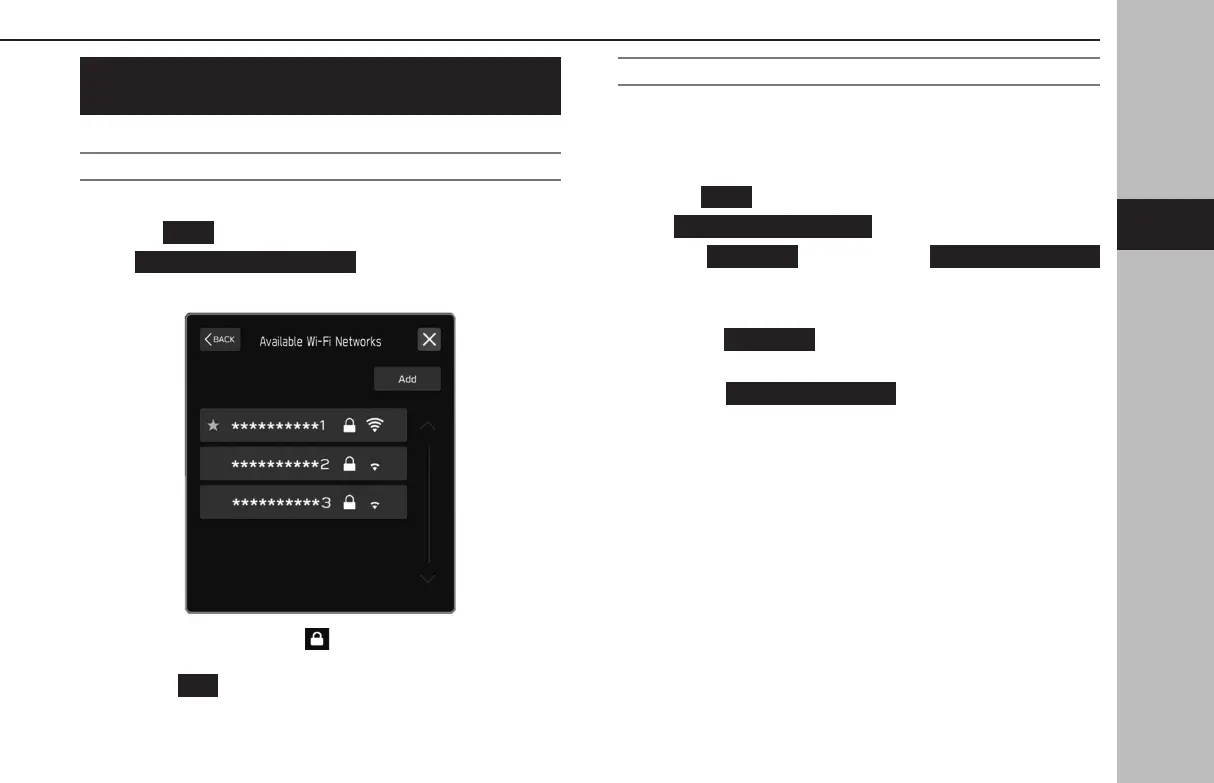
CONNECTING TO A Wi-Fi® NETWORK
1.
Display the general settings screen. (→P.83)
2.
Select
(Wi-Fi).
3.
→
(Available Wi-Fi Networks)
4.
Select the desired network.
● When a network with is selected and the password
entry screen is displayed, enter the password, and then
select
(OK).
SETTING UP A CONNECTION QUICKLY
If a Wi-Fi® device is Wi-Fi® Protected Setup compatible, it can be
connected to more quickly.
1.
Display the general settings screen. (→P.83)
2.
Select
(Wi-Fi).
3.
→
(Wi-Fi Protected Setup)
4.
Select
(PIN Setup) or
(Push Button Setup) as determined by the device.
5.
Operate the Wi-Fi® device to connect.
● When
(PIN Setup) is selected: Enter the
displayed PIN code into the Wi-Fi® network device.
● When
(Push Button Setup) is
selected: Push the WPS button on the Wi-Fi® network
device.
OTHER SETTINGS
85
Settings
GB8_US.indb 85 2020/10/09 7:22:35














 To Next Page