SETTING THE SiriusXM® Radio
1.
Display the radio settings screen. (→P.91)
2.
Select
(SiriusXM).
3.
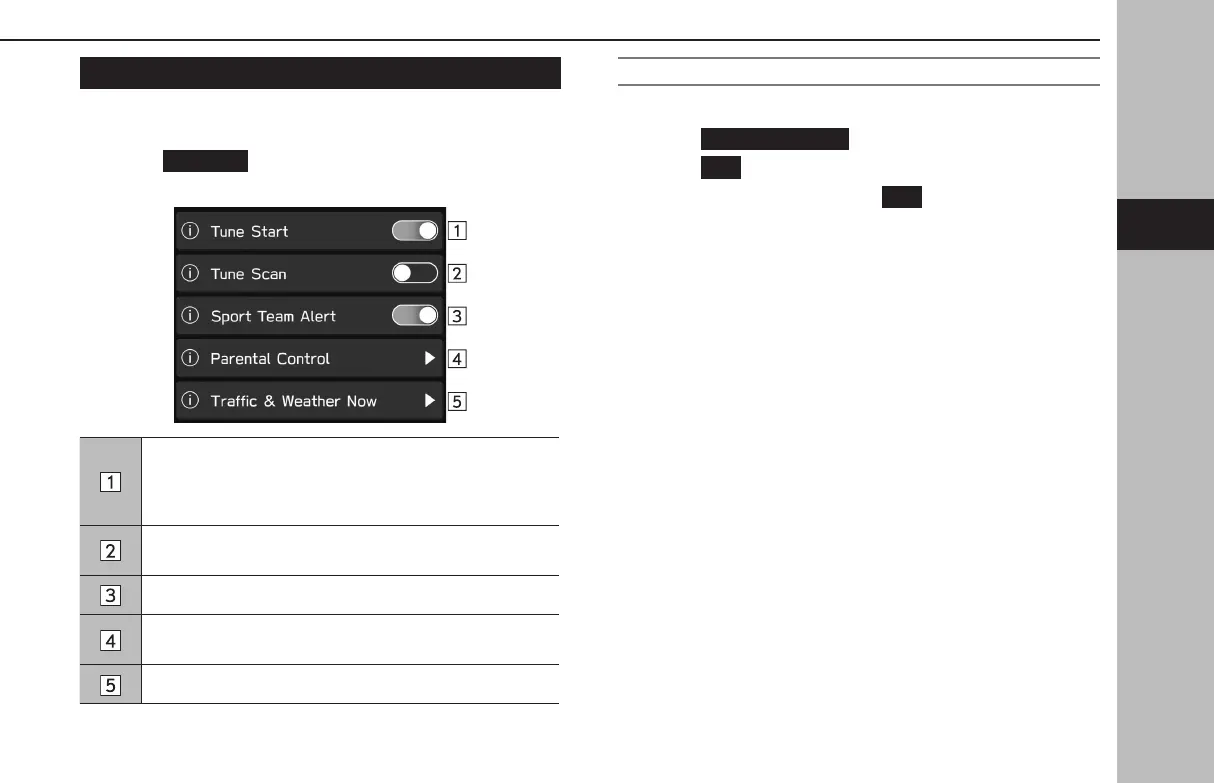
Select the desired item to be set.
When this function is on, channels registered as Smart
Favorites will be cached, and when the channel is changed,
the song on that channel can be listened to from the
beginning.
Select to enable/disable the search function for channels
registered to Smart Favorites.
Select to turn the “Sport Team Alert” on/o. (→P.156)
Select to set the parental control passcode and locked
channels. (→P.93, 94)
Select to set the city for which you wish to get information.
SETTING THE PARENTAL CONTROL PASSCODE
1.
Display the SiriusXM settings screen. (→P.93)
2.
Select
(Parental Control).
3.
Select
(OK) when the conrmation message appears.
4.
Enter the 4 digits passcode. →
(OK)
OTHER SETTINGS
93
Settings
GB8_US.indb 93 2020/10/09 7:22:41














 To Next Page