6
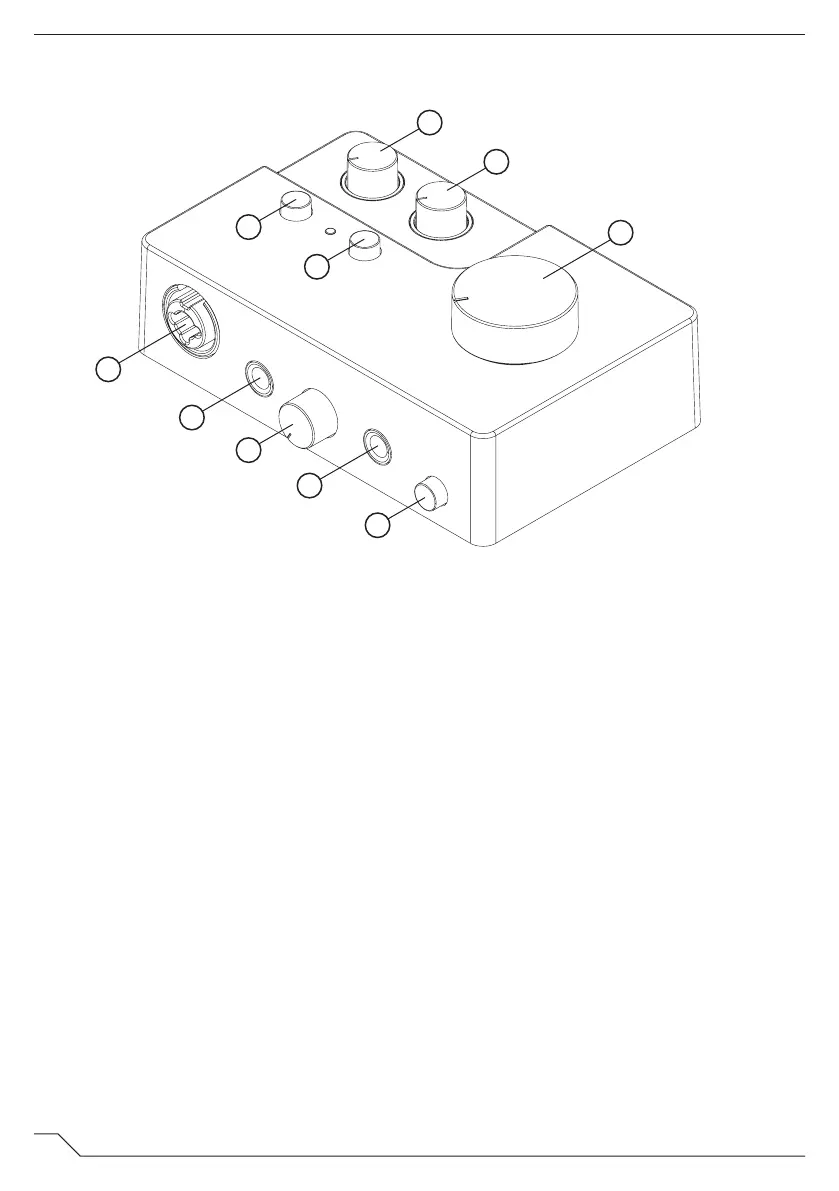
AI1 FUNCTIONS
FRONT / TOP
1. Mic/Line Input 1
Use this input to connect XLR devices such as microphones
(at mic level) or TRS Jack devices such as synths (at line level).
2. Line/Hi-Z Input 2
Use this input to connect TRS devices such as synths or guitars.
3. Headphone Gain
Adjust this knob to control the headphone volume output.
4. Headphone Input
Use this output to connect your headphones.
5. Monitor
Use this button to toggle direct monitoring, allowing you to
listen to your input signal with near zero latency.
6. Input 1 Gain
Use this knob to set the gain for Mic/Line Input 1.
7. Input 2 Gain
Use this knob to set the gain for Line/HI-Z Input 2.
8. +48V
Use this button to apply phantom power when connecting a
condenser microphone to input 1.
9. Line On/Off
Use this button to toggle between Line and HI-Z inputs on
Input 2.
10. Volume
Use this knob to adjust the master output volume.
1
10
2
3
6
4
5
8
9
7



 To Next Page