TV's are generally programmed for the required service levels before they are
installed in a hospital. When you replace TV's or when channel numbers change,
reprogramming is needed.
The most common service levels used are levels 1 to 4. Premium 1 and/or
Premium 2 Service Levels are used when "pay per view" movies or events or
when movie channels are offered at an extra charge.
1. Free Service Level
The Free Service Level lets patients watch hospital education and information
channels, without renting the television. The channels over which education and
information are broadcast must be programmed into this level of service.
Entertainment channels are not generally included and therefore are not
programmed into this Free Service Level.
2. Locked Service Level
The Locked Service Level does not let the
patient, "self rent" and when a patient tries to
do so, this message appears.
The free channels, over which education and
information are broadcast, must be
programmed into this service level so that the
non paying viewer can watch the
free education and information channels.
Locked service makes it possible to cut off rental, to those who continue to "self
rent" and then refuse to pay for this rental service.
6
Owner's Manual
About service levels
For Additional
Service Please
Contact TV
Representative
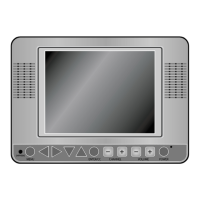
In the easy to clean, membrane control panel, on the lower front of the TV, there
are 11 large, easy to read, buttons. Either the patient or the TV representative
can use the 5 buttons on the right side, to turn the TV on and off, change
channels and raise or lower the sound. These functions can be controlled as well,
with the infrared hand unit. The far right side of this panel responds to the infrared
beam produced when you press the buttons on the hand held infrared unit.
On the left side of the membrane control panel, the Menu button and the Enter
button makes it easy for patients to rent the television or "self rent", as it is called,
when the TV representative is not present. The other 4 buttons, on the left side of
the panel, become active when the L-10 TV is operated as part of a computerized
system. Patients can then use these buttons to select from the menu options that
appear on the TV.
The infrared hand unit lets the TV representative manage the special features of
the L-10, such as levels of service, channel groupings and selections and as well
change the quality of the picture, features and choice of language.
EARPHONE Jack
The EARPHONE Jack is in the lower left corner. Insert an ear piece or head set
and the sound comes only from this device.
Closed Captioning :
When available, captions (CC) may be displayed on a selected channel by
pressing the ENTER/CC button on the front panel of thetelevision or on the
remote control unit.
By continuing to press the ENTER/CC button four different selections can be
made.
Caption 1, Caption 2, Text 1, Text 2.
Once you choose a Caption leave it in that selection unless you know there is
something available in one of the other options.
Once selection is made it is remembered until you change it.
To turn off captions continue pressing the ENTER/CC button until the OFF
position is reached.
5
Owner's Manual
About the L-10 ELF television


 To Next Page