
 Need help?
Do you have a question about the Summer WIDE VIEW 2.0 DUO and is the answer not in the manual?
Charge the portable handheld unit before first use for optimal performance and battery life.
Connect and set up the digital video monitor camera in the desired location for viewing.
Ensure the camera cord is safely secured to prevent potential hazards.
Power on both the camera and handheld monitor units to begin operation.
Activate the scanning function to automatically cycle through multiple cameras.
Learn how to select the active camera from the monitor menu for viewing.
Familiarize yourself with the various icons displayed on the monitor screen for status and features.
Overview of key buttons: Power/Nightlight, Zoom, Talkback, Video ON/OFF, and Volume.
Learn to use the Menu/Enter and Up/Down navigation buttons for device interaction.
How to activate and use the built-in nightlight feature on the monitor.
Instructions on how to use the zoom feature to get a closer view.
Utilize the talkback feature to communicate with your baby.
Understand how the lights activate in response to sound detection.
Learn how to turn the video feed on or off from the monitor.
Instructions on how to adjust the brightness level of the monitor screen.
 General
| Night Vision | Yes |
|---|---|
| Two-Way Audio | Yes |
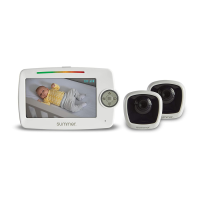
| Number of Cameras | 2 |
| Temperature Sensor | Yes |
| Camera Resolution | 720p |
| Features | Remote Pan/Tilt/Zoom, Room Temperature Monitoring |
| Cameras | 2 |
| Power Source | AC adapter, rechargeable battery |
| Connectivity | 2.4GHz FHSS |
| Additional Features | room temperature monitoring |
| Display | Color LCD |



 To Next Page