EasyManua.ls Logo

Summit BIM68OSGDR - User Manual

Summit BIM68OSGDR
28 pages
Print Icon
To Next Page IconTo Next Page
Loading...
0
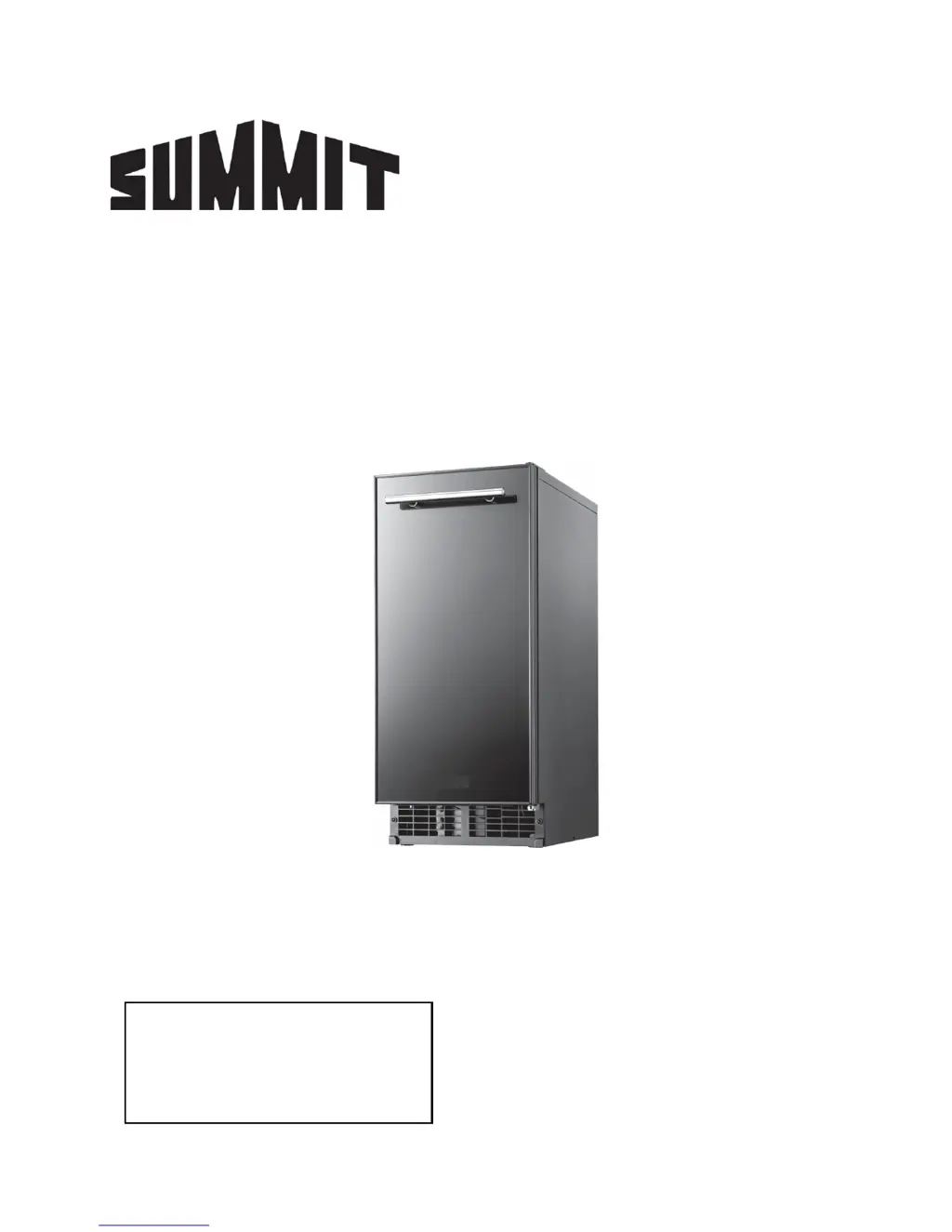
INDOOR/OUTDOOR ICE MAKER
Models BIM68OSGDR
BIM68OSPUMP
User’s Manual
BEFORE USE, PLEASE READ AND FOLLOW
ALL SAFETY RULES AND OPERATING INSTRUCTIONS
FELIX STORCH, INC.
Summit Appliance Division
An ISO 9001:2015 registered company
770 Garrison Avenue
Bronx, New York 10474
Write Model and Serial Numbers here:
Model No.: _____________________
Ser. No.: _______________________

Questions and Answers

  • J
    Jeff ObrienJul 31, 2025
    Why is my Summit BIM68OSGDR not operating?
    • R
      rebecca96Jul 31, 2025
      If your Summit Ice Maker isn't working, check these potential causes: * Make sure the ice maker is plugged in. * Check the breaker and reset it if tripped. If tripping continues, contact an authorized service center. * Ensure the switch is set to “ICE” and not “OFF”. * If the ice tank is full, the ice maker will stop. Wait 15-30 minutes after removing ice for it to resume operation.
  • S
    Spencer MarshallAug 4, 2025
    What to do if my Summit BIM68OSGDR Ice Maker is operating, but no ice is made?
    • J
      James MitchellAug 4, 2025
      If your Summit Ice Maker is running but not producing ice, there are several potential causes to investigate: * Ensure there's enough water in the tank and that the water supply valve is open. * If ice cubes are stuck on the vaporizer, check the water supply and hot gas valve. * If the water isn't getting cold, inspect the water supply valve; if it's working, contact customer service. * Verify water is being sprayed and that the circulation pump is functioning. * Examine the condenser for dust and clean it, and also check the condenser fan motor. * Confirm that the ambient temperature isn't too high. * For hot gas leaks or if refrigerant needs refilling, contact customer service.
  • M
    Marvin SpencerAug 9, 2025
    What to do if my Summit BIM68OSGDR Ice Maker tank is not fully filled with ice cubes?
    • K
      Karen AtkinsonAug 9, 2025
      If the ice tank in your Summit Ice Maker isn't filling completely, consider these factors: * The ice tank will be filled with ice after about 12 hours of operation. * Ensure the drain pipe of the water tank is properly connected and clean the drain. * Check the installation site to ensure hot air isn't blowing into the tank.
  • M
    Matthew NortonAug 13, 2025
    Why are the ice cubes from my Summit BIM68OSGDR too small?
    • Y
      yatesjuanAug 13, 2025
      If the ice cubes from your Summit Ice Maker are too small, here are a few things to check: * The ambient temperature may be too high; lower ambient temperatures result in larger ice cubes. * Ensure there's enough water in the water tank by checking the water supply. * Make sure the water nozzle isn't clogged, preventing water from ejecting properly. * For issues with ice thickness control, contact customer service.
  • V
    vanessasteeleAug 17, 2025
    Why are the ice cubes from my Summit Ice Maker too large?
    • A
      Ashley JohnsonAug 17, 2025
      If the ice cubes from your Summit Ice Maker are too large, consider these factors: * The ambient temperature might be too low; lower temperatures produce larger ice. * If you're having trouble controlling the ice thickness, contact customer service.
  • C
    Connie ReyesAug 22, 2025
    Why is the ice fragmented in my Summit BIM68OSGDR Ice Maker?
    • T
      tshepherdAug 22, 2025
      If the ice from your Summit Ice Maker is fragmented, the water may not be spraying accurately from the nozzle to the center of the vaporizer cube. Clean the ice maker, as the nozzle may be clogged.
  • M
    Maria GainesAug 26, 2025
    Why are the ice cubes from my Summit BIM68OSGDR Ice Maker white?
    • J
      James AlexanderAug 26, 2025
      If the ice cubes from your Summit Ice Maker appear white, it could be due to too little water in the water tank. Check the water supply and inspect the tank for any leaks.

Summary

Ice Maker Safety

Safety Alert Symbols and Instructions

Explains DANGER, WARNING, CAUTION symbols and lists important safety instructions.

Electrical and Usage Safety Guidelines

Covers safe electrical connections, grounding, and general usage precautions.

Installation and Environmental Safety

Details safe unpacking, installation environment, water supply, and quality.

Location of Parts

Ice Maker Component Identification

Identifies and labels key parts of the ice maker from front and back views.

Installation Guide

Space, Power, and Plumbing Requirements

Outlines space, electrical, and plumbing connection needs.

Drain Model Installation Procedures

Provides step-by-step instructions for gravity and drain pump models.

Pre-Installation Checks & Door Adjustment

Lists checks before installation and how to change door opening direction.

Final Installation Checklist

A checklist to ensure safe and proper installation of the ice maker.

Product Features

Design, Capacity, and Operational Features

Highlights sink-mounting, depth, capacity, auto-removal, door system, ventilation, and insulation.

Operation Guide

Initial Setup and Daily Ice Making

Steps for powering on, starting production, scooping ice, and container management.

Ice Characteristics and Production Cycles

Explains ice shape, quality, production time, and water usage.

Cleaning Procedures

Internal Component Cleaning

Guide for cleaning nozzles, ice slides, and water tanks.

Filter, Exterior, and Condenser Cleaning

Instructions for cleaning tank filters, exterior, and the condenser.

Maintenance and Adjustments

Winterizing and Ice Maker Adjustments

Steps for winterizing and guidelines for adjusting the ice maker.

Technical Specifications

Capacity, Dimensions, and Ratings

Details capacity, dimensions, power, and operating parameters.

Operational Parameters and Components

Lists refrigerant, cooling method, sensors, and conditions.

Troubleshooting Guide

Common Ice Maker Issues and Solutions

Provides solutions for problems like non-operation, size, or formation issues.

Limited Warranty Information

Warranty Coverage, Exclusions, and Disclaimer

Outlines the terms, duration, what is not covered, and legal rights.

Summit BIM68OSGDR Specifications

General IconGeneral
Water ConnectionYes
Dimensions33.5" H x 14.88" W x 23.63" D
MaterialStainless Steel
Door StyleSolid
Ice Production68 lbs
Power Supply115V

Related product manuals