4
CR1001 QUICK
REFERENCE GUIDE
Congratulations on your purchase of a Sunbeam
®
Clock Radio.
TheCR1001hasbeenspecicallydesignedtodelighthotelguestswiththelatesttechnologyandinnovativefeatures.
Inaddition,thecontrolshavebeenorganizedandlabeledforoptimaleaseofuseforyourguest.
Sunbeam
®
Hospitality Together We’ll Make Their Day.
™
Daily Alarm Reset: TheCR1001featuresDailyAlarmReset.Whenthealarmsounds,itisturnedoffbytheguest
orautomaticallydisabled.Thealarmwillnotrepeatthenextday,unlessitisturnedonagain.Thisfeatureensuresaguestis
not woken up by a previous guest’s alarm.
12
10
2
1
3
4
5
6
7
8
9
11
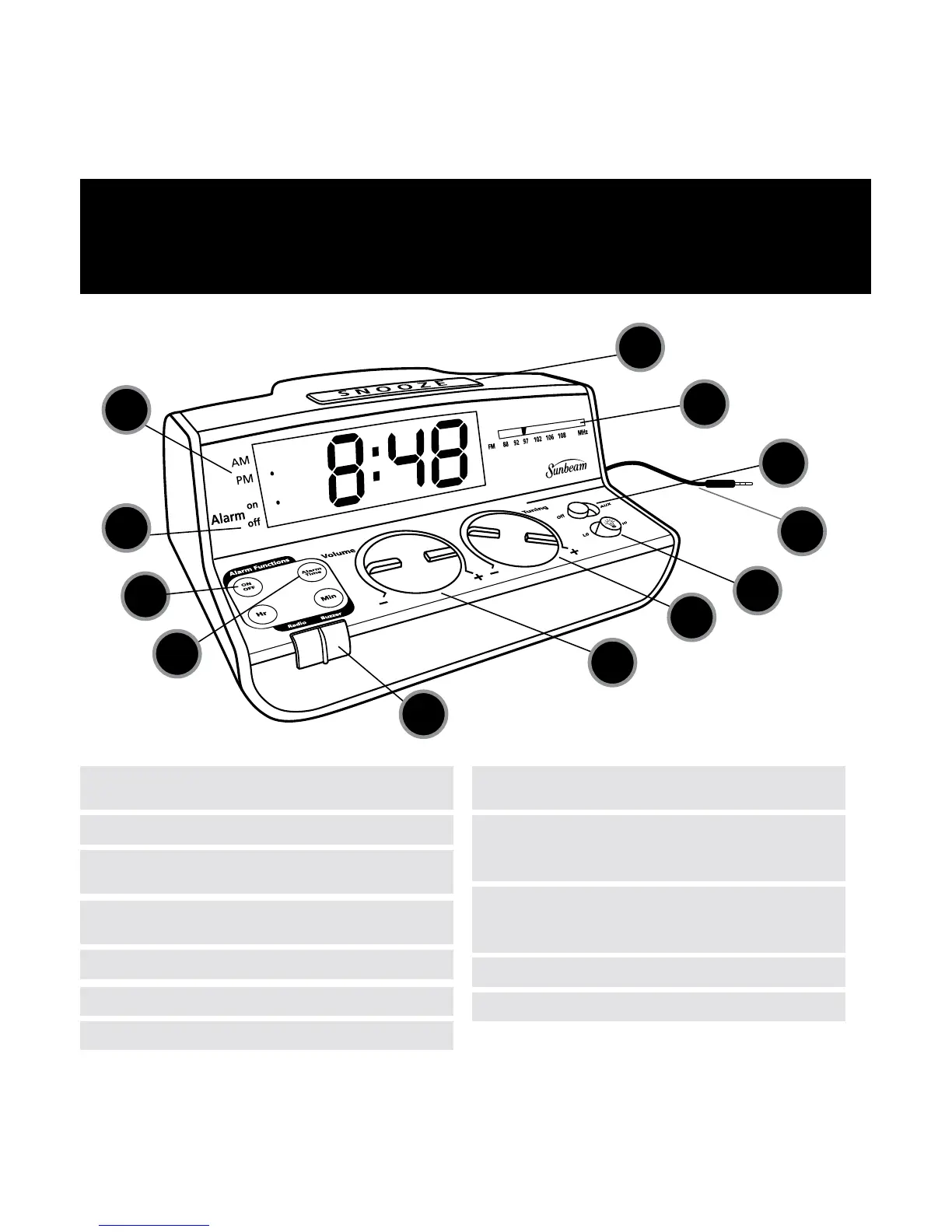
1. Snooze Button - Temporarily silences alarm
4. Aux Audio Jack - Plug into MP3 device
to play music
10. Alarm On/Off button - Press to turn alarm ON
or OFF, display indicator confirms selection
2. Radio Frequency Indicator - FM only
8. Alarm Sound Selector - Choose “Radio”
or “Buzzer” as the alarm sound
5. Display Brightness Switch - Choose “Lo” or “Hi”
11. Alarm On/Off Indicators
3. Music Selector - Choose “Off”, “Radio”
or “AUX”
9. Alarm Time Button - Press to confirm alarm
time, press and hold to set time
6. Radio Tuning Dial
12. AM/PM Time Indicators
7. Volume Control Dial


 To Next Page