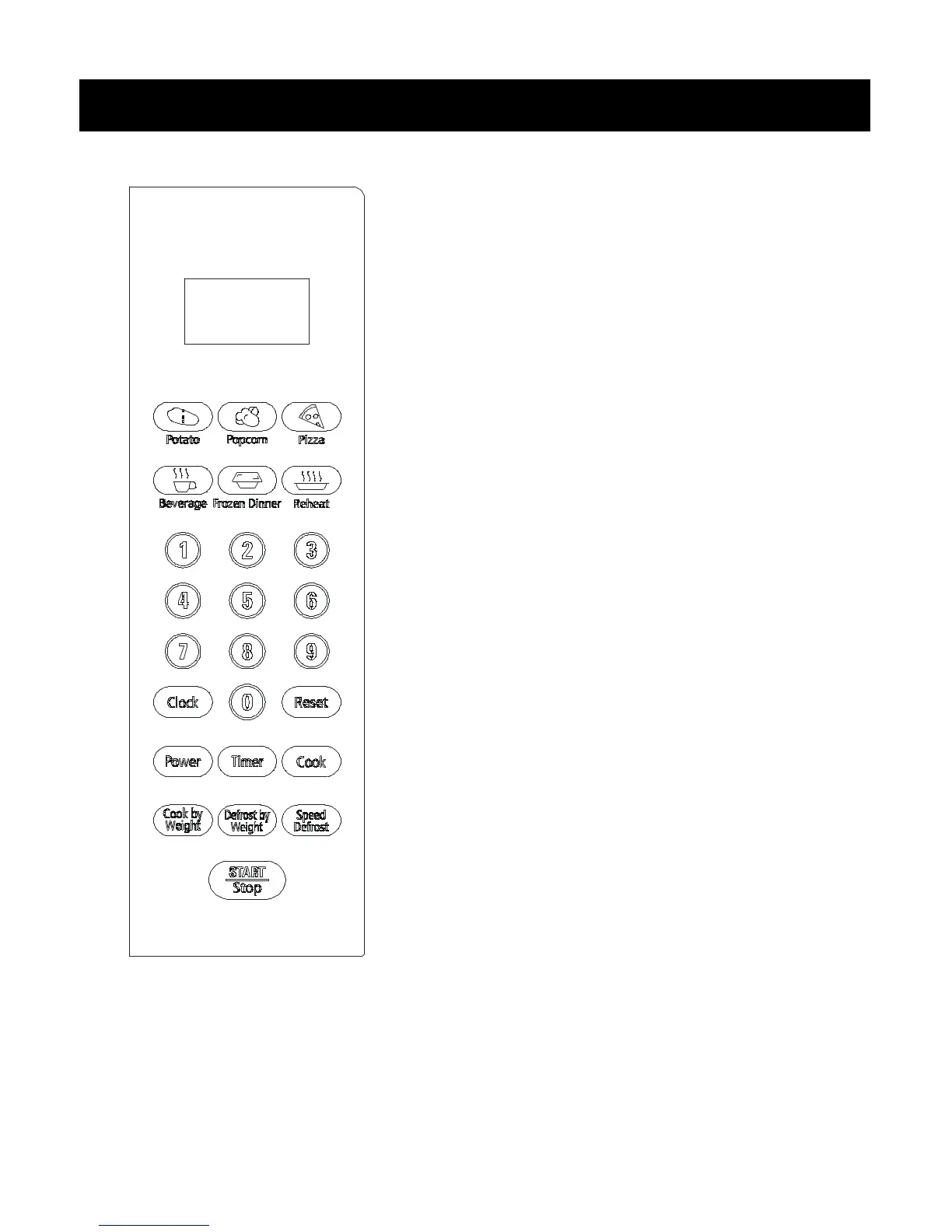
DISPLAY
Cooking time, power, indicators and present time are displayed.
QUICK COOK BUTTONS
Instant settings to cook popular foods.
NUMBER PADS ( 0 – 9 )
Touch to set times or weights.
CLOCK
Use to set the time of day or recall the time of day.
RESET
Use to clear all previous settings.
POWER
Use to set power level. To check power level during cooking, touch
POWER pad.
TIMER
Timer functions independently, even while a cooking program is in
process.
COOK
Use for multi-stage cooking. Enables cooking at multiple power and
time settings automatically.
COOK BY WEIGHT
Programmed cooking based on the weight of the food to be cooked.
DEFROST BY WEIGHT
Programmed defrosting based on the weight of the foods to be
defrosted.
SPEED DEFROST
Quick defrost function that alternates defrost and stand times to
quickly and effectively defrost foods.
START / STOP
Touch to start or stop cooking.


 To Next Page