8 WWW.SUNBEAMSYSTEM.COM
3.3 Controller Conguration
In the previous gure, four indicators (1-4) show conguration “entrances”.
Conguration changes general operation:
Long press Enter. Browse settings with Select. Click enter to conrm selected setting. Or leave settings
unchanged by pausing for 10 seconds.
B Reset the“PV generated energy”counter
Step 1: Browse with select until you reach “PV Generated energy”. Long press the Enter button (hold
5s). The value will start to ash.
Step 2: Press the Enter button again to reset the generated energy counter.
Reset the “LOAD used energy”counter
Is done under “LOAD used energy” in the same way as described in PV energy above.
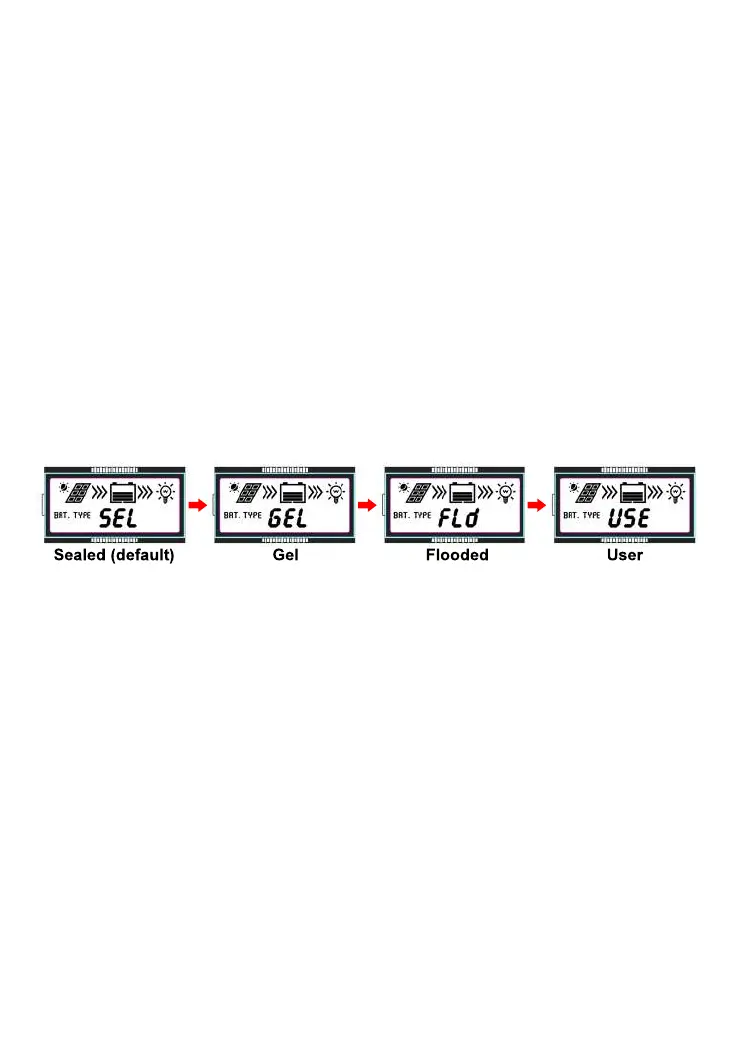
C Change preset charge battery prole
Step 1: Browse with select until you reach “BATTERY voltage”. Long press the Enter button (hold 5s).
Step 2: Cycle between available preset battery types by clicking the Select button
Step 3: Conrm selected battery type by a click on the Enter button.
Please check with your battery producer for a suitable charge program.
“User settings” can only be congured by using an external display or Bluetooth dongle together
with the APP. The following chapter 4 lists the different charge levels in depth.
Overview of the options for conguration of the Load output:
The controller will learn the length of the day and can predict dusk & dawn.
The Load Timer function can be set in four different ways with the onboard interface:
A) Manual on/off.
B) On during nighttime only.
C) Turn on at dusk and stay on for X hours.
D) Turn on X hours before dawn (shut down at dawn).
A to C Settings are changed by entering the rst menu “Load Type 1XX” and D is set in the next menu
alternative named “Load Type 2XX”.



 To Next Page