7WWW.SUNBEAMSYSTEM.COM
EN SVNLDE FI
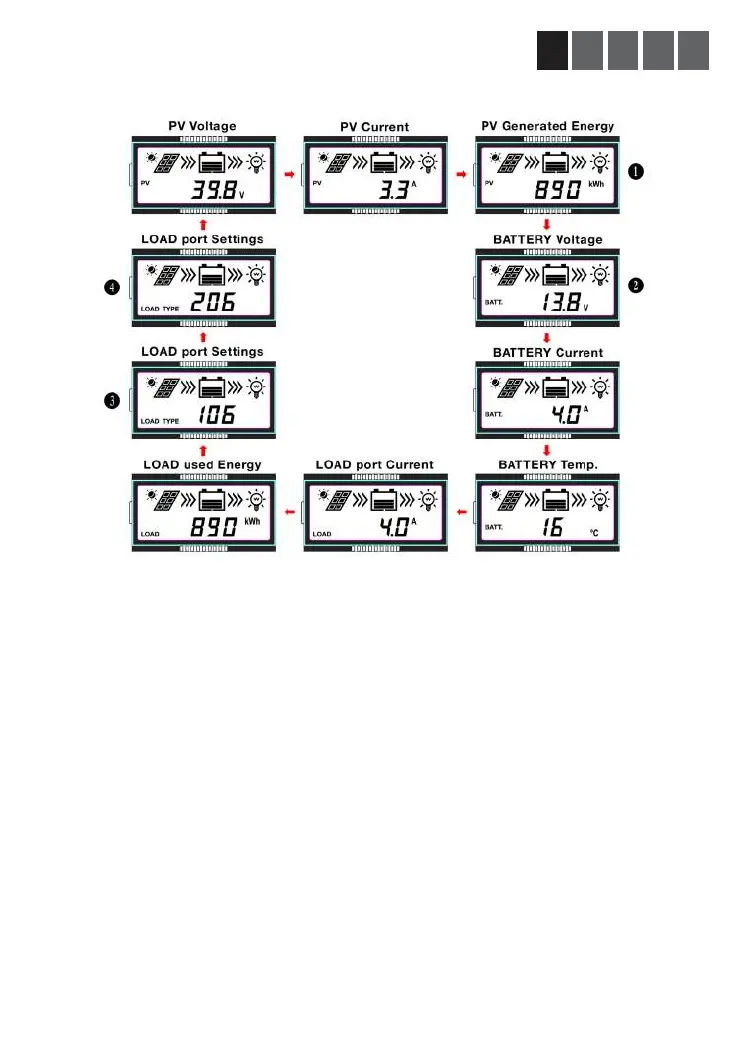
3.2 Main LCD interface
Status information is constantly displayed on the LCD. The displayed content is auto-rotated according
to the below displayed scheme.
Scroll: Press the Select button (repeatedly) to manually browse the menu cycle. This will also light the
LCD backlight temporarily.
Load port On/Off: You can turn the load port on or off by short press the Enter button (If Load is set
in manual mode).
Clear fault indication: The Enter button will acknowledge that you have read the message.
Charge indication: PV current will be less than Battery current during normal use. “Battery current” is
the proper indication of the charge properties.



 To Next Page