EasyManua.ls Logo

SunDING SD-589 - User Manual

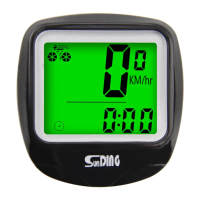
SunDING SD-589
2 pages
Print Icon
To Next Page IconTo Next Page
Loading...
Computer Battery Installation
SD-589 (19 Function)
Setting(km)/(mile)
Bicycle Computer Instruction Manual V1.0
Installation of Speedometer
- SPD Current Speed
- ODO Odometer (0~99999km/m)
- DST Trip Distance
- MXS Maximum Speed
- AVS Average Speed
- TM Elapsed Time
- CLK Clock (12H/24H)
- TMP Temperature / (-10°C~70°C)
- SCAN
- “+”“-”Comparator
- SETTING TYRE CIRCUMFERENCE / (0mm~9999mm)
- SETTING SPEED SCALE (km,m)
- MAINTENANCE ALERT
- SETTING THE LAST VALUE OF ODOMETER / ODO
- COMPUTER LOW BATTERY INDICATOR
- WIRELESS WAKE UP
- AUTO BACKLIGHT
- BACKLIGHT IS LONG BRIGHT
- AUTO ON/OFF
Functions
Installation
Parameter Settings
Wheel Size Input
3~5mm
Notice
The magnet is designed for spokes
that are less than 2mm thick.
Pass bicycle spokes through the
plastic hole on the bottom of the
magnet and tighten to secure
Mounting Shoe \ Computer
TIRE SIZE
CIRC
TIRE SIZE
CIRC
TIRE SIZE
CIRC
12×1.75 935
12×1.95 940
14×1.50 1020
14×1.75 1055
16×1.50 1185
16×1.75 1195
16×2.00 1245
16×1-1/8 1290
16×1-3/8 1300
17×1-1/4 1340
18×1.50 1340
18×1.75 1350
20×1.25 1450
20×1.35 1460
20×1.50 1490
20×1.75 1515
20×1.95 1565
22×1-3/8 1770
22×1-1/2 1785
24×1.75 1890
24×2.00 1925
24×2.125 1965
24×1(520) 1753
24×/34Tubular 1785
24×1-1/8 1795
24×1-1/4 1905
26×1(599) 1913
26×1.25 1950
26×1.40 2005
26×1.50 2010
26×1.75 2023
26×1.95 2050
26×2.10 2068
26×2.25 2070
26×2.35 2083
26×3.00 2170
26×1-1/8 1970
26×1-3/8 2068
26×1-1/2 2100
26×7/8 1920
6520C 1938
6523C 1944
6525C 1952
6538A 2125
6538B 2105
27×1(630) 2145
27×1-1/8 2155
27×1-1/4 2161
27×1-3/8 2169
27.5×1.50 2079
27.5×1.95 2090
27.5×2.1 2148
27.5×1.25 2182
7018C 2070
7019C 2080
7020C 2086
7023C 2096
7025C 2105
7028C 2036
7030C 2146
7032C 2155
700Tubular 2130
7035C 2168
7038C 2180
7040C 2200
7042C 2224
7044C 2235
7045C 2242
7047C 2268
29×2.1 2288
29×2.2 2298
29×2.3 2326
MODE
SET
MODE
Wired Remote Control
Button Function Description
3
4
Insert the threaded strap through
the locking hole and tighten via
the included nut.
Cut off excessive strap
1
2
Align the computer unit and
rotate it to lock into the
mount base.
Attach the mount base
onto the handlebar at
the desired location.
Top View:
Align the
computer unit as
showed then
rotate clockwise
To install the battery, make sure the positive (+) pole
faces the battery cover and then put the cover back
on and tighten with a coin or flat head screw driver.
If the LCD shows strange figures, take out the
battery and put it back in.
Attach speedometer sensor to the front fork using the ties. The
computer and sensor should be installed on the same side of the
fork, with distance between them of less than 60cm. The arrow
on the sensor should point at the magnet. Install magnet as
shown in figure. Distance between sensor and magnet should
be 3~5mm.
Computer
Sensor
Magnet
60CM
To check if the speed function and
sensor alignment are working
properly, spin the front wheel with the
computer in speed mode. Adjust the
position of sensor and magnet if there
is no or weak signal.
Reinstall the battery or press the MODE key +
SET key for 4 seconds at the same time. After
the screen is fully displayed, release the key,
and the screen will display 2060 with 1 digit
blinking.Refer to the table below to select your desired
circumference, press MODE key to change the flashing value,
press SET key to confirm, and move on to set the next digit.
Input circumference range is 09999mm. Keep pressing SET
key to enter kilometers/miles unit setting.
Press the MODE button to choose between
km (kilometer) or m (mile).
Press the SET button to enter MAINTENANCE
ALERTsetting.

Question and Answer IconNeed help?

Do you have a question about the SunDING SD-589 and is the answer not in the manual?

Summary

Bicycle Computer Mounting

Mounting Shoe and Computer Attachment

Steps to attach the computer unit and mount base to the handlebar.

Speedometer Sensor Installation

Instructions for mounting the sensor on the fork and magnet on the spoke.

Initial Setup and Settings

Computer Battery Installation

Procedure for installing the battery correctly into the computer unit.

Wheel Size Configuration

Setting the correct tire circumference for accurate measurements.

Function Descriptions

Speedometer and Speed Comparator

Displays current speed and compares it to average speed.

Odometer and Trip Distance

Tracks total mileage and distance for a single trip.

Maximum Speed and Average Speed

Shows the highest speed achieved and the average speed for a trip.

Trip Time and Temperature

Records cumulative riding time and measures ambient temperature.

Scan, Sleep Mode, and Backlight

Features for cycling through data, power saving, and screen visibility.

Settings and Maintenance

Clock and Odometer Settings

Setting the time format and the initial odometer value.

Temperature Unit and Data Clearing

Switching temperature units and clearing stored data.

Maintenance Alert and Deep Sleep

Setting reminders for maintenance and enabling power-saving sleep modes.

Troubleshooting and Accessories

Common Malfunctions and Problems

Solutions for issues like no speed reading, display problems, or inaccurate values.

Included Accessories

List of items provided with the bicycle computer.

Overview

This document describes the SD-589 Bicycle Computer, a device designed to track various cycling metrics.

Function Description

The SD-589 Bicycle Computer offers 19 distinct functions to monitor and enhance your cycling experience:

  • SPD (Current Speed): Displays your real-time cycling speed.
  • ODO (Odometer): Tracks the total distance traveled, with a range of 0 to 99999 km/m.
  • DST (Trip Distance): Measures the distance covered during a single trip.
  • MXS (Maximum Speed): Records the highest speed achieved during a trip.
  • AVS (Average Speed): Calculates the average speed for a single trip.
  • TM (Elapsed Time): Measures the duration of your cycling trip.
  • CLK (Clock): Displays the current time in either 12H or 24H format.
  • TMP (Temperature): Shows the ambient temperature, with a range of -10°C to 70°C.
  • SCAN: Automatically cycles through DST, MXS, AVS, and TM displays every four seconds.
  • "+" "-" Comparator: Indicates whether your current speed is higher or lower than your average speed.
  • SETTING TYRE CIRCUMFERENCE: Allows you to input the circumference of your bicycle's tire (0-9999mm) for accurate speed and distance calculations.
  • SETTING SPEED SCALE: Enables selection between kilometers (km) and miles (m) for speed and distance units.
  • MAINTENANCE ALERT: Notifies you when scheduled maintenance is due based on set mileage intervals.
  • SETTING THE LAST VALUE OF ODOMETER / ODO: Allows manual input or adjustment of the odometer reading.
  • COMPUTER LOW BATTERY INDICATOR: Alerts you when the computer's battery is low.
  • WIRELESS WAKE UP: The computer automatically wakes up from sleep mode upon detecting a signal or button press.
  • AUTO BACKLIGHT: The backlight automatically activates in low-light conditions.
  • BACKLIGHT IS LONG BRIGHT: Allows for continuous backlight illumination.
  • AUTO ON/OFF: The device automatically turns on and off.

Important Technical Specifications

  • Temperature Measurement Range: -10°C to 70°C.
  • Odometer Range: 0 to 99999 km/m.
  • Trip Distance Range: 0.01 to 9999 km/m.
  • Trip Time Range: 0:00:00 to 9:59:59.
  • Speed Accuracy: +/- 0.1 km/h (mile/h).
  • Tire Circumference Input Range: 0 to 9999 mm.
  • Sensor-Magnet Distance: The distance between the speed sensor and the magnet should be 3-5mm for optimal performance.
  • Computer-Sensor Distance: The computer and sensor should be installed on the same side of the fork, with a distance of less than 60cm between them.
  • Battery Type: CR2032 Battery (for the computer).

Usage Features

Installation:

  • Computer Battery Installation: Ensure the positive (+) pole faces the battery cover when inserting the CR2032 battery. If the LCD shows strange figures, remove and reinsert the battery.
  • Mounting Shoe: Align the computer unit with the mounting base and rotate clockwise to lock it. Attach the mount base to the handlebar at the desired location using the threaded strap and nut.
  • Speedometer Sensor and Magnet: Attach the speedometer sensor to the front fork using ties, ensuring the arrow on the sensor points towards the magnet. The magnet should be secured to a bicycle spoke, with a 3-5mm gap between the sensor and magnet. The magnet is designed for spokes less than 2mm thick.
  • Speed Function Check: To verify proper speed function and sensor alignment, spin the front wheel while the computer is in speed mode. Adjust the sensor and magnet positions if the signal is weak or absent.

Parameter Settings:

  • Wheel Size Input: Reinstall the battery or press MODE + SET for 4 seconds to enter wheel size setting. The screen will display "2060" with a blinking digit. Use the MODE key to change the flashing value and the SET key to confirm and move to the next digit. Input your tire circumference (0-9999mm) based on the provided table.
  • Unit Setting (km/mile): Press the MODE button to select between kilometers (km) and miles (m). Press the SET button to confirm and proceed to Maintenance Alert setting.

Mode Navigation:

  • Press the MODE button to cycle through different functions (e.g., ODO, DST, MXS, AVS, TM, SCAN, CLK, TMP).

Setting Specific Functions:

  • Clock (12H/24H): In clock mode, press and hold SET for 4 seconds to enter 12/24H format setting. Press SET to switch formats. Use SET to select Hour/Minute and MODE to change the flashing figure. Press SET to confirm.
  • Odometer Last Value: In ODO mode, press and hold SET for 4 seconds. Use MODE to change the flashing figure and SET to confirm each digit to set the desired ODO value.
  • Temperature Unit: In temperature display mode, press and hold SET for 4 seconds to switch between Celsius (°C) and Fahrenheit (°F).

Data Clearing:

  • In DST, MXS, AVS, or TM mode, hold the SET button for 4 seconds to clear all data for that specific mode.

Backlight Control:

  • Auto Backlight: Activates automatically in insufficient light. Press any button to turn on the backlight for 5 seconds.
  • Long Bright Backlight: Press and hold the MODE key for 4 seconds to turn on continuous backlight. Repeat the action to turn it off.

Sleep Modes:

  • Sleep Mode: The computer enters sleep mode when there is no signal input or key press. The clock is retained, and values before sleep are remembered.
  • Deep Sleep Mode: To enter deep sleep mode, press and hold MODE + SET for 6 seconds. The screen will display "SLEEP." The computer will automatically enter deep sleep mode if there is no operation within 7 days. To wake up from deep sleep, press any key.

Maintenance Features

  • Maintenance Alert:
    • To set the maintenance alert, press the MODE button to choose from 200/400/600/800 km/mile (default is 200km/mile). Press SET to confirm.
    • When the ODO reaches the set maintenance alert value, a wrench symbol will appear on the screen.
    • To clear the alert, press both SET and MODE buttons simultaneously.
  • Computer Low Battery Indicator: A dedicated icon will appear on the screen to indicate when the computer's battery is low, prompting replacement of the CR2032 battery.
  • Troubleshooting Guide: The manual provides a table of common malfunctions and their corresponding solutions:
    • No speed reading: Check for incorrect magnet/sensor alignment.
    • Inaccurate value indicated: Verify correct wheel circumference input.
    • Slow display response: Indicates temperature exceeding operating limits (0°C-55°C).
    • Black display: Suggests the temperature is too high or the unit is in direct sunlight. Allow the unit to cool down.
    • Weak display: Check for poor battery contact or a dead battery.
    • Irregular figures displayed: Remove and reinstall the battery after 10 seconds.
  • Battery Replacement Note: Before replacing the battery, it is recommended to write down your current mileage (ODO) and re-enter it after battery replacement to maintain accurate total distance tracking.

SunDING SD-589 Specifications

General IconGeneral
BrandSunDING
ModelSD-589
CategoryBicycle Accessories
LanguageEnglish

Related product manuals