Quick Start Guide
Universal Subwoofer
Wireless Receiver
and Transmitter
SDSWiTX and SDSWiRX
2
To find out more about this and other Sunfire products,
please visit our website: www.sunfire.com
Important Safety Instructions
1. Read these instructions.
2. Keep these instructions.
3. Heed all warnings.
4. Follow all instructions.
5. Do not use this apparatus near water.
6. Clean only with dry cloth.
7. Install in accordance with the manufac-
turer’s instructions.
8. Do not install near any heat sources
such as radiators, heat registers, stoves
or other apparatus (including amplifiers)
that produce heat.
9. Only use attachments/accessories
specified by Sunfire.
10. Unplug this apparatus during Iightning
storms or when unused for long periods
of time.
11. Refer all servicing to qualified service
personnel. Servicing is required when
the apparatus has been damaged in any
way such as power-supply cord or plug
is damaged, liquid has been spilled or
objects have fallen into the apparatus,
the apparatus has been exposed to rain
or moisture, does not operate normally,
or has been dropped.
FCC and IC Information
This equipment complies with Part 15 of
FCC RF Rules. Operation is subject to the
following two conditions:
1. This device may not cause interference
and
2. This device must accept any interfer-
ence, including interference that may
cause undesired operation of the device.
This Device complies with RSS-210 of the
IC Rules. Operation is subject to the follow-
ing two conditions:
1. This device may not cause interference
and
2. This device must accept any interfer-
ence received, including interference that
may cause undesired operation.
Warning: Changes or modifications to this
unit not expressly approved by the party
responsible for compliance could void the
user’s authority to operate the equipment.
FCC and IC Radiation Exposure State-
ment
This equipment complies with FCC radiation
exposure limits set forth for an uncontrolled
environment and meets the exemption from
the routine evaluation limits in section 2.5 of
RSS 102.
1. This Transmitter must not be co-located
or operating in conjunction with any other
antenna or transmitter.
2. This equipment complies with FCC RF
radiation exposure limits set forth for an
uncontrolled environment. This equipment
should be installed and operated with a
minimum distance of 20 centimeters from
user and bystanders.
Warning: The device meets the exemption
from the routine evaluation limits in section
2.5 of RSS 102, and users can obtain
Canadian information on RF exposure and
compliance by contacting Sunfire (The
AVC Group), 790-710-0990.
3
Introduction
Thank you for purchasing a Sunfire
Dynamic Series Subwoofer Wireless
system. This universal wireless system
allows any powered subwoofer to be
connected to an audio system without the
need to run cables to the subwoofer, pro-
vided the audio system has a subwoofer
or LFE output available.
The SDSWiTX transmitter receives the
line-level subwoofer/LFE signal from the
system’s preamplifier or receiver. It then
wirelessly transmits the subwoofer audio
signal to the SDSWiRX receiver which is
connected to the subwoofer.
Note: While wireless technology is a
reliable and simple way to connect a
subwoofer to a system, other wireless de-
vices near-by, such as telephones, may
have an effect on the functionality of this
system. If the transmitter and receiver do
not function correctly, it may be required
to move either the transmitter or receiver
slightly until the operation is consistent
and reliable.
Contents
• One SDSWiTX Transmitter or
• One SDSWiRX Receiver
• One detachable AC/DC power
adapter
• One RCA audio cable
Unpacking
Your Sunfire product should reach you in
good condition. If you do notice any ship-
ping damage, please contact your Sunfire
Dealer immediately.
Remove the unit and all accessories.
Save all the packing materials and the
box in case your unit ever needs to be
moved or shipped.
Please keep your sales receipt. It is the
only way to establish the duration of your
Limited Warranty.
Care
To clean the unit, first unplug the AC
power cord and then use a soft dry cloth
to clean the surfaces.
Specifications
Wireless Band
2.4 GHz
Sampling Rate
48 kHz
Resolution
16 bit
Latency
22 ms
Indoor Range
One Tx and One Rx: 40 feet
One Tx and Two Rx: 25 feet
Power Supply
5V dc, 0.5A (AC/DC adapter supplied)
Receivers
Each transmitter can control up to 2
receivers
Audio Input/Output
Line-Level RCA connector.
Dimensions L x W x H
8.1 x 5.5 x 2.6 in
206 x 140 x 66 mm
Weight
SDSWiRX 10.8 oz (305g)
SDSTiRX 11.4 oz (324g)
Service
If your Sunfire product ever requires
service, please write to us or call:
Sunfire,
The AVC Group
1969 Kellogg Avenue
Carlsbad, CA 92008-6582
Phone: 760-710-0990
Fax: 760-710-2013
Warranty
Sunfire, a division of The AVC Group
LLC., is proud of its products which have
been built with care using advanced tech-
nology and premium component parts.
The warranty details for your product are
shown on the Sunfire website
www.sunfire.com
4
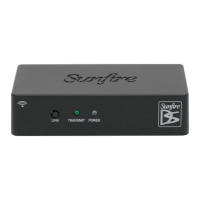
1. LINK Button
This button is only located on the transmitter.
It is used in the initial set-up, to establish a
link between the transmitter and one or two
receivers.
2. Transmit LED
This green LED is only on the transmitter.
Pushing and holding the Link button will
cause this LED to begin to blink when first
transmitting signals to the receiver(s). After
linking is established, the LED will become
solid green and remain on to indicate trans-
mission is operating.
3. Power LED
This turns on when the supplied AC/DC
adapter is connected on both the receiver
and transmitter.
4. Receive LED
This LED is only on the receiver. It will begin
to blink when receiving signals from the
transmitter, and changes to a solid color
when linking is complete.
Overview/Features
Transmitter Receiver
1 2 3 4 3
5 6 7 6
The wireless transmitter and receiver(s)
must be “linked” together before they are
connected to the audio system and the
subwoofer. This is done by performing a
“linking procedure” between the transmit-
ter and up to two receivers. This proce-
dure is required, and if not completed
properly, your subwoofer will not receive
the audio signal from your audio system.
Linking the equipment together only has
to be done once, unless you add a sec-
ond receiver to a single receiver system
at a later time. Two receivers may be
linked simultaneously to avoid having to
repeat the linking procedure for a second
receiver later.
Note: The transmitter and receiver do not
have separate power switches. They are
powered on when their AC power sup-
plies are plugged into an AC outlet near
the subwoofer and then connected to the
transmitter and receiver. The transmitter
is powered on first, then the receiver(s),
are powered on. After AC power is
applied, the RCA audio cables on both
the transmitter and receiver(s) are then
connected.

 Need help?


 To Next Page
 General