SunFounder GalaxyRVR Kit for Arduino, Release 1.0
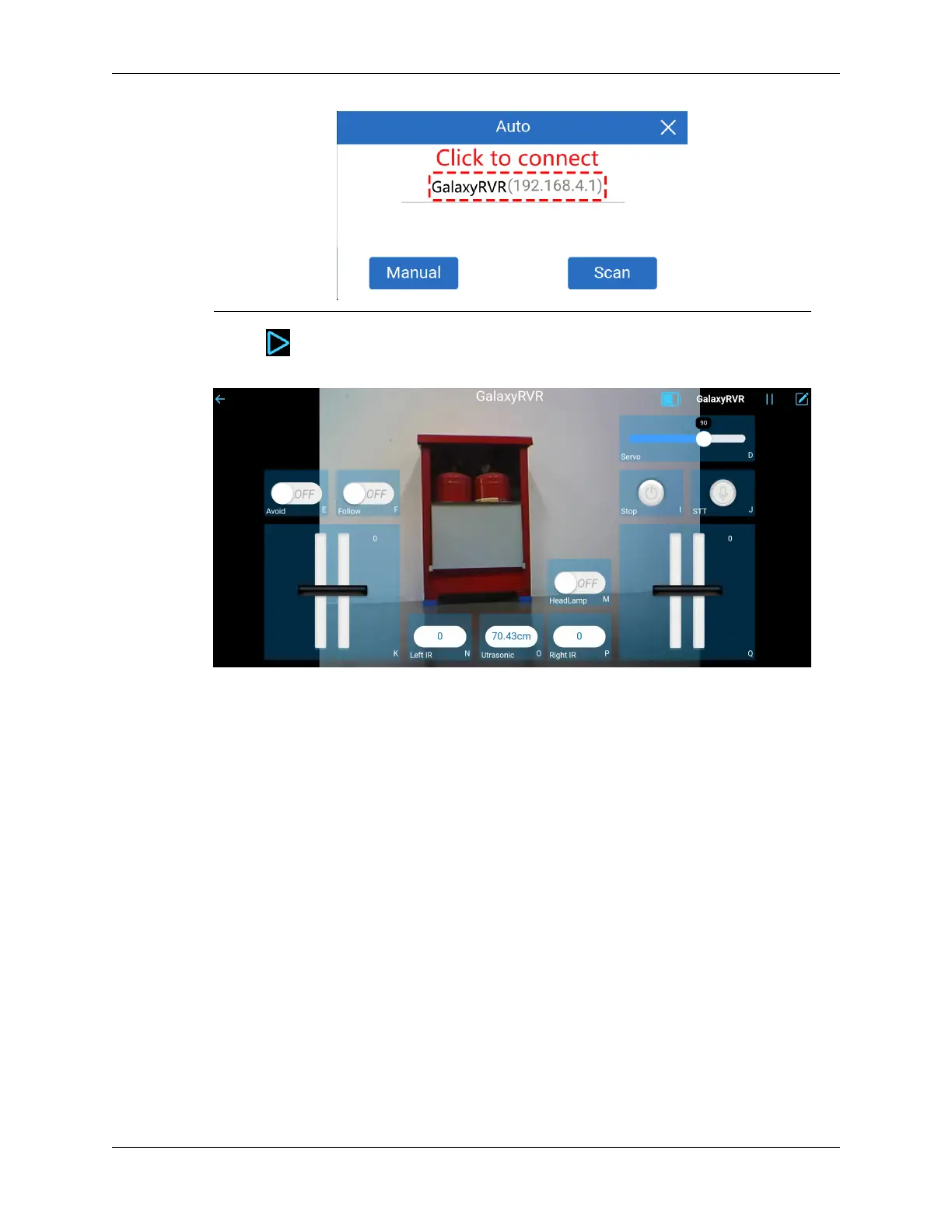
• Now, tap the button enables you to view the live video feed from the camera and control the car using
the provided widgets.
5. Let’s now delve into the functions of each widget:
• Servo(D): Controls the tilt mechanism of the Rover’s camera, allowing you to observe a wider range.
• Avoid(E): Switches the Rover into obstacle avoidance mode. The factory-set detection distances for each
obstacle avoidance module may differ. Manual adjustment is required.
• Follow(F): Toggles the Rover into follow mode. The factory-set detection distances for each obstacle avoid-
ance module may differ. Manual adjustment is required.
• Stop(I): Immediately halts all Rover movements.
• STT(J): Press this widget to initiate voice recognition and make the Rover perform corresponding actions.
• HeadLamp(M): To turn the LED on/off on the ESP32 CAM.
• Throttle Widgets on K and Q: The throttle widget in the K area controls the Rover’s left motors, while
the one in the Q area controls the right motors. Coordinating both widgets allows the GalaxyRVR to move
in any direction.
• Left IR(N): Displays the readings from the left obstacle avoidance module.
• Ultrasonic(O): Shows the distance measured by the ultrasonic module.
• Right IR(P): Displays the readings from the right obstacle avoidance module.
2.1. Quick Guide 9



 To Next Page