1
3
4
5
5
6
7
8
9
2
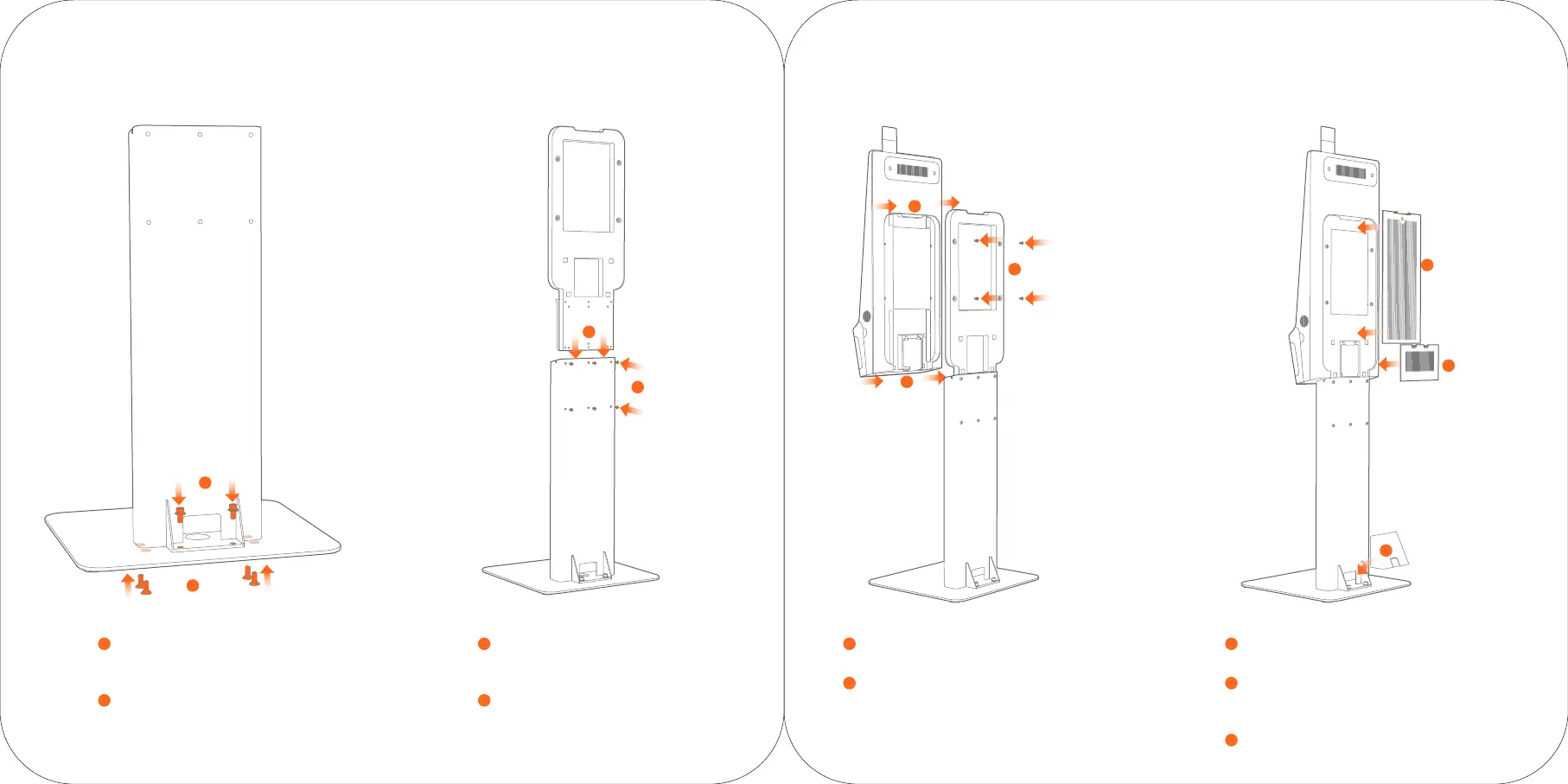
Preassemble the stand on the baseplate
1
Preassemble the stand on the baseplate by two
M10X20 screws and do not twist them too tightly.
Fix the stand on the baseplate
2
Twist four M10X20 screws from the bottom of the
plate as shown in the picture and fasten them.
Then fasten the all the screws.
Insert the host back support
3
Insert the host back support into the stand.
Fix the back support with stand
4
Fix the back support with stand by six
M6X12 screws.
Hang the host
5
Hang the host onto the back support.
Fix the back support and host
6
Fix the back support and host by four M6X30 screws.
Assemble the mainboard maintain cover
7
Assemble the mainboard maintain cover onto the host.
Plug lines
8
Plug power line and network cable and cross the lines
through the stand. Fix the back plug cover.
Assemble the line cover
9
Push forward to fix the line cover onto the stand.
B Installation Steps of Floor-standing



 To Next Page