5
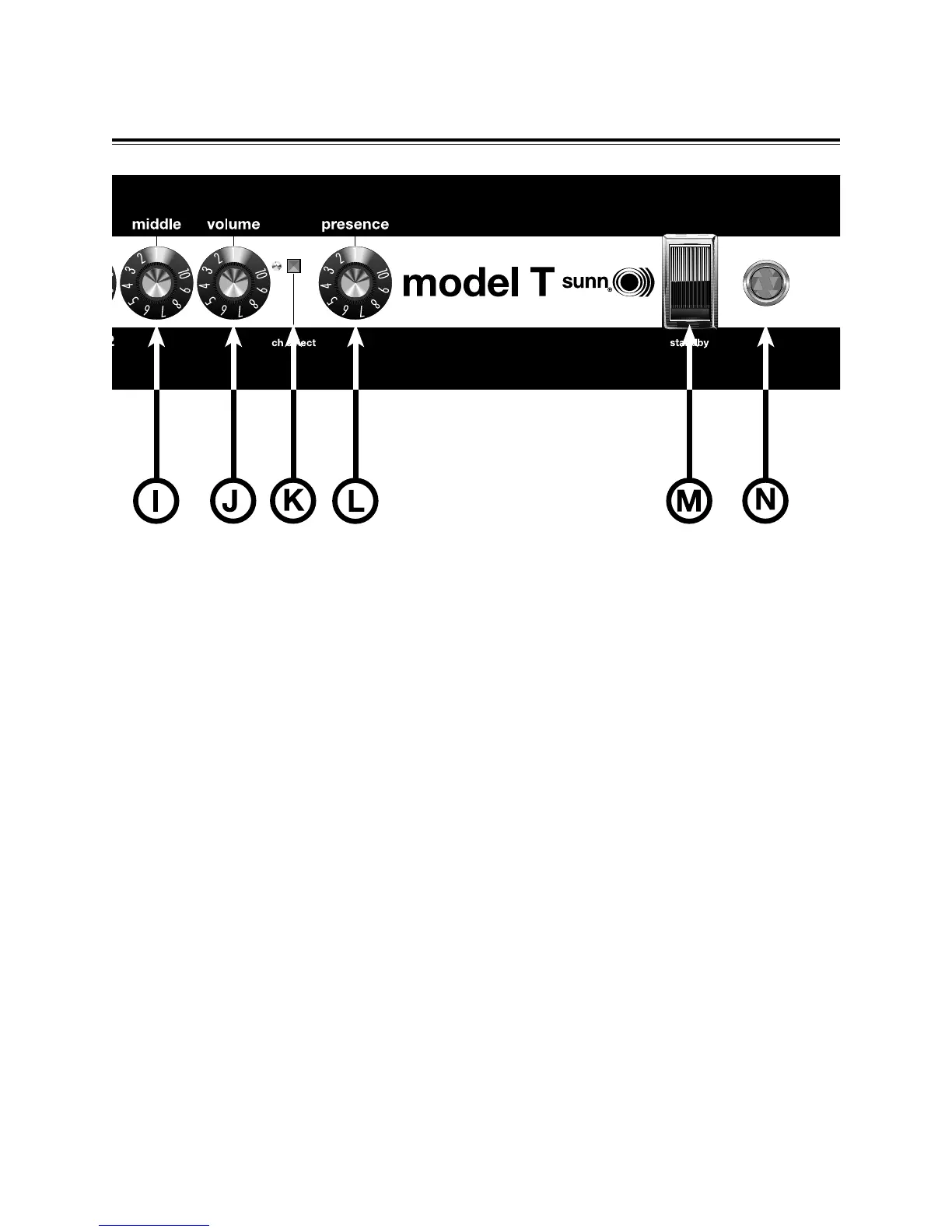
K. CHANNEL SELECT LED - This LED Does Not
illuminate when Channel 1 is active. When this LED
illuminates RED, Channel 2 is active. CH SELECT-
This push-push button switches between Channel 1
and Channel 2. When this button is in, Channel 2 is
active. Using the footswitch (included) overrides the
channel select switch.
L. PRESENCE- Adjusts the high frequency response
of the amplifier. Rotating this knob clockwise
enhances the upper highs giving the Model T a
slightly “crisper” tone.
M. STANDBY - When the power switch and this
switch are ON, your Model T is ready to perform. In
the STANDBY position, power is supplied ONLY to
the tube filaments and sound will NOT come out of
the amp. Using the STANDBY SWITCH during short
breaks eliminates tube warm-up time and will
increase tube life.
N. PILOT LIGHT - This pilot jewel illuminates when
the Model T is receiving power. Should this bulb burn
out, turn off and unplug the amplifier, unscrew the
pilot jewel and replace the lamp with a type T47 bulb.


 To Next Page