6
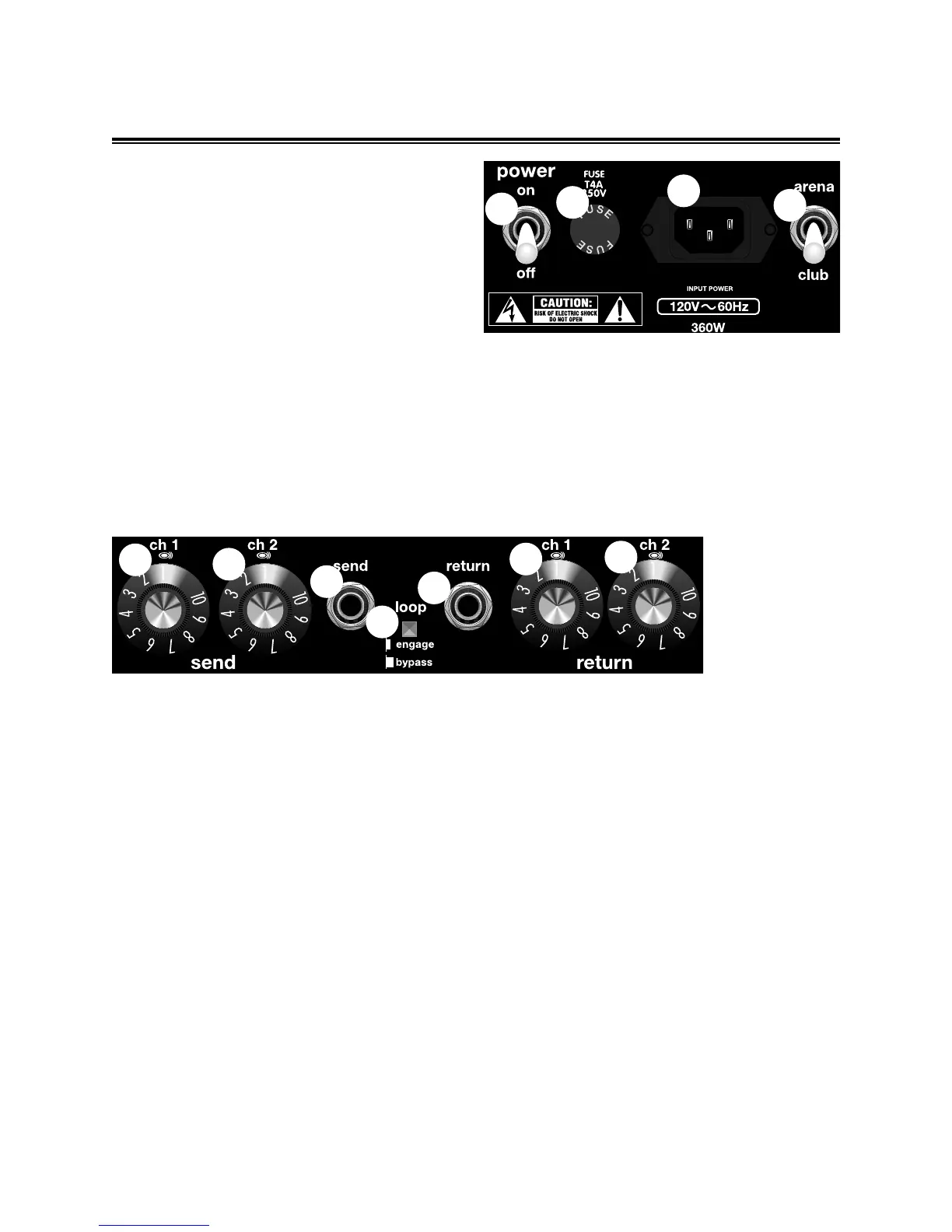
A. POWER SWITCH - Turns the AC power ON and
OFF. When the switch is in the OFF position, the
amplifier is completely shut down.
B. FUSE - The fuse is in the AC supply of the amplifier
and will help to protect the amplifier in the event of an
electrical fault. If a fuse blows, replace it only with one
of the same type and rating. (Refer to the
specification page to determine the correct fuse type
and rating for your amplifier). NEVER use a fuse with
a higher current rating as this could damage the
equipment and present a serious safety hazard. If
the amplifier repeatedly blows fuses, it should be
taken to an authorized Fender service center.
C. LINE CORD - The Model T is equipped with a
grounding type IEC supply cord to reduce the
possibility of shock hazard. Be sure to connect it to
a grounded AC receptacle. DO NOT ALTER THE
AC PLUG.
D. ARENA / CLUB - Switches the output power of
your Model T between 100W and 25W operation.
When the switch is in the arena position, the
amplifier’s output is at 100W useful for larger venues.
When the switch is in the club position, the amplifier’s
output is at 25W.
MODEL T REAR PANEL FUNCTIONS
A
B
C
D
E
F
G
I
H
J
K
E. CH.1 SEND - This knob adjusts the channel 1
send level for the effects loop. Rotating the knob
clockwise increases the amount of signal sent to
your effects unit.
F. CH.2 SEND - This knob adjusts the channel 2
send level for the effects loop. Rotating the knob
clockwise increases the amount of signal sent to
your effects unit.
G. SEND - This 1/4 inch, unbalanced, TS, output
jack is designed to send a signal to an external signal
processing device, such as a digital delay or a
chorus unit.
H. LOOP - This push-push button is the On / Off switch
for the effects loop circuit. When this button is pressed,
the effects loop is engaged and the guitar amp’s signal
is routed to your effects unit. Note: Using the
footswitch overrides the Loop bypass button.
I. RETURN - This 1/4 inch, unbalanced, TS, input
jack is designed to accept signal from an external
processing device, such as a digital delay or a
chorus unit. The effects loop will not operate without
a plug inserted into this jack.
J. CH.1 RETURN - This knob adjusts the channel 1
return level for the effects loop. Rotating the knob
clockwise increases the amount of signal returned to
your Model T amplifier from your effects unit.
K. CH.2 RETURN - This knob adjusts the channel 2
return level for the effects loop. Rotating the knob
clockwise increases the amount of signal returned to
your Model T amplifier from your effects unit.


 To Next Page