6
Installation of Paper Roll
a. Open the printer cover by pressing the release button on the front right-side of the printer.
b. Insert the thermal paper roll and note the direction in the image, to ensure the roll is correctly inserted .
c. Pull a small amount of the thermal paper roll in the direction of the paper cutter until it is showing on the
outside of the printer, before closing the lid.
Driver Installation
SUP58T2 series printer driver: I. direct to install the diver procedures on WIN9X/2K/NT/XP; II. using serial
and parallel direct to drive. III. Run the driver installation in diver CD.
1. Add a printer on “printer and scan” panel, and specify the driver files to drive disk. Just call the Print
command in the program can begin print. upon this way, actually used by WINDOWS own print
program, put the character into a pattern dot matrix method to print
2. Serial port and Parallel port direct drive
Upon this way, no need to install supplier driver, the data(by byte) just needs to be sent directly to the
port by command .The printer will print the character by line printing form instead of page form after
transferring using internal font. It is more convenient.
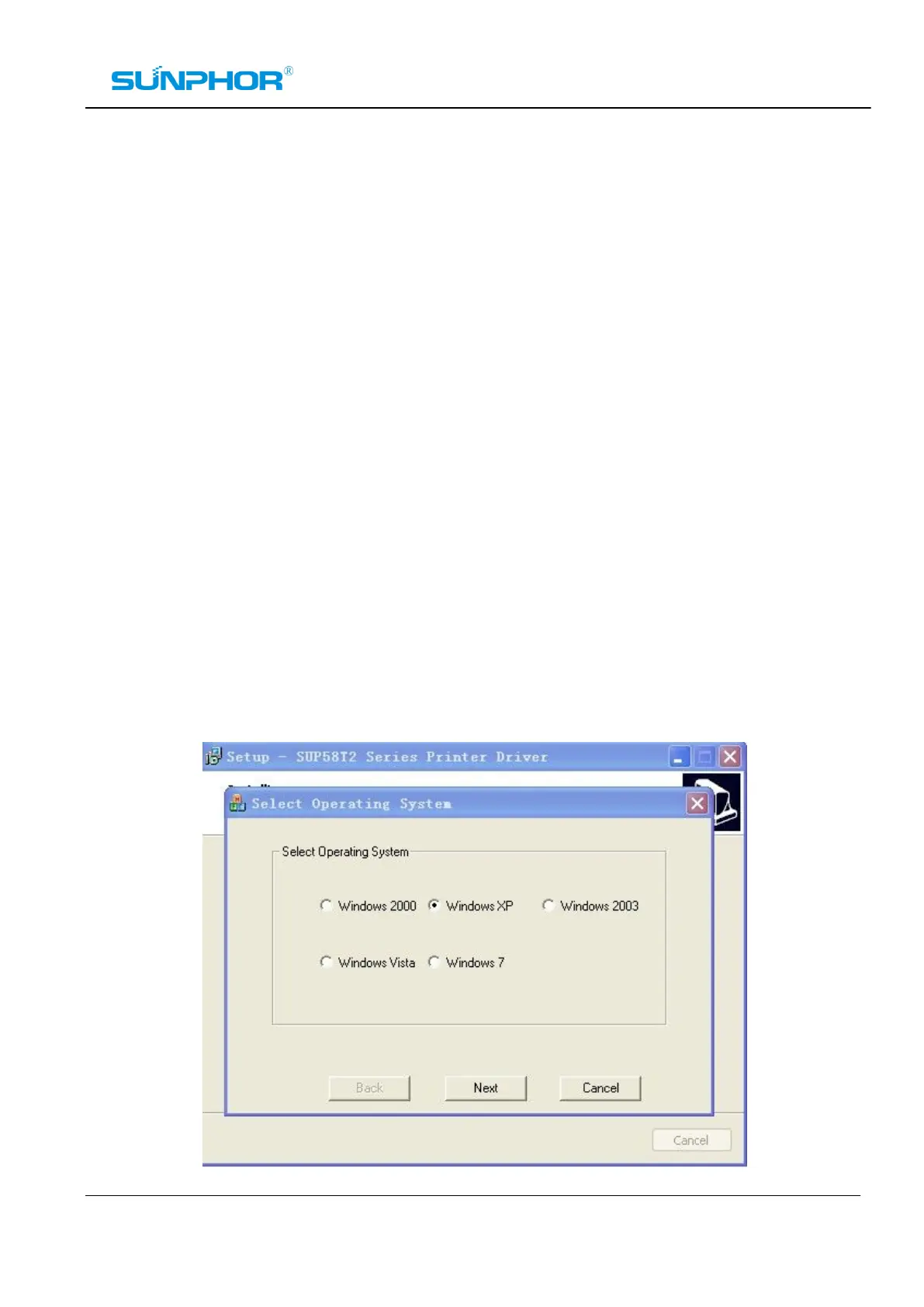
3. Insert the driver CD open “Sup58T2 driver” directory, Double-click the “setup.exe”. Select your
operating system. Click next to continue the installation. See the following image:



 To Next Page