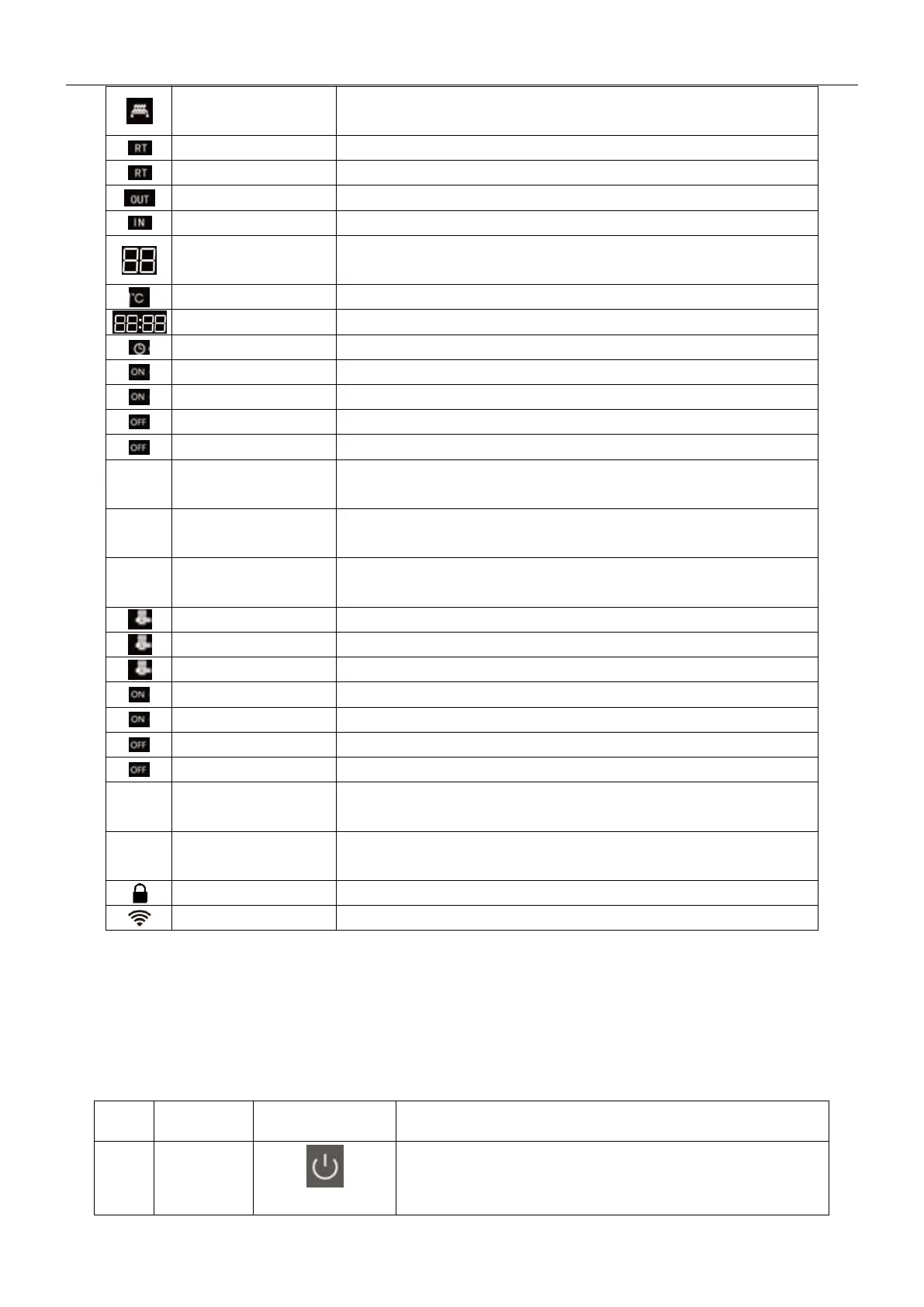
electric heater is on for disinfection
current water temperature in the tank
set water temperature in the tank
current outlet water temperature
current inlet water temperature
Display actual water temperature, set water temperature and
fault code
Currently showing Celsius temperature
Currently in the on-time working hours
set start time for working time
Currently at boot time, non-working time
end time of current set working time
Constantly bright /
Extinguished
Timing working period 1,always on when set, at other
conditions are off.
Constantly bright /
Extinguished
Timing working period 2,always on when set, at other
conditions are off.
Constantly bright /
Extinguished
Timing working period 3,always on when set, at other
conditions are off.
start timing water return function
start manual water return function
turn off water return (timing/manual) function
Currently the return water is in regular timing working period
Current set start time of backwater working time
Currently the return water is in the non-working hours
Currently set end time of water return period
Constantly bright /
Extinguished
Timing zero cold water period 1, always on when setting, at
other conditions are off.
Constantly bright /
Extinguished
Timing zero cold water period 2, always on when setting, at
other conditions are off.
The controller is connected to the router
1.2 Instruction of the buttons
1. Press and hold for 1 second to turn on/off.
2. In the query state, click this button to return to the
main interface.


 To Next Page