EasyManua.ls Logo

Suntex SC-110 - 4. Settings

Suntex SC-110
28 pages
Print Icon
To Next Page IconTo Next Page
To Previous Page IconTo Previous Page
Loading...
6
4. Settings
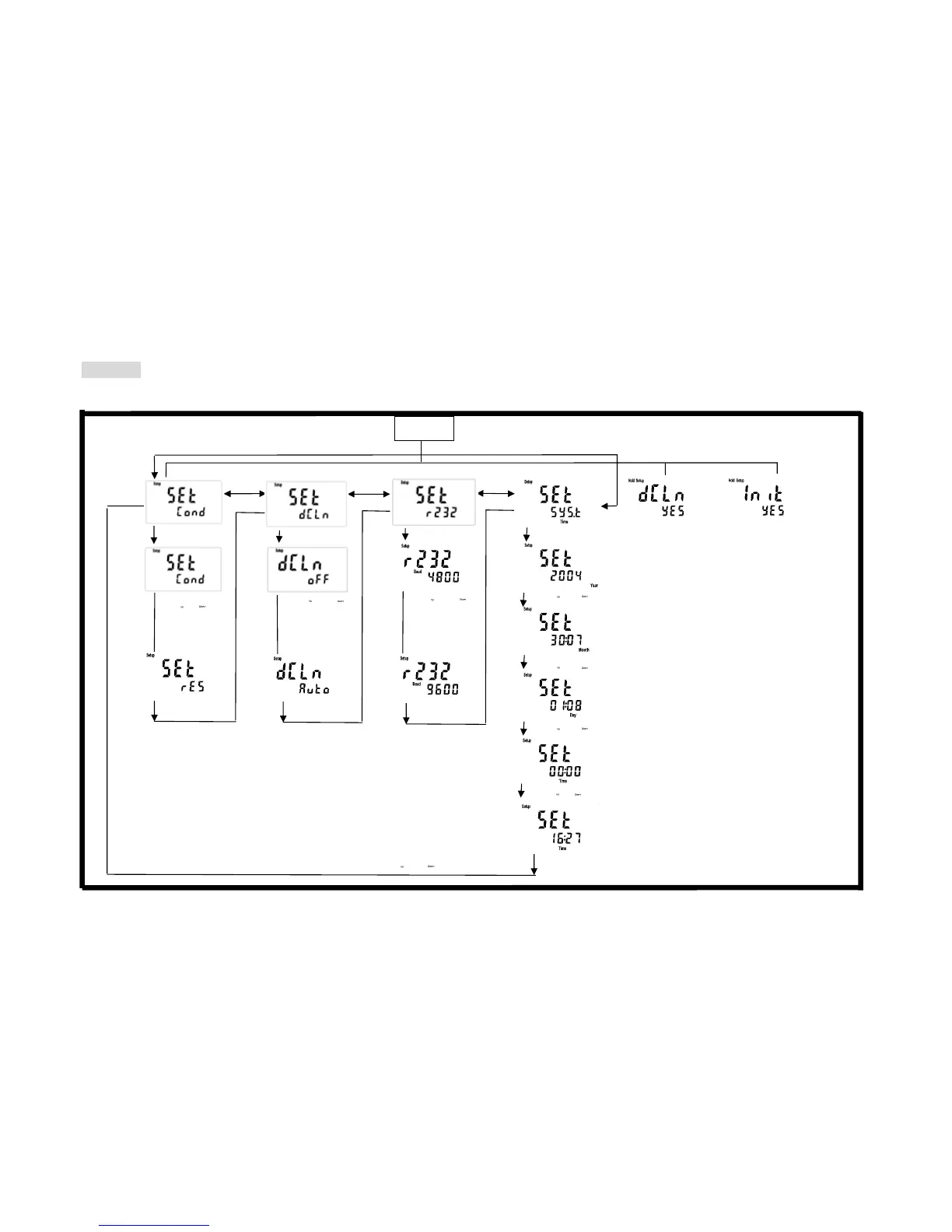
Block diagram of settings
↓: Enter key
→: Downward key for right
←: Upward key for left
Data overcast settings
Baud rate settings
Push o
r
to select auto
overcast or
cancel overcast
Push or
to select other
transmission
speed: 1200,
2400, 4800 or
9600
Push Store+Powe
r
,
Loose Power+Store
To delete all stored
data
Push CAL+Powe
r
,
Loose Power+CAL
System reset
Push Mode+Powe
r
Loose Power+MODE to
enter the measurement
mode
Settings of measurement
mode
Power off
System time settings
Push or to modify the minute
Push or to modify the year
Push or to modify the month
Push or to modify the day
Push or to modify the
Push o
to select
conductivity or
specific resistivity