EasyManua.ls Logo

Sunx DP4 Series - User Manual

Sunx DP4 Series
15 pages
Print Icon
To Next Page IconTo Next Page
Loading...
PRESSURE SENSORS
DP5/DPH
Head-separated
DP4
DP2
DP3
DP-M
Digital Display
PE
LED Bar Display
780
DP4
SERIES
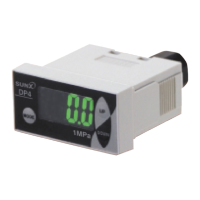
Compact Size Digital Pressure Sensor
New shape makes it
most suitable for panel
mounting
UL Recognition
Conforming to
EMC Directive
Digital
Automatic sensitivity
setting
A panel mounting bracket MS-DP-1 is
enclosed to enable simple mounting of
the sensor onto the panel surface, thus
contributing to the total cost reduction.
Light-weight, compact design Can be mounted closely
Bright, easy to view two-color digital display
A compact form specifically designed
for mounting on an equipment panel.
It only uses half the space of our
conventional product and provides the
lightest weight in the industry of just
30 g (cables excluded).
Even when you use more than one
sensor at the same time, you can
mount them close together in one hole
to save both space and man-hours.
The digital display is a large, easy-to-
view, and two-color digital display. It is
also functions as an output indicator as
it changes from green to red color
when the output turns ON, enabling
you confirm the output status at a
glance.
20 mm (20 mm (0.787 in)20 mm (0.787 in)
40 mm (1.575 in) 40 mm (1.575 in) 40 mm (1.575 in)
40 mm
(1.575 in)
40 mm
(1.575 in)
60 mm60 mm
(2.362 in)
60 mm
(2.362 in)
Snap-fit connector is used for cable connection
The cable has a snap-fit connector for
easy mounting and removal. The
connector can be easily assembled by
yourself.
Further, the connection by connector
eliminates waste and is eco-friendly.
Usable with a panel thickness of 1 to 6 mm 0.039 to 0.236 in
Supplied with a simple-to-mount panel mounting bracket
Since the panel thickness can be from 1 to
6 mm 0.039 to 0.236 in, the sensor can even
be mounted on thick, resin-made panels.
Two types of sensor mounting brackets available
The MS-DP-3 bracket, enabling vertical
mounting, and the MS-DP-4, enabling
horizontal mounting, are available as
options. One-touch mounting of the
sensor mounting brackets is possible
with the panel mounting bracket included
with the sensor.
MS-DP-3 MS-DP-4
Label space
Accessory
Panel mounting
bracket
MS-DP-1
Output OFF
(Green)
Output ON
(Red)
mThe panel mounting bracket MS-DP-5 (optional)
enabling the sensors to be attached to each
other laterally is available.
mConnector attached cable CN-63-C2 (2 m
6.562 ft cable length) and CN-63-C5 (5 m
16.404 ft cable length) are also available.
* Passed the UL 991 Environment Test
* UL 61010C-1 compatible, Passed the UL 991 Environment Test based on SEMI S2-0200.
[Category applicable for semiconductor manufacturing: TWW2, Process Equipment]
[Applicable standards: UL 61010C-1]
[Additional test / evaluation standards as per intended use: UL991, SEMI S2-0200]
Question and Answer IconNeed help?

Do you have a question about the Sunx DP4 Series and is the answer not in the manual?

Summary

Applications

Mounting on a DIN rail

Describes the sensor's compatibility with DIN rail mounting using an optional bracket.

High-speed response

Highlights the sensor's fast response time of 2 ms or less with chattering prevention.

Analog bar display option

Explains the availability of an analog bar display for indicating pressure changes.

Compound pressure type

Introduces the availability of a ±100 kPa compound pressure type sensor.

Memory bank function

Details the function for storing and recalling two patterns of set values.

Flexible control with output modes

Discusses the sensor's ability to control outputs using four different modes.

Order Guide

Options

Connectors

Lists available connector options and their specifications.

Connector attached cables

Details the available cables with attached connectors, including lengths.

DIN rail mounting bracket

Describes the optional bracket for mounting the sensor on a 35 mm DIN rail.

Sensor mounting brackets

Introduces available brackets for vertical and horizontal sensor mounting.

Horizontal multiple panel mounting bracket

Explains the bracket for attaching sensors laterally on a panel.

Specifications

I;O Circuit and Wiring Diagrams

NPN output type

Provides the I/O circuit diagram and pin position for NPN output type sensors.

PNP output type

Provides the I/O circuit diagram and pin position for PNP output type sensors.

Precautions for Proper Use

Operation

Details the operational procedures, including key-protect and window comparator mode.

Functional Description

Explains the functions of the LCD display and the keys used for operation.

CE Conformity Conditions

Outlines the conditions required for CE conformity, particularly regarding wiring.

Error Messages

Lists potential error messages and their corresponding corrective actions.

Wiring Precautions

Provides essential guidelines for safe and effective wiring of the sensor.

Other Precautions

Covers general precautions related to usage, environment, and handling.

Setting Procedures

Details the step-by-step procedures for sensor setting, including zero-point adjustment.

Forced Output Mode

Explains how to use the forced output mode for checking sensor operation.

Memory Bank Function

Describes the function for storing and recalling multiple set values.

Peak Hold & Bottom Hold Functions

Details functions for displaying maximum and minimum pressure values.

Key-Protect Function

Explains how to set and release the key-protect function to prevent changes.

Piping

Provides instructions and torque specifications for connecting fittings to the pressure port.

Mounting

Details the installation procedure for the panel mounting bracket.

Dimensions

DP4-5 Sensor Dimensions

Shows the overall dimensions and key features of the DP4-5 sensor.

MS-DP-2 DIN Rail Mounting Bracket

Illustrates the dimensions and mounting options for the DIN rail bracket.

MS-DP-1 Panel Mounting Bracket

Provides dimensions and cut-out details for the panel mounting bracket.

MS-DP-5 Horizontal Multiple Panel Mounting Bracket

Shows dimensions and panel cut-out for the multi-panel mounting bracket.

MS-DP-3 Sensor Mounting Bracket

Details the dimensions for the vertical sensor mounting bracket.

MS-DP-4 Sensor Mounting Bracket

Details the dimensions for the horizontal sensor mounting bracket.

Connector Options

Illustrates the dimensions of the CN-63 connector and attached cables.

Functional Description

Analog Bar Display

Explains the use of the LCD bar for displaying pressure changes.

Memory Bank Function

Describes the function for storing two types of set values for quick changes.

Output Modes & Their Characteristics

Hysteresis Mode

Details how to set hysteresis for comparative output ON/OFF control.

Window Comparator Mode

Explains how comparative output turns ON/OFF within a set pressure range.

Forced Output Mode

Describes the mode where output is forcibly maintained at OFF level.

Automatic Sensitivity Setting Mode

Explains automatic setting of pressure values using actual objects.

Setting

Zero-point Adjustment

Procedure for adjusting the displayed pressure to zero when the port is open.

Initial Setting

Setting the display mode, output mode, and unit of measurement.

Supplementary Setting

Setting NO/NC, display cycle, response time, and pressure range.

Pressure Value Setting

Details setting of output values P-1 to P-3, and P-4 to P-6.

Forced Output Mode

Peak Hold & Bottom Hold Functions

Key-Protect Function

Summary

Applications

Mounting on a DIN rail

Describes the sensor's compatibility with DIN rail mounting using an optional bracket.

High-speed response

Highlights the sensor's fast response time of 2 ms or less with chattering prevention.

Analog bar display option

Explains the availability of an analog bar display for indicating pressure changes.

Compound pressure type

Introduces the availability of a ±100 kPa compound pressure type sensor.

Memory bank function

Details the function for storing and recalling two patterns of set values.

Flexible control with output modes

Discusses the sensor's ability to control outputs using four different modes.

Order Guide

Options

Connectors

Lists available connector options and their specifications.

Connector attached cables

Details the available cables with attached connectors, including lengths.

DIN rail mounting bracket

Describes the optional bracket for mounting the sensor on a 35 mm DIN rail.

Sensor mounting brackets

Introduces available brackets for vertical and horizontal sensor mounting.

Horizontal multiple panel mounting bracket

Explains the bracket for attaching sensors laterally on a panel.

Specifications

I;O Circuit and Wiring Diagrams

NPN output type

Provides the I/O circuit diagram and pin position for NPN output type sensors.

PNP output type

Provides the I/O circuit diagram and pin position for PNP output type sensors.

Precautions for Proper Use

Operation

Details the operational procedures, including key-protect and window comparator mode.

Functional Description

Explains the functions of the LCD display and the keys used for operation.

CE Conformity Conditions

Outlines the conditions required for CE conformity, particularly regarding wiring.

Error Messages

Lists potential error messages and their corresponding corrective actions.

Wiring Precautions

Provides essential guidelines for safe and effective wiring of the sensor.

Other Precautions

Covers general precautions related to usage, environment, and handling.

Setting Procedures

Details the step-by-step procedures for sensor setting, including zero-point adjustment.

Forced Output Mode

Explains how to use the forced output mode for checking sensor operation.

Memory Bank Function

Describes the function for storing and recalling multiple set values.

Peak Hold & Bottom Hold Functions

Details functions for displaying maximum and minimum pressure values.

Key-Protect Function

Explains how to set and release the key-protect function to prevent changes.

Piping

Provides instructions and torque specifications for connecting fittings to the pressure port.

Mounting

Details the installation procedure for the panel mounting bracket.

Dimensions

DP4-5 Sensor Dimensions

Shows the overall dimensions and key features of the DP4-5 sensor.

MS-DP-2 DIN Rail Mounting Bracket

Illustrates the dimensions and mounting options for the DIN rail bracket.

MS-DP-1 Panel Mounting Bracket

Provides dimensions and cut-out details for the panel mounting bracket.

MS-DP-5 Horizontal Multiple Panel Mounting Bracket

Shows dimensions and panel cut-out for the multi-panel mounting bracket.

MS-DP-3 Sensor Mounting Bracket

Details the dimensions for the vertical sensor mounting bracket.

MS-DP-4 Sensor Mounting Bracket

Details the dimensions for the horizontal sensor mounting bracket.

Connector Options

Illustrates the dimensions of the CN-63 connector and attached cables.

Functional Description

Analog Bar Display

Explains the use of the LCD bar for displaying pressure changes.

Memory Bank Function

Describes the function for storing two types of set values for quick changes.

Output Modes & Their Characteristics

Hysteresis Mode

Details how to set hysteresis for comparative output ON/OFF control.

Window Comparator Mode

Explains how comparative output turns ON/OFF within a set pressure range.

Forced Output Mode

Describes the mode where output is forcibly maintained at OFF level.

Automatic Sensitivity Setting Mode

Explains automatic setting of pressure values using actual objects.

Setting

Zero-point Adjustment

Procedure for adjusting the displayed pressure to zero when the port is open.

Initial Setting

Setting the display mode, output mode, and unit of measurement.

Supplementary Setting

Setting NO/NC, display cycle, response time, and pressure range.

Pressure Value Setting

Details setting of output values P-1 to P-3, and P-4 to P-6.

Forced Output Mode

Peak Hold & Bottom Hold Functions

Key-Protect Function

Overview

The DP4 Series is a compact digital pressure sensor designed for a wide range of applications, particularly suitable for panel mounting due to its new shape. It offers a bright, easy-to-view two-color digital display and various output modes for flexible control.

Function Description

The DP4 Series functions as a pressure detection sensor, capable of measuring vacuum, positive, and compound pressures. It features a 3½ digit LCD display that shows measured pressure, settings, error messages, and key-protect status. The display changes color from green (output OFF) to red (output ON) to indicate output status at a glance.

The sensor supports four output modes:

  • Hysteresis mode: Allows arbitrary setting of output hysteresis with set values for ON/OFF control.
  • Window comparator mode: Turns output ON or OFF when pressure is within a specified range.
  • Automatic sensitivity setting mode: Automatically sets the optimum pressure value (mid-value) based on input pressure values for OK and NG objects.
  • Forced output mode: Maintains the output at an OFF level in sensing mode, irrespective of set values, and allows forced switching of output ON/OFF without applying pressure, useful for operation checks.

It also incorporates a memory bank function, allowing storage of two patterns of set values (Set Values 1-3 and Set Values 4-6) for quick changes. Peak hold and bottom hold functions are available to display maximum and minimum pressure values, aiding in determining pressure variation ranges and setting references.

Important Technical Specifications

The DP4 Series is available in three main types:

  • Vacuum pressure type (DP4-50/DP4-50P): Rated pressure range of 0 to -101.3 kPa.
  • Positive pressure type (DP4-52/DP4-52P): Rated pressure range of 0 to 1.000 MPa (gauge pressure).
  • Compound pressure type (DP4-57/DP4-57P): Rated pressure range of -100.0 to 100.0 kPa.

Common Specifications:

  • Pressure withstandability: 490 kPa (vacuum/compound types), 1.470 MPa (positive type).
  • Applicable fluid: Non-corrosive gas.
  • Repeatability: Within ±0.2% F.S. ±1 digit (within ±3 digits for vacuum/positive), ±2 digits (within ±6 digits for compound).
  • Supply voltage: 12 to 24 V DC ±10% (Ripple P-P 10% or less).
  • Current consumption: 40 mA or less.
  • Output: NPN or PNP open-collector transistor, 100 mA maximum sink/source current.
    • NPN: Applied voltage 30 V DC or less, residual voltage 1 V or less (at 100 mA), 0.4 V or less (at 16 mA).
    • PNP: Applied voltage same as supply voltage, residual voltage 2 V or less (at 100 mA).
  • Response time: Selectable from 2 ms, 16 ms, 128 ms, 512 ms or less.
  • Display: 3½ digit LCD with red and green backlight. Sampling rate selectable from 256 ms, 512 ms, 1,024 ms.
  • Ambient temperature: 0 to +50 °C (no dew condensation) for operation, -10 to +60 °C for storage.
  • Ambient humidity: 35 to 85% RH for operation and storage.
  • Protection: IP40 (IEC).
  • Vibration resistance: 10 to 150 Hz frequency, 0.75 mm amplitude, or 5 G in X, Y and Z directions for two hours each.
  • Shock resistance: 100 m/s² acceleration (10 G approx.) in X, Y and Z directions for three times each.
  • Pressure port: M5 female thread.
  • Material: Front case: ABS, LCD display: PET, Rear case: PBT [M5 threaded part: Brass (nickel plated)].
  • Weight: Approximately 30 g (excluding cables).
  • CE Conformity: UL 61010C-1 compatible, passed UL 991 Environment Test based on SEMI S2-0200. Conforms to EMC Directive EN 61000-6-2.

Usage Features

  • Compact and Lightweight Design: At just 30 g (excluding cables), its compact form is specifically designed for mounting on equipment panels, using half the space of conventional products.
  • Close Mounting: Multiple sensors can be mounted close together in one hole, saving space and man-hours.
  • Panel Mounting: The sensor's new shape is optimized for panel mounting. It can be mounted on panels with thicknesses from 1 to 6 mm (0.039 to 0.236 in). A simple-to-mount panel mounting bracket (MS-DP-1) is included, contributing to cost reduction. Optional horizontal multiple panel mounting bracket (MS-DP-5) allows lateral attachment of sensors.
  • DIN Rail Mounting: Can be mounted on a 35 mm (1.378 in) width DIN rail using the optional MS-DP-2 bracket, allowing installation in narrow spaces.
  • Two-Color Digital Display: The large, bright display changes from green to red when the output turns ON, providing an immediate visual confirmation of output status.
  • Analog Bar Display: Pressure changes can be indicated as a bar display, with color reflecting output changes, allowing detection of sudden pressure changes.
  • Selectable Pressure Units: Six pressure units (inHg, mmHg, kPa, psi, kgf/cm², bar) can be selected, with automatic conversion of measured pressure and set values.
  • Memory Bank Function: Stores two patterns of set values for quick changes.
  • Snap-fit Connector: Features a snap-fit connector for easy cable mounting and removal, promoting eco-friendliness and reducing waste. Optional attached cables (CN-63-C2, CN-63-C5) are available.
  • Key-Protect Function: Prevents unintentional changes to settings by locking key operations.
  • Error Messages: Displays error codes (e.g., "E" for overcurrent, "E-3" for pressure during zero-point adjustment) to guide corrective actions.

Maintenance Features

  • Wiring: Ensure power supply is off during wiring. Verify supply voltage is within rating. Connect frame ground (F.G.) to actual ground if using a commercial switching regulator or noise-generating equipment. Use a surge absorber if the power supply generates surges. Avoid running wires with high-voltage or power lines to prevent malfunction due to induction. Keep wiring as short as possible.
  • Environmental Considerations: Use within rated pressure range and avoid exceeding pressure withstandability value to prevent diaphragm damage. Do not use during initial transient time (approx. 3 sec) after power-on. Avoid dust, dirt, steam, water, oil, grease, or organic solvents. Do not insert wires into the pressure port. Do not operate keys with pointed or sharp objects.
  • Zero-Point Adjustment: Performed by simultaneously pressing UP and DOWN keys in sensing mode when the pressure port is open to atmospheric pressure.
  • Setting Procedures: Clear, step-by-step instructions are provided for initial settings (display, output mode, unit), supplementary settings (NO/NC, display cycle, response time, pressure range), and pressure value settings.
  • Cable Extension: Cable extension up to 100 m (328.084 ft) is possible with 0.3 mm² or more cable (less than 10 m for CE marking).
  • EEPROM: Set conditions are stored in EEPROM, which has a guaranteed life of 100,000 write operation cycles.

Sunx DP4 Series Specifications

General IconGeneral
BrandSunx
ModelDP4 Series
CategoryAccessories
LanguageEnglish

Related product manuals