60
X11SSM(-F)/X11SSL(-F) User Manual
CPU
VGA
LAN2
LAN1
LE1
COM1
COM2
USB6/7
(3.0)
USB0/1
IPMI_LAN
JOH1
JUIDB1
BAR CODE
IPMI CODE
MAC CODE
FAN4
JPWR2
JPWR1
JPL1
DIMMB2
DIMMB1
DIMMA2
DIMMA1
LED BMC
JPI2C1
JPL2
CPU SLOT7 PCI-E 3.0 x8
FAN1
FAN2
FAN3
FANA
LED PWR
JSTBY1
JWD1
I-SGPIO1 I-SGPIO2
USB10(3.0)
USB8/9(3.0)
JSD1
JF1
I-SATA0
I-SATA1
JSD2
I-SATA2
I-SATA3
I-SATA4
I-SATA5
I-SATA6
I-SATA7
USB4/5
JTPM1
JBT1
JL1
USB2/3
JD1
JPG1
JBR1
JPME2
JPB1
JI2C1
JI2C2
X11SSM(-F)/X11SSL(-F)
REV:1.01
Designed in the USA
BMC
MEGERAC
LICENSE
CPU SLOT6 PCI-E 3.0 x8(IN x16)
PCH SLOT5 PCI-E 3.0 x4(IN x8)
PCH SLOT4 PCI-E 3.0 x4(IN x8)
JIPMB1
SP1
Intel PCH
BT1
1
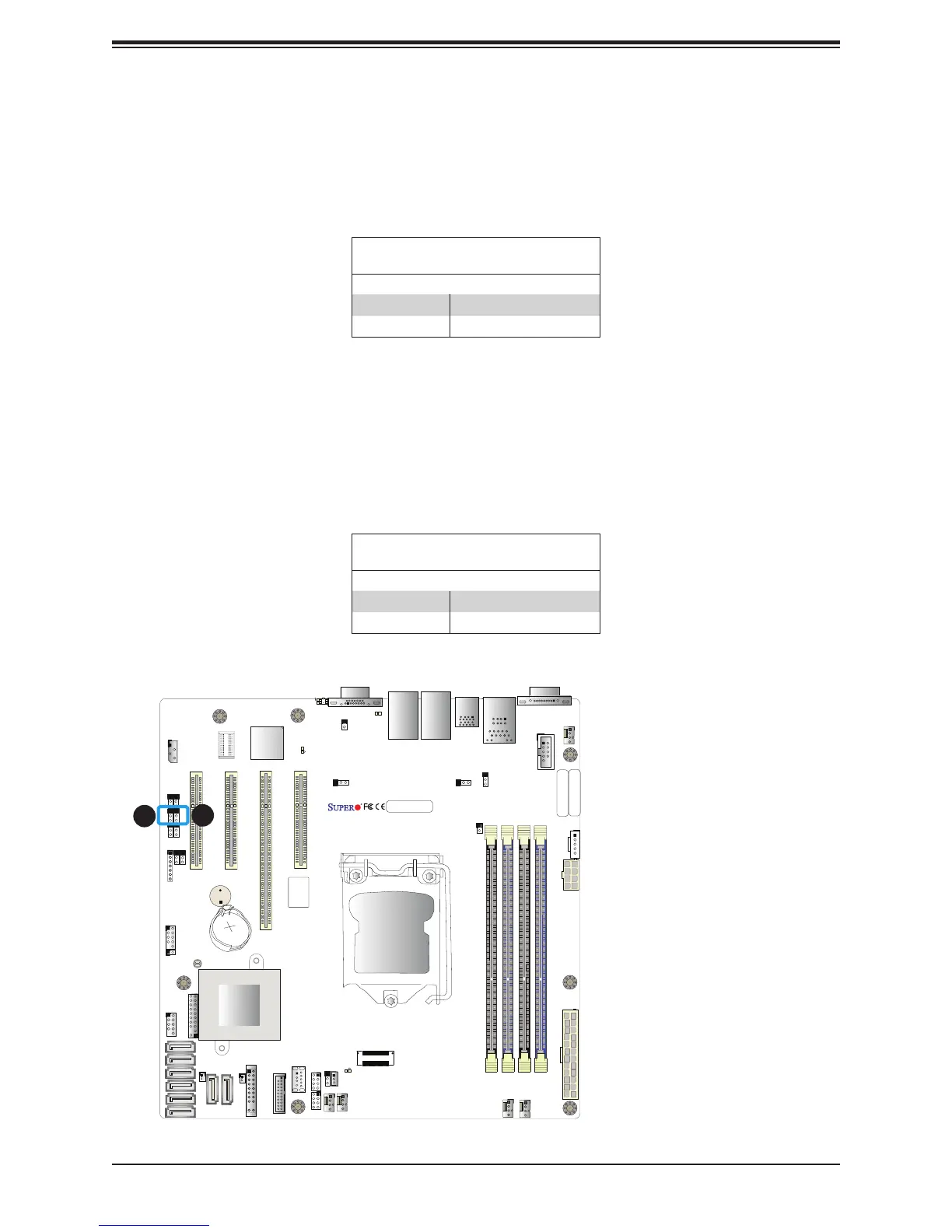
1. BMC Enable
2. Manufacturer Mode
BMC Enabled
Jumper JPB1 allows the user to enable the embedded ASpeed AST2400 Baseboard
Management Controller (BMC) to provide IPMI 2.0/KVM support on the motherboard. Refer
to the table below for jumper settings. The default setting is BMC Enable.
BMC Enable
Jumper Settings
Jumper Setting Denition
Pins 1-2 BMC Enabled
Pins 2-3 Disabled
Manufacturer Mode Select
Close pin 2 and pin 3 of jumper JPME2 to bypass SPI ash security and force the system to
operate in the manufacturer mode, which will allow the user to ash the system rmware from
a host server for system setting modications. Refer to the table below for jumper settings.
The default setting is Normal.
Manufacturer Mode
Jumper Settings
Jumper Setting Denition
Pins 1-2 Normal
Pins 2-3 Manufacturer Mode
2


 To Next Page