SUPER STEAM X5 47
3) When the unit has been fully assembled and lled with wa-
ter, plug in the power cord to grounded electrical outlet. When the
red indicator light started blinking, that indicate the machine start
preheang. pump switch(0/l) is in the o(0)posion(higher posi-
on). Wait for 20 ~ 25 seconds, the compleon of preheang, red
light stops blinking, that machine can be normal use.
When press the pump switch(0/l)to the ON(l) posion (lower po-
sion),the mop will start eming steam.
The pump will not work when you press the switch if the red in-
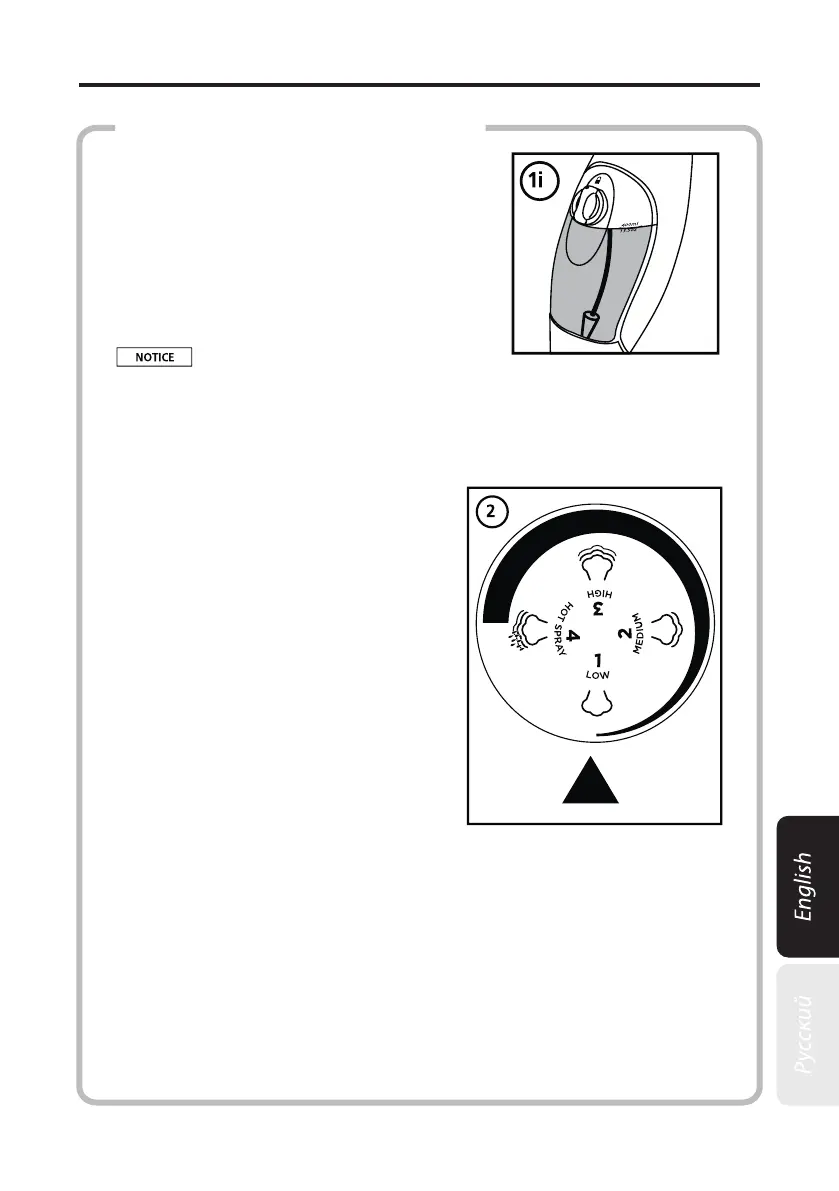
Make sure the Copper Cone inside the
Water Tank is always submerged in water
(As illustrated in Fig. 1i) while operang
the SUPER STEAM X5.
2) Select one of the following Steam Regulator posions:
1 - Low, 2 - Medium, 3 - High and 4 - Hot Spray
• 1 - Low and 2 - Medium Set-
ng: Ideal for cleaning all hard oors,
such as linoleum, ceramic, marble,
wood, etc.
• 3 - High Seng: Ideal for
cleaning carpets and rugs.
• 4 - Hot Spray Seng: Ideal
for cleaning bathrooms, kitchens,
window sills, car wheels, etc.
You can change the Steam Regu-
lator posion and change the steam
output while operang the SUPER
STEAM X5.
HOW TO USE THE SUPER STEAM X5
Never put cleaning detergents or scented products into the SU-
PER STEAM X5. This will make operaon unsafe and damage the unit.


 To Next Page