SUPER STEAM X546
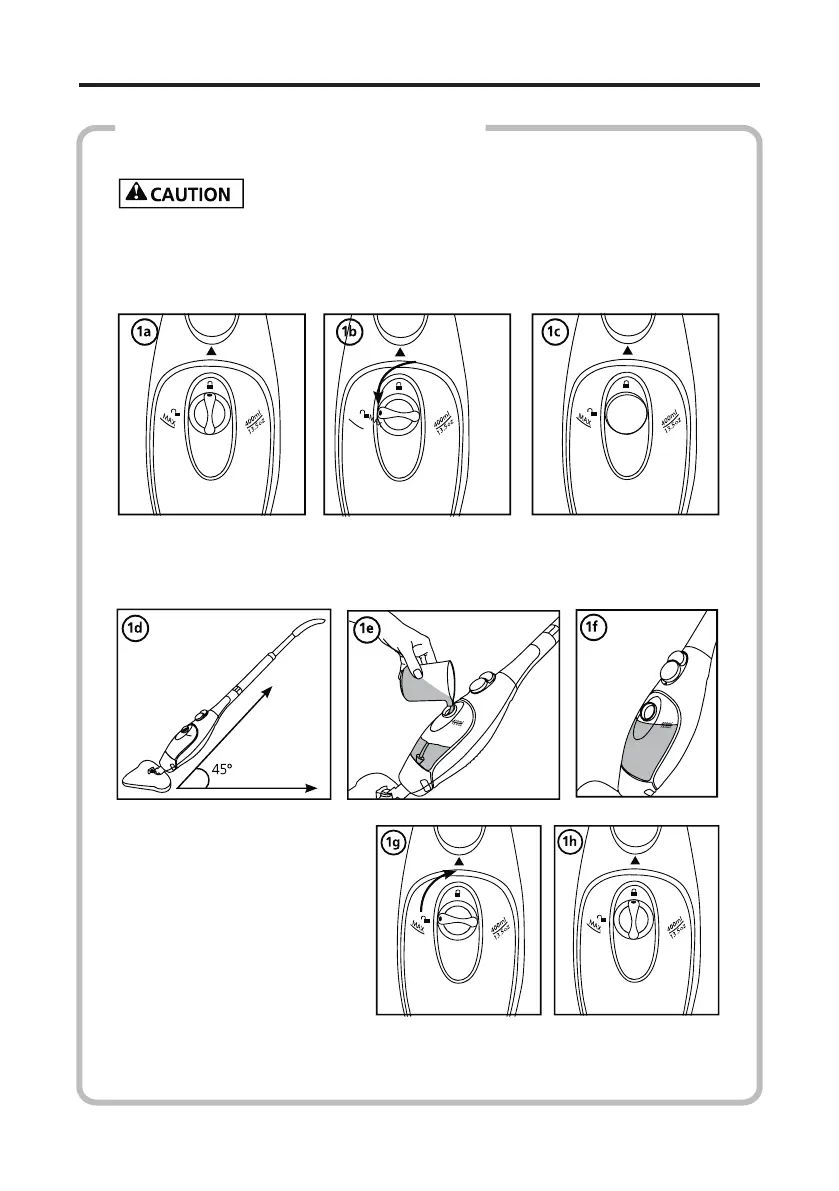
Turn the Water Tank cap counter-clockwise approximately 90° to
the “OPEN” posion and remove the cap as illustrated in Fig. 1a, b
and c.
1) Fill the Water Tank with water:
Make sure that the SUPER STEAM X5 is unplugged.
Hold the mop at a 45° angle as illustrated in Fig. 1d and add water
in the tank up to the MAX level by using the measuring cup.
Do not overll. The maximum tank capacity is 400 ML/13.5 OZ.
Replace the Water
Tank cap and turn clock-
wise approximately 90°
to the “CLOSE” posion
unl the cap is ghtened
securely.
The SUPER STEAM X5
uses tap water. However,
in areas with hard water, dislled water should be used for beer
performance.
HOW TO USE THE SUPER STEAM X5


 To Next Page