Page 15 of 24 Form 0160C 3825 03/10/08
Superchips Inc.
Superchips Inc. 1790 East Airport Blvd., Sanford, FL. 32773 (407) 585-7000 http://www.Superchips.com
Superchip & Superchips are registered trademarks of Superchips, Inc.
Section A – Overview of
FLASHPAQ
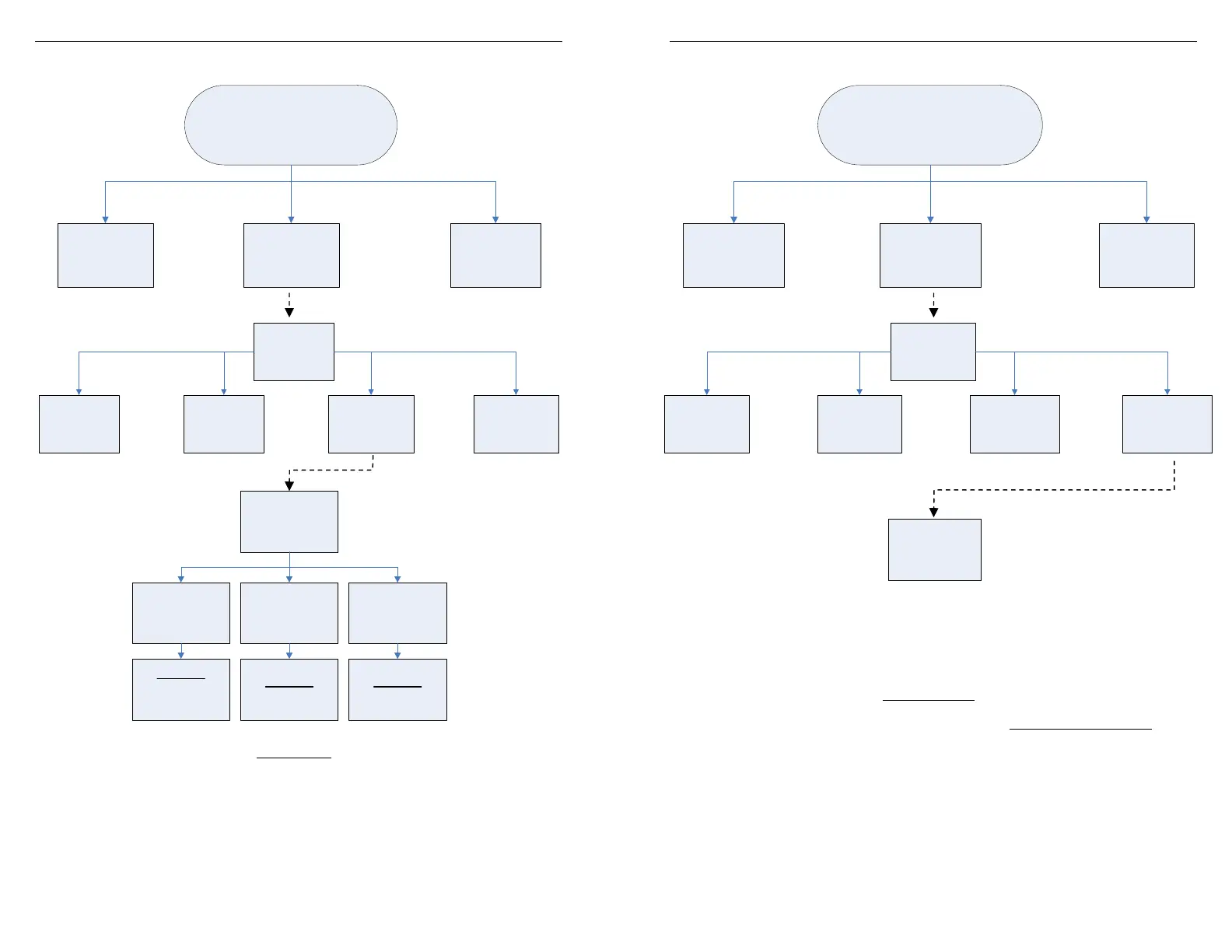
View Settings
Display Vehicle ID & Tuner Status: Displays stored vehicle ID & tuner programming status
(This feature displays previously read data, no communications with the vehicle occur)
Display Power Level: Displays stored user selection from Change Setup - Power Level.
(This feature is for display only, to make changes see Performance Tuning - Change Setup)
Display Options: Displays current settings user has selected from Change Setup – Options.
(This feature is for display only, to make changes see Performance Tuning - Change Setup)
FlashPaq
Main Menu
FlashPaq
Setup
Performance
Tuning
Advanced
Features
Performance
Tuning
Read
Vehicle
Change
Setup
View
Settings
Program
Vehicle
View
Settings
Power Level Options
FlashPaq
Status
Display
Power Level
Display
Options
Display
Vehicle ID
Tuner Status
Page 16 of 24 Form 0160C 3825 03/10/08
Superchips Inc.
Superchips Inc. 1790 East Airport Blvd., Sanford, FL. 32773 (407) 585-7000 http://www.Superchips.com
Superchip & Superchips are registered trademarks of Superchips, Inc.
Section A – Overview of
FLASHPAQ
Program Vehicle
Program Vehicle: Programs vehicle based on Change Setup – Power Level and Options.
(This feature is for live vehicle programming; an active vehicle connection to tuner is required.
Superchips optimum tuning will be installed without modification unless the user changes
settings in Power Level – Options)
FlashPaq
Main Menu
FlashPaq
Setup
Performance
Tuning
Advanced
Features
Program
Vehicle
Performance
Tuning
Read
Vehicle
Change
Setup
View
Settings
Program
Vehicle


 To Next Page