6
TROUBLESHOOTING
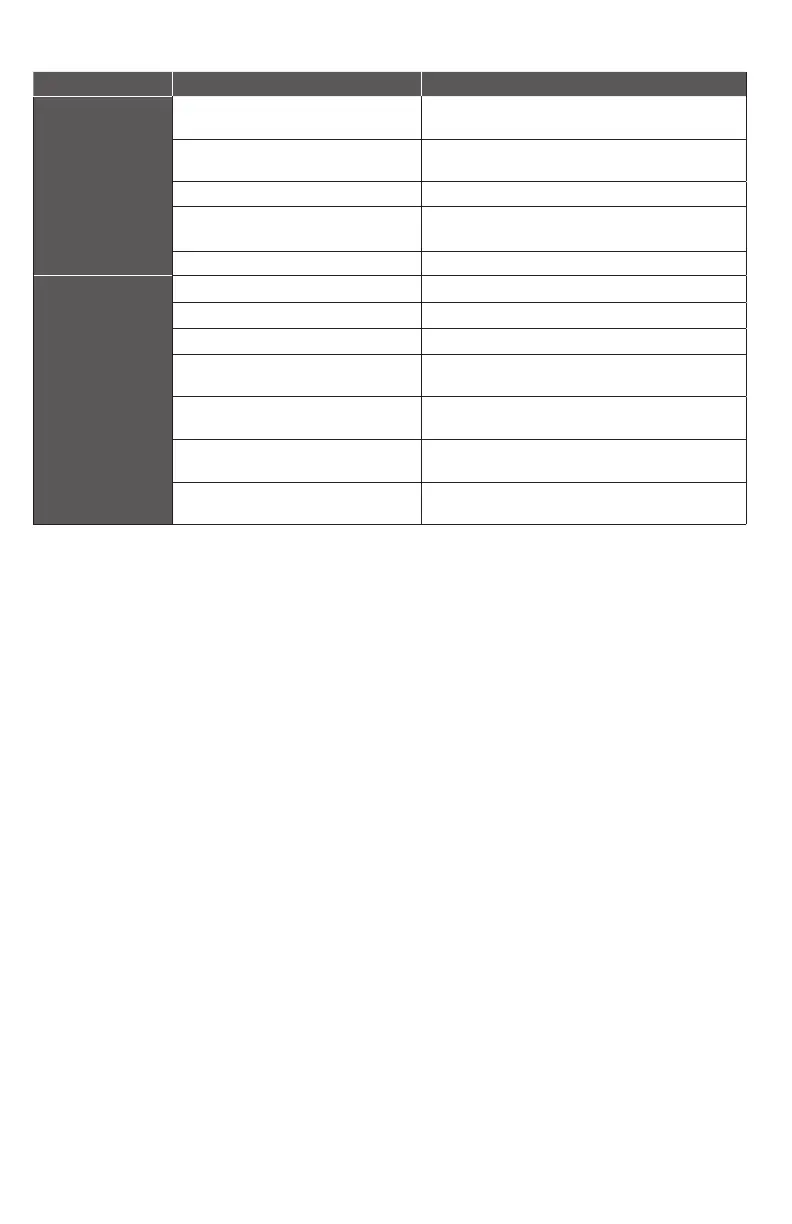
PROBLEM POSSIBLE CAUSES HOW TO CORRECT
The pump does not
start or run.
Pump is not plugged in; switch or breaker
is o.
Plug pump in or turn on switch/breaker.
Check for blown fuses or tripped circuit
breakers or tripped GFCI outlets.
Replace fuse; reset breaker; reset GFCI outlet.
Motor thermal protector tripped. Allow pump to cool. Pump will reset automatically.
Water level is not high enough
Wait until water level activates the switch or turn pump
upside down to activate, then place in the water.
Switch housing is clogged. Clean/remove clog.
Pump runs but
moves little or no
water.
Clogged intake screen. Clean or replace screen.
Clogged discharge hose/pipe. Remove clog.
Frozen discharge hose/pipe. Allow hose/pipe to thaw.
Low line voltage / Improper size extension
cord
Check supply voltage and/or wire size and increase if
necessary and/or reduce length
Worn, damaged or clogged pump parts.
Inspect for wear, damage or clog and clean or replace
if necessary.
Discharge head exceeds pump capacity or
hose length is too long
See performance chart for pump limitations.
Hose or pipe length is too long
Reduce hose length and/or increase diameter of the
hose/pipe to reduce friction loss.


 To Next Page