Need help?
Do you have a question about the Supermicro TPM Series and is the answer not in the manual?
Describes the purpose and target audience of the user's guide.
Outlines the structure and organization of the user's manual.
Explains the symbols and conventions used throughout the user's guide for clarity.
Provides the main contact address and details for Supermicro headquarters.
Lists contact information for Supermicro's European operations.
Details contact information for Supermicro's Asia-Pacific region.
Introduces the Trusted Platform Module (TPM), covering its purpose and available types.
Details the comprehensive features and specifications of Supermicro's TPM modules.
Lists the Supermicro motherboard models that are compatible with the TPM.
Explains Intel Trusted Execution Technology (TXT) and how it works with the TPM.
Provides important usage notes and disclaimers regarding the manual's graphics and content.
Step-by-step instructions for the physical installation of the TPM module onto the motherboard.
Guides on enabling TPM and TXT support through BIOS settings and Intel provisioning tools.
The Supermicro Trusted Platform Module (TPM) is a specialized add-on module designed to enhance data security for Supermicro X12/H12 dual and single processor motherboards that support CPU Socket 3674. This user's guide provides comprehensive information for system integrators, IT professionals, and knowledgeable end-users on how to configure, provision, and effectively utilize the TPM to protect highly sensitive applications. The TPM-9670 series modules adhere to the Trusted Computing Group (TCG) version 2.0 firmware, ensuring compliance with industry standards for trusted computing.
The primary function of the Supermicro TPM is to provide a secure environment for critical system operations and data. It acts as a hardware-based security solution, offering a robust foundation for trusted computing. The TPM module incorporates a microcontroller built with 0.22/0.09-µm CMOS technology, ensuring efficient and reliable operation. Its embedded software is compliant with TCG standards, further solidifying its security capabilities.
A key feature of the TPM is its EEPROM, which is utilized for TCG firmware enhancements and for supporting user data and cryptographic keys. This allows for secure storage and management of sensitive information. To bolster cryptographic operations, the TPM includes a hardware accelerator for SHA-1 and SHA-256 hash algorithms, enabling fast and secure data integrity checks. Furthermore, a True Random Number Generator (TRNG) is integrated to provide high-quality random numbers essential for strong cryptographic keys and protocols.
The TPM also incorporates a tick counter with tamper detection, which helps in identifying and preventing unauthorized attempts to interfere with the module's operation. Protection against dictionary attacks is another crucial security feature, safeguarding against brute-force attempts to guess passwords or keys.
For enhanced assurance, Infineon's TPM 2.0, used in these modules, is Common Criteria (CC) certified at Evaluation Assurance Level (EAL) 4 Moderate. This certification signifies that the module has undergone rigorous security evaluations and meets a high standard of trustworthiness. The TPM also offers general-purpose I/O capabilities, allowing for flexible integration within various system configurations.
A significant aspect of the TPM's functionality is its support for Intel® Trusted Execution Technology (TXT) and AMD® Secure Virtual Machine Architecture. Intel TXT is a software tool that, when used with the TPM, provides additional security for pre-launch firmware of clusters and clouds, including the BIOS, IPMI, SAS firmware, and CMM firmware. It works by matching hypervisor measures with encryption keys upon system launch. If a mismatch occurs, the hypervisor is prevented from starting, thereby protecting against malicious attacks on vulnerable areas. The TPM is essential for provisioning TXT, and it can be configured as either a server model or a client model to suit specific needs.
The TPM also supports full personalization with an Endorsement Key (EK) and an EK certificate. The EK is a unique cryptographic key embedded in the TPM during manufacturing, serving as a root of trust. The EK certificate provides assurance of the TPM's authenticity and integrity. To conserve power, the module features a power-saving sleep mode. It operates on a 3.3V power supply, making it compatible with standard motherboard power rails. The TPM also includes a WHQL dual-mode 1.1b + 1.2 TPM Windows Kernel Mode Driver, ensuring compatibility and proper functioning within Windows operating environments.
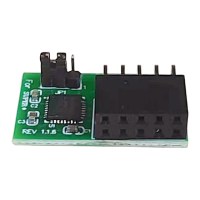
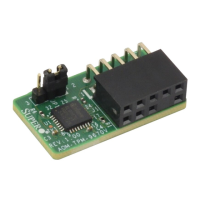
The Supermicro TPM modules come in two form factors: vertical (AOM-TPM-9670V) and horizontal (AOM-TPM-9670H). The choice between these depends on the physical space available within the chassis. Horizontal TPMs are typically used in 1U chassis, while vertical TPMs are designed for 2U or taller chassis, offering a smaller footprint to occupy less space on the motherboard. This flexibility in form factor allows for optimal integration into various server and client systems.
Installation of the TPM onto the motherboard involves locating the 9-pin male JTPM1 connector. Users are guided to orient and align the TPM with the connector using a key pin as a reference, ensuring correct placement and preventing damage to the pins. The orientation of the TPM (horizontal or vertical) is crucial and depends on the module's form factor, with vertical TPMs standing perpendicular and horizontal TPMs lying flat on the motherboard.
Enabling the TPM involves a two-step process: first, verifying the TPM through the BIOS, and then "locking" it in the firmware using Intel's provision utility. In the BIOS setup, users navigate to the "Advanced" tab, then to "CPU Configuration," and enable "Intel Virtualization Technology." Subsequently, they access the "Trusted Computing" option to configure TPM settings. By default, "SHA-1 PCR Bank" and "SHA-256 PCR Bank" are enabled. For TXT provisioning, users are instructed to disable "PH Randomization" and "TXT Support" in the BIOS initially, save changes, and then boot into the UEFI shell.
Within the UEFI shell, users identify their USB device and execute specific commands to provision Intel TXT. For AOM-TPM-9670V-S or AOM-TPM-9670H-S models, the Intel Provisioning tool is not required; users can directly enable the Intel TXT feature in the BIOS. After the provisioning process is complete, users return to the BIOS to enable "TXT Support." Finally, to fully enable TXT, a specific command is run in the UEFI shell, confirming that the system is now in the TXT Environment. This detailed process ensures that the TPM is correctly configured and ready to provide its security benefits.
The user's guide emphasizes the importance of staying updated with the latest information regarding the TPM. Users are advised to refer to the Supermicro website for the most current version of the manual and a complete list of supported motherboards. This ensures that users always have access to the most accurate and relevant information for their TPM modules.
The guide also highlights that TPM modules must be provisioned to use Intel Trusted Execution Technology (TXT). For specific details about the Intel tool and provisioning process, users are encouraged to contact Supermicro Technical Support. This direct line to support ensures that users can receive expert assistance for any complex configuration or troubleshooting needs.
In terms of environmental and safety considerations, the manual includes a California Best Management Practices Regulations for Perchlorate Materials warning. This warning specifically applies to products containing CR (Manganese Dioxide) Lithium coin cells, indicating that "Perchlorate Material-special handling may apply." Users are directed to www.dtsc.ca.gov/hazardouswaste/perchlorate for more information, promoting responsible handling and disposal.
Additionally, a general warning is provided regarding chemicals, including lead, that the product may expose users to, which are known to the State of California to cause cancer and birth defects or other reproductive harm. Users are directed to www.P65Warnings.ca.gov for further details. These warnings underscore Supermicro's commitment to user safety and environmental responsibility, providing users with the necessary information to maintain the device safely.
The manual itself is a key maintenance feature, providing clear, step-by-step instructions for installation and configuration. It includes notes and warnings to guide users through proper TPM configuration and to help avoid common errors. The graphics shown in the guide are based on the latest available information at the time of publishing, though it acknowledges that actual screens may vary slightly. This commitment to providing accurate and helpful documentation aids users in maintaining their TPM modules effectively.
Supermicro also maintains a comprehensive contact list for headquarters, Europe, and Asia-Pacific regions, including addresses, telephone numbers, fax numbers, and email addresses for general information, sales inquiries, technical support, and RMA support. This extensive support network ensures that users can easily reach out for assistance, whether for technical issues, product inquiries, or warranty services, thereby facilitating the long-term maintenance and usability of their TPM modules.
 General
| Form Factor | Discrete |
|---|---|
| Manufacturer | Supermicro |
| Series | TPM Series |
| Category | Control Unit |
| Compatibility | Supermicro Motherboards |
| Interface | LPC |

 To Next Page