34
Super X13DEG-OAD User's Manual
A
B
a
b
CPU Key
CPU Key
CPU Key
Latch
Latch
Latch
Latch
1
2
3
4
A
B
a
b
CPU Key
CPU Key
CPU Key
CPU Key
Latch
Latch
Latch
Latch
1
2
3
4
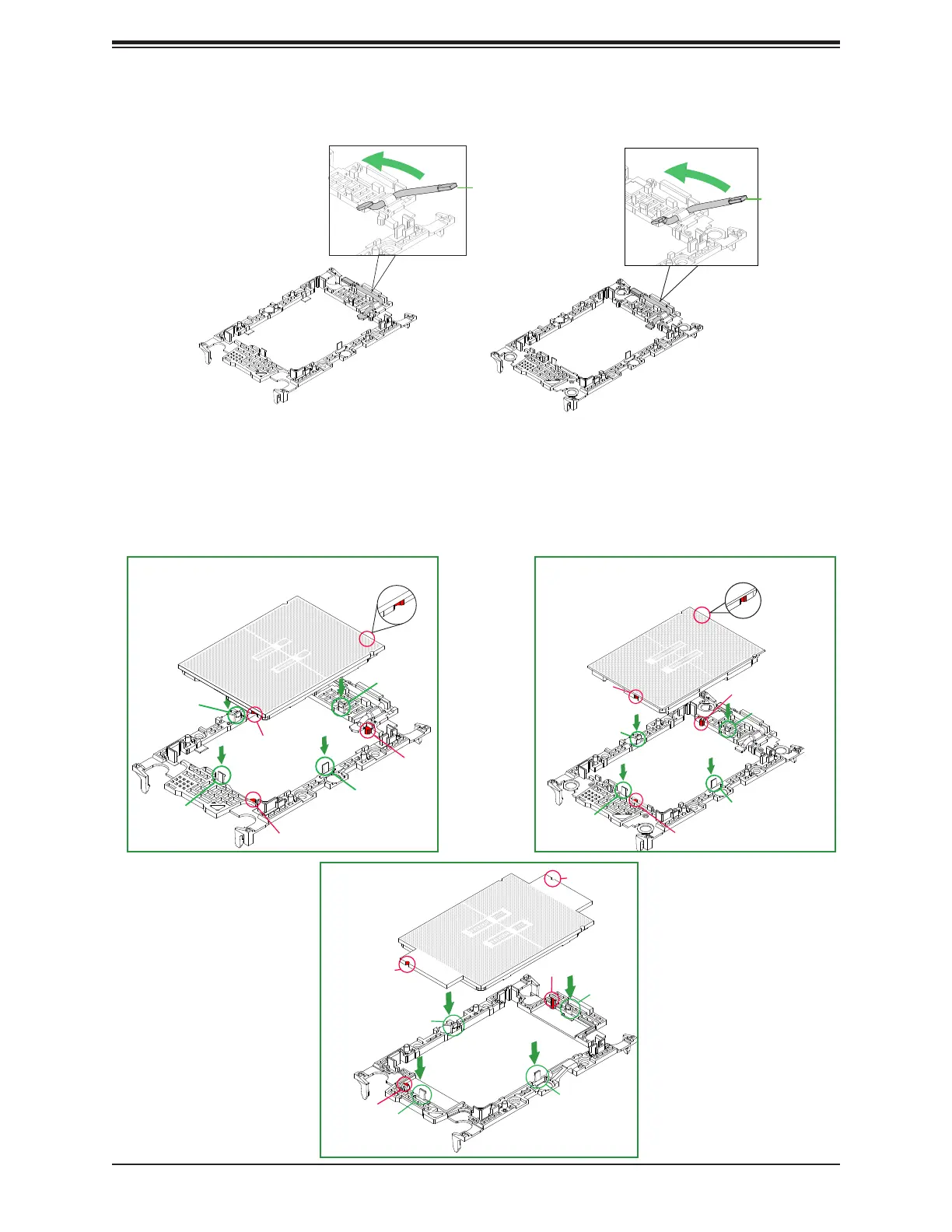
4. Using Pin 1 as a guide, carefully align the CPU keys (A and B) on the processor against
the CPU keys on the carrier (a and b) as shown in the drawing below.
5. Once they are properly aligned, carefully insert the CPU into the carrier, making sure
that the CPU is properly secured by latches 1, 2, 3, and 4.
3. Locate the lever on the CPU socket and press it down as shown below.
Lever
Carrier E1A
Carrier E1B
Lever
Latch
Latch
Latch
Latch
1
2
3
4
B
CPU Key
CPU Key
A
CPU Key
b
CPU Key
a
SP XCC
SP MCC
Max Series (HBM)






 To Next Page