Chapter 2: Confi guring BMC IPMI Settings
2-23
2.5.1 Console Redirection
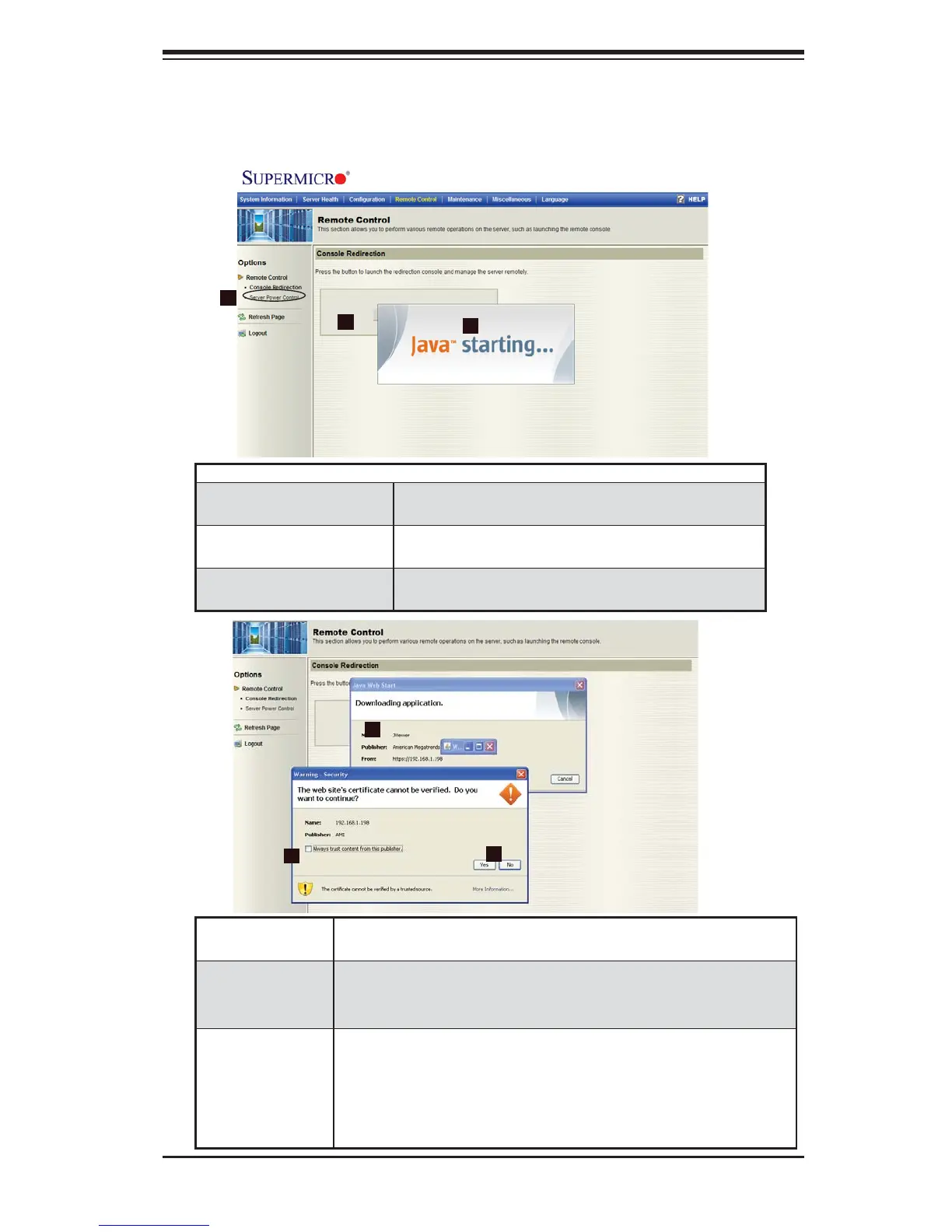
When you click on the Remote Control icon in the Options window (1) to activate
Remote Control settings, the following screen will display.
Remote Control - Console Redirection
1. Console Redirection Check this item to enable Console Redirection
and manage the server from a remote site.
2. OK Click on this button to launch Console Redirection
via the Java script.
3. Java Starting Upon launching Console Redirection, a screen
will be displayed, indicating that Java is starting.
2
1
3
4
6
4. Downloading
Application
When Java is activated, a screen will display, showing that
the application is downloading.
5. Always trust
content from
this publisher
Click on this button to always allow the applications from this
publisher to be downloaded.
6. Do you want
to continue--
Yes/No?
A warning message appears, indicating that the website's
certifi cate cannot be verifi ed. Select Yes to continue. Click No
to cancel the procedure. When the next message appears,
indicating that the application's digital signature cannot be
verifi ed, press <Run> to enable Console Redirection.
5



 To Next Page