4
ENGLISH
Connecting Speakers
• The impedance of the connected Speaker System
must be 8 ohms or more. If the connected speaker
has an impedance of less than 8 ohms, audio may
be distorted or the protection circuit may trigger to
prevent damage to the system.
• Always match polarity when connecting the amplifier
to the speaker system (Plus ( ): Red and Minus ( ):
Black).
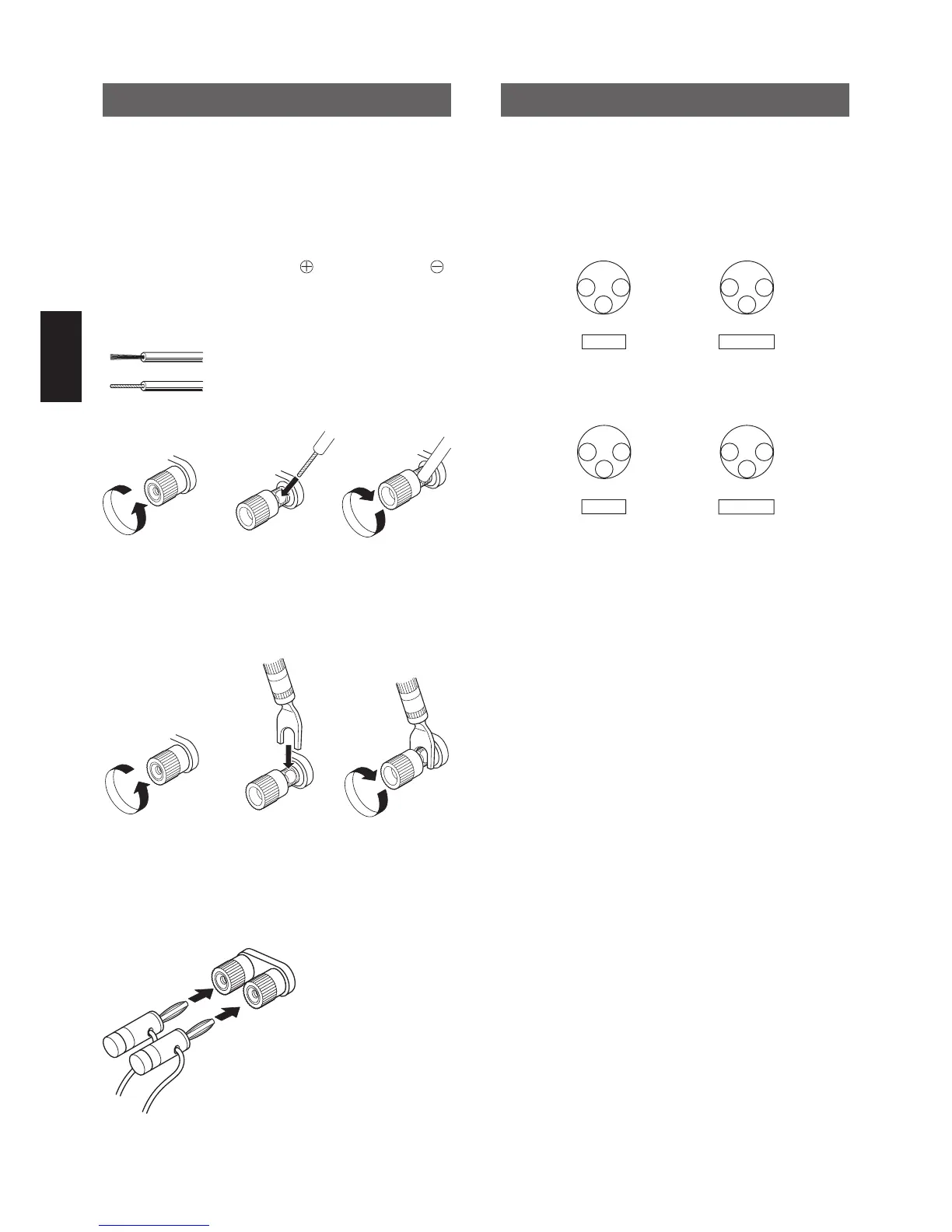
Connection for Speaker Cable
Loosen by turning
counterclockwise
Insert the core wire Tighten by turning
clockwise
Speaker cable
Peel off the sleeve of the cable end.
Twist the core wire.
Connection for Y Lug Terminal
Loosen by turning
counterclockwise
Insert the Y Lug
Terminal
Tighten by turning
clockwise
Y Lug Terminal
Connection for Banana Plug
Insert the Banana Plug
Balanced Input/Output
The XLR Connector is used for Balanced Input/Output.
There are two types of connection, “European Type”
and “USA Type”.
1. European Type (connector for this equipment)
(pin 2 = HOT, pin 3 = COLD)
This equipment adopts the European Type of XLR
connector. If the connecting equipment has the “USA
Type” of XLR then the audio signal becomes reverse
phase. In this case, swap pin 2 and pin 3 of XLR
connector (INPUT or OUTPUT) to work the same as the
European Type.



 To Next Page