2
ENGLISH
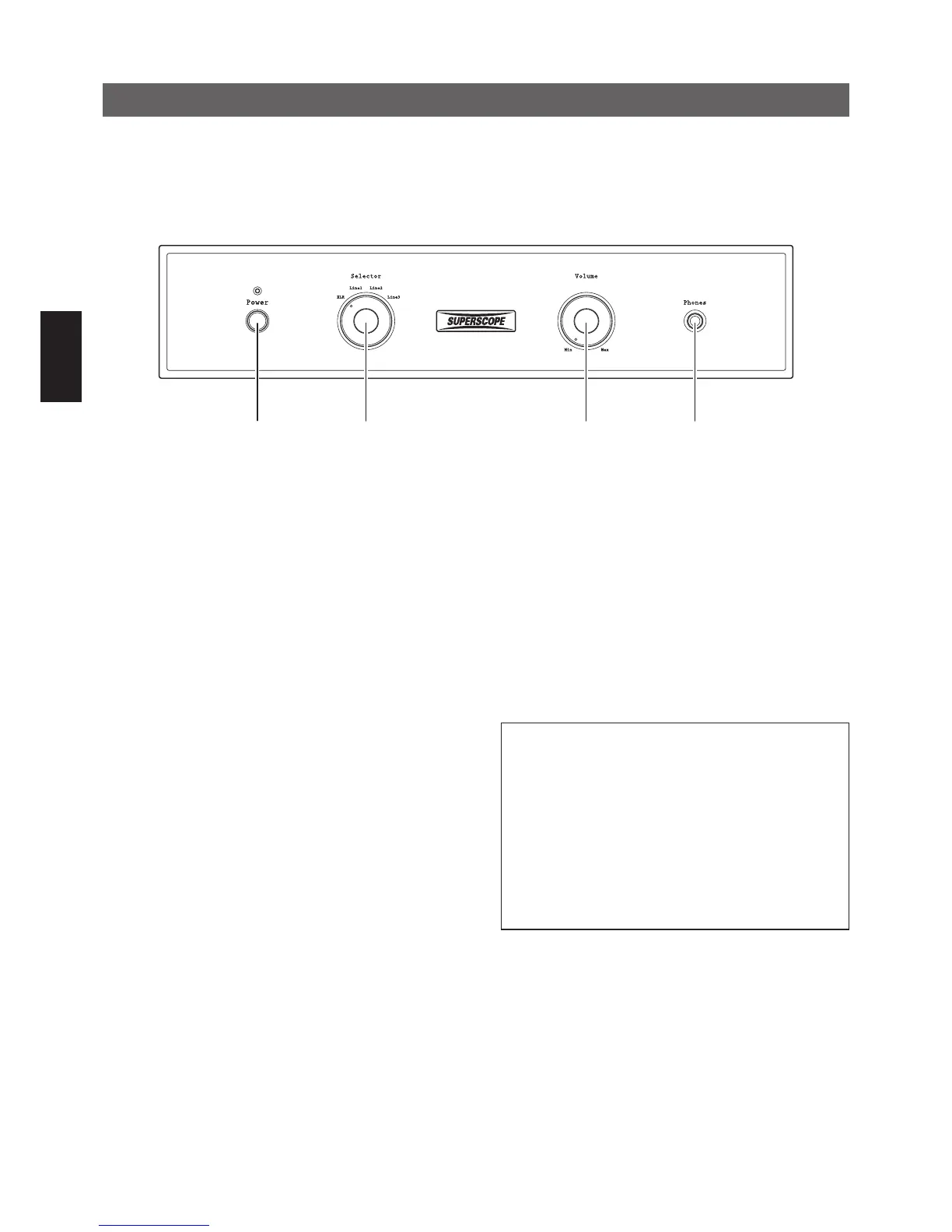
①
Power Switch (Power)
Press the “Power” switch to turn the a210 on, and press
again to turn off. The sound will not be output for four
seconds after the a210 is turned on.
②
Input Selector Switch (Selector)
Select input source (INPUT) that is connected at the
back of the a210.
③
Volume Knob (Volume)
Adjust the audio volume. Audio level will increase by
turning the Volume clockwise.
④
Headphone Output (Phones)
Insert headphones here. Sound will not be output to
the speakers when headphones are inserted. Adjust
headphone volume by turning the volume knob.
Note:
In the interest of sound quality, the headphone
output circuit has been designed without the use
of a series resistor. Therefore, the right and left
channels may be shorted when the headphone plug
is inserted halfway, resulting in sound dropouts.
When using headphones, make sure the head-
phone plug is inserted completely. Audio volume
should be minimized when the headphone plug is
inserted or removed.
Front Panel Functions



 To Next Page