Need help?
Do you have a question about the suprema BioStar and is the answer not in the manual?
Defines the distributed intelligence system architecture and network connectivity options for BioStar.
Details the advanced biometric identification and access card capabilities offered by the BioStar system.
Lists the minimum and recommended operating systems and hardware for installing BioStar.
Guides users through the simplified installation process for BioStar server and client applications.
Provides steps for installing the BioStar server application, including database configuration options.
Outlines the procedure for installing the BioStar client application on user workstations.
Explains how to use the BADB Conv tool to migrate existing BioAdmin databases to the new BioStar system.
Covers creating administrator and operator accounts with different privilege levels for system management.
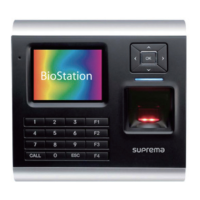
Details how to search for, add, and configure BioStation and BioEntry Plus devices within the BioStar system.
Step-by-step guide to using the device wizard to discover and add devices to BioStar.
Explains configuration options for BioStation devices across various tabs like Operation Mode and Fingerprint.
Details configuration settings for BioEntry Plus devices, including operation modes and card management.
Describes how to configure Wiegand input/output formats for device communication.
Guides on adding, associating devices, and configuring doors within the BioStar access control system.
Procedure for adding a new door entity in the BioStar system.
Details the various settings available for configuring individual doors, including alarm and access control.
Explains how to set up and configure different types of zones (Access, Anti-passback, Alarm, etc.) for advanced access control.
Steps for adding new zones and configuring their details, alarms, and associated devices.
Comprehensive guide on creating user accounts, registering fingerprints, and issuing access cards.
Process for creating new user profiles, including personal details and access levels.
Instructions on capturing and registering fingerprint templates for user authentication.
Covers issuing various types of access cards (EM4100, HID, MIFARE) to users.
Explains how to create and manage access groups to define user permissions for doors and timezones.
Procedure for creating a new access group by selecting doors and timezones.
Details how to configure system alarms, sounds, and notifications for events.
Guide to customizing alarm priority levels, actions, and sounds for event responses.
How to view live event monitoring data from connected devices in the BioStar interface.
Covers accessing, uploading, and filtering event logs for users, doors, and zones.
Procedure for manually uploading log data from devices not connected to the server.
Method for viewing pre-defined event logs through specific panes in the BioStar interface.
Instructions for remotely opening/closing doors, releasing alarms, and managing device locking.
How to lock or unlock connected devices to manage access and communication.
Covers user data management tasks like deleting, transferring, exporting, and importing user information.
Steps for removing user accounts from the BioStar system.
Guide on importing user data from CSV files into BioStar.
Procedures for removing devices and upgrading their firmware through the BioStar interface.
Steps to update device firmware to the latest version for improved functionality.
Overviews device-specific settings for BioStation and BioEntry Plus, enabling precise control.
Customization options for BioStation devices, including operation modes, fingerprint, and network settings.
Configures device time and various authentication modes based on schedules.
Allows customization of fingerprint security, quality, sensitivity, and matching parameters.
Settings for device network connectivity, including TCP/IP, RS485, and server configurations.
Customization options for BioEntry Plus devices, covering operation modes, fingerprint, and network settings.
Configures BioEntry Plus device time and authentication modes, including double verification.
Customizes fingerprint security levels, scan timeouts, and matching for BioEntry Plus.
Settings for BioEntry Plus network connections, including TCP/IP, RS485, and server settings.
Options for customizing door behavior, including unlock times, lock times, and alarm actions.
Configures door-specific settings like inside/outside devices, unlock/lock times, and IO device selection.
Allows customization of zone functions, including anti-passback, entrance limits, and alarm zones.
Settings for anti-passback zones, including APB type and reset time.
Configuration for entrance limit zones, specifying limits and time periods.
Settings for alarm zones, including delay times and arm/disarm types.
Customizes user-specific settings, including personal details, fingerprint, and access card information.
Manages user's personal details, ID, start/expiry dates, title, and contact information.
Configures fingerprint scanner selection, security levels, and duress fingerprint settings.
 General
| Category | Security System |
|---|---|
| Power | 12VDC |
| Manufacturer | Suprema |
| Model | BioStar |
| Biometric Technology | Fingerprint Recognition |
| Memory | 8MB RAM + 16MB Flash |
| RF Card Options | 125kHz EM, 13.56MHz Mifare/DesFire |
| Interface | TCP/IP, RS485 |
| Device Type | Terminal |
| Memory Capacity | 8MB RAM + 16MB Flash |
| Compatibility | BioStar Software |
| Fingerprint Sensor | Yes |
| Supported Languages | Multiple languages |

 To Next Page