Need help?
Do you have a question about the suprema Secure I/O and is the answer not in the manual?
Lists the items included with the Secure I/O device.
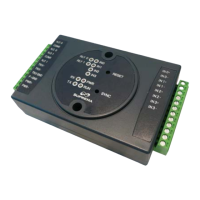
Details the LEDs and buttons on the front of the Secure I/O.
Explains the dip switch settings for Secure I/O identification.
Describes the various connectors for external devices on the Secure I/O.
Details the input connectors on the Secure I/O device.
Provides the physical dimensions and mounting details of the Secure I/O.
Illustrates a typical installation scenario for the Secure I/O.
Guides on how to properly connect the power supply to the Secure I/O.
Explains the procedure for establishing an RS-485 communication link.
Details the wiring for a fail-secure relay lock configuration.
Details the wiring for a fail-safe relay lock configuration.
Describes how to connect a Request-to-Exit (RTE) switch.
Explains how to integrate the Secure I/O with a fire alarm system.
 General
| Brand | suprema |
|---|---|
| Model | Secure I/O |
| Category | Security System |
| Language | English |

 To Next Page