Need help?
Do you have a question about the suprema Xpass and is the answer not in the manual?
Avoid direct sunlight, heat, magnets, liquids, and ensure proper device handling.
Do not drop, disassemble, damage, or misuse. Supervise children during operation.
Lists essential components and available optional accessories for the device.
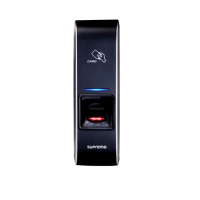
Describes the LED status, reset button, card touch area, and fixing screw.
Provides detailed measurements (mm) for the Xpass reader and its bracket.
Details CPU, memory, interfaces, capacity, power, electrical parameters, and certifications.
Explains pin assignments and wiring for LAN, RS485, Power, Relay, and Wiegand.
Covers bracket mounting, installation diagrams, and system configuration references.
 General
| Built-in display | No |
|---|---|
| Type | Basic access control reader |
| Log capacity | 50000 |
| Certification | CE, FCC, KCC |
| Product color | Black, Grey |
| Authentication type | Access chip/card |
| Access chip/card reader | Yes |
| International Protection (IP) code | IP65 |
| RS-485 ports | 1 |
| PC connection | RS-485 |
| Supported network protocols | TCP/IP |
| Processor frequency | 400 MHz |
| Sustainability certificates | RoHS |
| Operating temperature (T-T) | -20 - 50 °C |
| DC voltage range | 12 - 12 V |
 Weight and Dimensions
| Depth | 27 mm |
|---|---|
| Width | 45 mm |
| Height | 130 mm |

 To Next Page