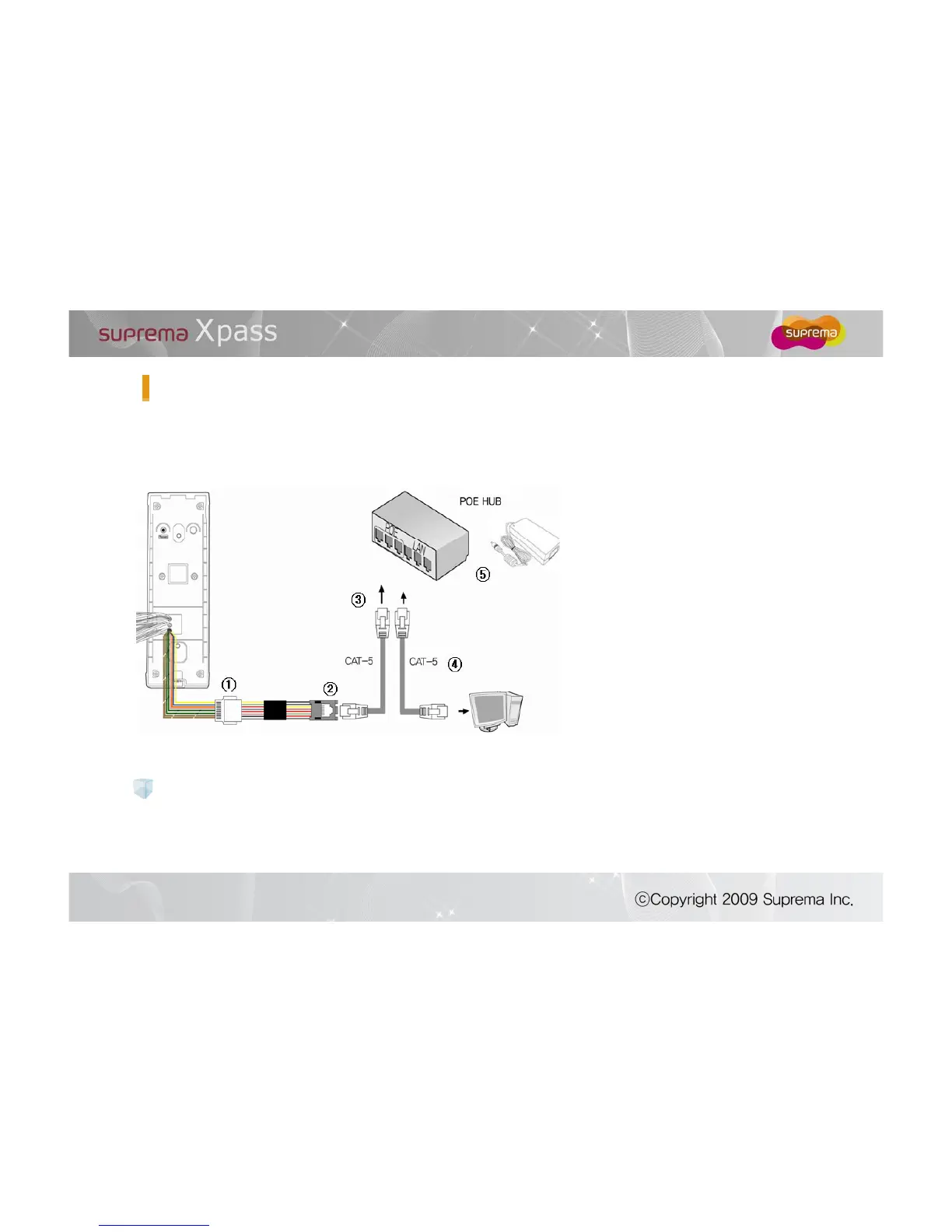
Please read below carefully before you install this product. This is essential steps for stable operation. Please
make sure to turn on the power of PSE only after connect all cables related to PoE
① Connect 8port Ethernet connect of
Xpass body to Ethernet expansion
cable in right direction
② Connect RJ45 modular from
Ethernet expansion cable to Ethernet
cable with CAT-5
Connect the opposite side of
Ethernet cable to PoE HUB port
④ Connect cable from PC to port from
PoE HUB and connect the opposite
side of cable to Ethernet port of PC
⑤ Connect power of PoE HUB
Please use the distance of LAN cable within 100m in case of PoE power.
Recommended Power Supply
PoE
: Use PSE(Power sourcing Equipment) that complies with IEEE802.3af standard only.


 To Next Page