HOW TO REMOVE
AND ASSEMBLE
THE BLADES?
To remove the blades, please follow the steps:
1. Please make sure the trimmer is unplugged
and off.
the screws after aligning the blades.
By following the above steps, you can ensure
that your clippers will cut hair smoothly and
safely.
If you still have troubles, please contact
SUPRENT SUPPORT Team for a detailed
instruction video via support@suprent.com
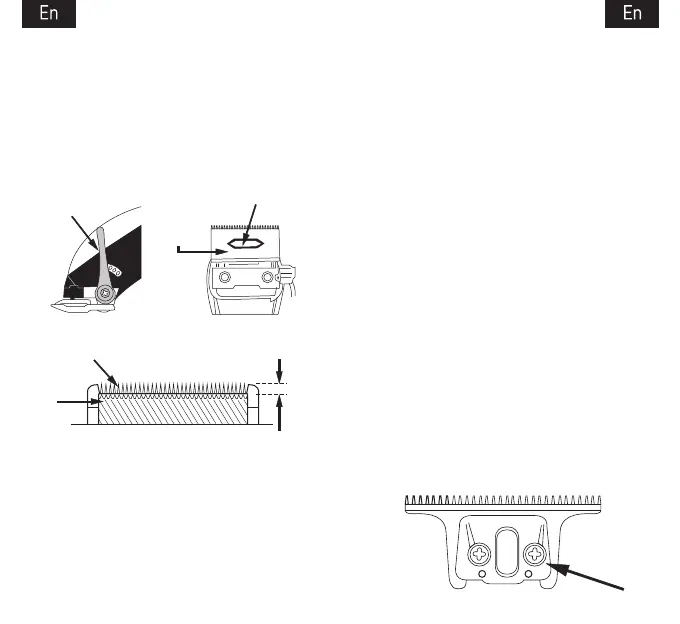
Plastic Oscillator
Taper
A. B.
Small
Moving
Blade
Fixed Blade 1/32" to 1/16"
Fixed
Blade
C.
2. Turn the trimmer upside down so the teeth of
the trimmer face down.
3. Place the trimmer on a flat surface and use a
screwdriver to loosen the screws;
4. Use another hand to hold it to avoid blades
falling;
To reassemble or replace a trimming blade,
follow the steps in reverse:
1. Align the blade pad shaft with the moving
blade pad (Picture 2) till the blades secure in
place;
2. Please make sure the moving blade edge
does not exceed the range of the fixed blade;
3. Align the screw hole of the fixed blade
parallel to the upper screw hole of the trimmer
and then insert two screws into the blade head
and tighten them with a screwdriver.
4. Hold down the blade head while tightening
the screws to ensure that the head does not fall
off.
If you still have troubles, please contact
SUPRENT SUPPORT Team for a detailed
instruction video via support@suprent.com
2.
7 8



 To Next Page