Press【Flag/Wrap】 , Select《Flag》
then you can set《Length》 、
《Diameter》、《Type》.
Press【Enter】Enter the settings
interface.
After select《Length》press【1-0】
number keys set the length of the
flag label.
Press【】select《Diameter》 ,
press【1-0】the number key sets
the diameter of the cable wrapped
by the flag label.
Press【】select《Type》Press【 】
【 】select label type.
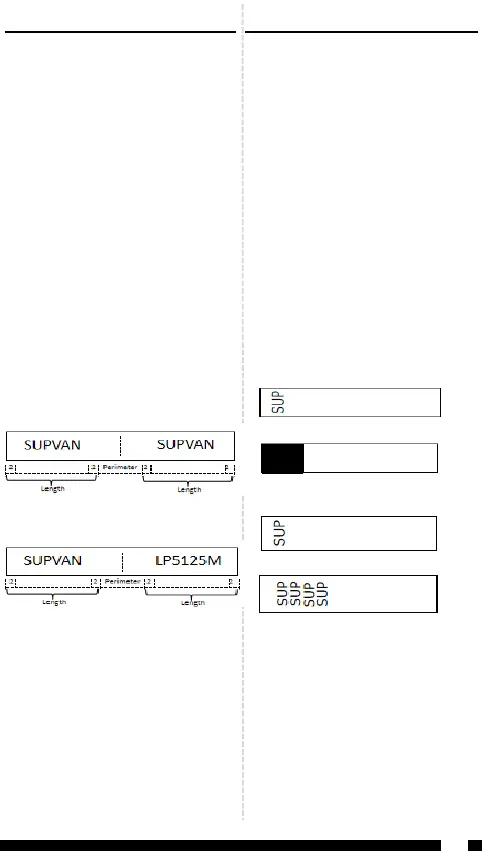
Type 1:《AA:AA 》
Type 2:《AA:BB》
Note:
Press【Add】can create multiple
flag labels.
The edited flag label can be
changed by press the [flag/wrap]
key.
Flag label is not allowed to addbarcodes.
《 Length 》 value range : 10mm-
200mm.
《Diameter》value range: 2mm-
90mm.
8
Flag label
2.
You can make a flag label and paste it
direc t ly o nt o the ca b l e . It is
recommen ded to use a strong
adhesive and non-liminated label
tape.
Note:
Chain printing mode is invalid when
flag label.
Press【Flag/Wrap】 , Select《Wrap》
then you can set《Diameter》 、
《Inverse》、《Repeat》.
Press【Enter】Enter the settings
interface.
Select《Diameter》press【1-0】
the number key sets the diameter
of the cable wrapped by the wrap
label。
Press【】set《Inverse》.
Inverse--- Off
Inverse-- On
Press【】set《Repeat》
Repeat--- Off
Repeat-- On
Wrap label
Note:
Diameter value range:3—90mm.
How much of the input character
in the wrap label is related to the
width of the label tape.
Press【Add】can create multiple
wrap labels.
The edited wrap label can be
changed by press the [flag/wrap]
key.
Wrap labels are not allowed to specify
label length .
Wrap labels are not allowed to set
horizontal andVertical.
Wrap label are not allowed to add
barcodes.
3.
You can make a flag label and paste it
directly onto the cable。The text is
printed on the label in a rotated
way.It is recommended to use wrap
label tape.
Note:
Chain printing mode is invalid when
wrap label.
SUP


 To Next Page
 Loading...

