EasyManua.ls Logo

Surecom SS-10 - User Manual

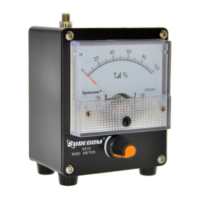
Surecom SS-10
2 pages
Print Icon
To Next Page IconTo Next Page
Loading...
Key Specifications:
Test suitable antenna for walkie-talkie use
Frequency bandwidth, high sensitivity. 100KHz-3000MHz
Measurement Radio Field Strength
The pointer amplitude can be adjusted (to protect the meter)
SS-10
100KHz -3GHz
75 x 100 x 64mm
SMA Female
240g (not include antenna)
Model No.
Frequency Range:
Size without Socket :
Antenna (in ) Interface:
Net Weight :
Specifications:
INTRODUCTION:
The SS-10 Field Strength Meter is ideal for reading relative
field strength from your antenna.
It is a compact unit that fits in the palm of your hand and can be
taken anywhere.
The best part of using it is that you now can tell if your
antenna is radiating or not by simply holding the unit near
your antenna and adjusting the sensitivity. Also, by taking
measurements, you can find out relatively how strong your
antenna field is. Operation The SS-10 Field Strength Meter is
very simple to use. It requires no power because your
antenna field provides the power necessary to run the meter.
Simply raise the single whip antenna on your unit, stand several
feet away, and adjust the sensitivity knob on the front, it’s that
easy.
You want to ensure that the whip antenna is parallel with the
polarity of the antenna you are reading.
Now you can read the relative field strength of your antenna.
Technical Assistance If you have any problem with this unit first
check the appropriate section of this manual. If the manual does
not reference your problem or your problem is not solved by
reading the manual you may call SURECOM Technical Service
at +852-54457217. You will be best helped if you have your unit,
manual and all information on your station handy so you can
answer any questions the technicians may ask. You can also
send questions by E-mail to SURECOM.COM.HK
Features:
The appearance is simple and efficient, beautiful and generous.
Frequency bandwidth, high sensitivity. 100KHz-3000MHz (with antenna
), please use different frequency antennas to test signals with different
frequencies for better effect and sensitivity)
The pointer amplitude can be adjusted (to protect the meter)
Built-in automatic damping function, which is the buffer function,
prevents the needle from swinging too fast and causing damage.
Small size, easy to carry, size: 75 x 100 x 64mm (excluding the raised
antenna part)
Instructions for use:
Before use, please rotate the "amplitude adjustment" to the left most
end. The length of the antenna to be pulled depends on the
frequency of the test. It is better to have 1/4 wave as much as
possible. The handheld walkie-talkie is about one meter away from
the field strength meter. Don't be too close! In order to avoid the
signal is too strong to burn the field strength meter! Then press the
walkie-talkie PTT button to make the walkie-talkie enter the launch
state. At this time, the pointer of the field strength meter should
have a signal indication. The stronger the signal, the greater the
indication!
Amplitude adjustment: If the field strength indicator indicates that
the maximum range is exceeded, the "amplitude adjustment" can be
adjusted to let the pointer indicate the appropriate position.
Method for testing the maximum gain point of an antenna
1. In order to change the frequency conveniently and quickly, you
should use the keyboard to set the frequency walkie-talkie manually.
2. Link the walkie-talkie and antenna feeders, place the field
strength meter near the antenna (depending on the environment),
place it within the vertical radiation angle of the antenna as much as
possible, and the antenna planning method is best.
3. Set the frequency of the walkie-talkie, press the launch button,
observe the meter reading, and register the meter reading. Then set
the walkie-talkie to other frequency points, let the walkie-talkie enter
the launch state again, observe the meter reading and then
compare the readings of each frequency point! You can know the
best frequency/segment of the antenna under test!
A typical field-strength meter is shown in Figure 1. This is a simple
passive (unpowered) circuit in which radio frequency energy is
intercepted by the antenna, rectified to DC, and then used to directly
drive the meter. The maximum sensitivity of this circuit is based
primarily on several factors:
The gain of the antenna: How much of the signal is actually
intercepted.
The sensitivity of the meter movement being used.
The nature of the diodes being used.
1x SMA MALE Telescopic Antenna
1x English Instructions
1x SS-10 Field Strength Meter
Package include
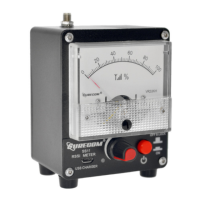
SS-10 100KHz-3GHz Field Strength Meter
Question and Answer IconNeed help?

Do you have a question about the Surecom SS-10 and is the answer not in the manual?

Summary

Introduction to SS-10 Field Strength Meter

Antenna Field Strength Measurement

Explains the SS-10's ability to read relative field strength from antennas.

SS-10 Specifications and Features

Key Specifications

Details frequency range, model, size, interface, and weight of the meter.

Product Features

Highlights appearance, bandwidth, sensitivity, damping, and portability.

Operating the SS-10 Meter

Basic Usage Instructions

Guides initial setup, antenna positioning, and sensitivity adjustment.

Amplitude Adjustment

Explains how to adjust the field strength indicator for maximum range.

Antenna Gain Testing Method

Details method to test maximum gain points of an antenna by frequency.

Technical Details and Diagrams

Package Contents

Lists items included in the SS-10 Field Strength Meter package.

SS10 Block Diagram

Presents the schematic diagram of the SS-10 Field Strength Meter.

SS10 Sensitive Cure Graph

Overview

The SURECOM SS-10 is a compact, passive field strength meter designed for measuring relative radio field strength from antennas. It operates without external power, drawing energy directly from the antenna's field.

Function Description

The primary function of the SS-10 is to provide a visual indication of the relative field strength of an antenna. By holding the unit near an antenna and adjusting its sensitivity, users can determine if their antenna is radiating and assess the relative strength of the antenna's field. This allows for quick checks of antenna functionality and performance. The device is particularly useful for testing walkie-talkie antennas and identifying the maximum gain point of an antenna across different frequencies.

Important Technical Specifications

  • Model Number: SS-10
  • Frequency Range: 100KHz - 3GHz
  • Measurement Type: Radio Field Strength
  • Sensitivity: High sensitivity across the specified frequency range.
  • Pointer Amplitude Adjustment: Features an adjustable knob to protect the meter from strong signals and set the pointer to an appropriate position.
  • Damping Function: Includes a built-in automatic damping function to prevent the needle from swinging too rapidly and causing damage.
  • Antenna Interface: SMA Female
  • Size (without socket): 75 x 100 x 64mm
  • Net Weight (without antenna): 240g
  • Power Source: Passive (no external power required; powered by the antenna's field).

The device's block diagram illustrates a simple passive circuit: radio frequency energy is intercepted by an antenna, rectified to DC by diodes (D1, D2), and then used to directly drive the meter (M1). Capacitors (C1, C2, C3) and a variable resistor (VR1) are also part of this circuit. The maximum sensitivity of this circuit depends on the antenna's gain, the sensitivity of the meter movement, and the characteristics of the diodes used.

A sensitivity test table provides guidance on expected distances for various transmitter power levels:

  • 0.1W: 0.1-1 meter
  • 2-8W: 1-3 meters
  • 10W: 2-5 meters
  • 50W: 3-10 meters

A graph titled "SS10 Sensitive Cure" shows dBm values across a frequency range from 0 to 3500 MHz, indicating the device's sensitivity profile. For instance, at 500 MHz, the reading is approximately 5.03 dBm, while at 3000 MHz, it reaches 17.57 dBm.

Usage Features

  1. Ease of Use: The SS-10 is designed for simplicity. It requires no power source, as it operates by drawing energy from the antenna's field. Users simply raise the single whip antenna, stand a few feet away from the transmitting antenna, and adjust the sensitivity knob on the front.
  2. Compact and Portable: Its small size (75 x 100 x 64mm) allows it to fit in the palm of a hand, making it easy to carry and use anywhere.
  3. Antenna Polarity: For accurate readings, it is crucial to ensure that the whip antenna on the SS-10 is parallel with the polarity of the antenna being tested.
  4. Pre-use Adjustment: Before use, the "amplitude adjustment" knob should be rotated to its leftmost end. The length of the SS-10's antenna should be adjusted based on the test frequency, ideally to 1/4 wavelength.
  5. Safe Operation: When testing, the handheld walkie-talkie should be kept about one meter away from the field strength meter to prevent strong signals from damaging the meter.
  6. Signal Indication: Once the walkie-talkie's PTT button is pressed to initiate transmission, the SS-10's pointer will indicate the signal strength. A stronger signal results in a greater indication.
  7. Amplitude Adjustment for Over-range: If the pointer exceeds the maximum range, the "amplitude adjustment" knob can be used to bring the pointer back to an appropriate position.
  8. Antenna Gain Point Testing: To find the maximum gain point of an antenna:
    • Manually set the walkie-talkie frequency for convenient changes.
    • Connect the walkie-talkie and antenna feeders.
    • Place the field strength meter near the antenna, ideally within its vertical radiation angle.
    • Set the walkie-talkie to a specific frequency, transmit, observe, and record the meter reading.
    • Repeat this process for other frequencies, then compare the readings to identify the best frequency/segment for the antenna under test.

Maintenance Features

  • Technical Assistance: In case of problems, users are advised to first consult the manual. If the issue persists, SURECOM Technical Service can be contacted at +852-54457217. Users should have their unit, manual, and station information ready. Questions can also be sent via email to SURECOM.COM.HK.
  • Built-in Protection: The automatic damping function prevents rapid needle swings, reducing the risk of damage to the meter. The adjustable pointer amplitude also serves as a protective measure against excessively strong signals.
  • Passive Design: As a passive device, it has fewer components susceptible to failure from power-related issues, contributing to its robustness and potentially longer lifespan.

Surecom SS-10 Specifications

General IconGeneral
BrandSurecom
ModelSS-10
CategoryMeasuring Instruments
LanguageEnglish

Related product manuals