XLINK 500/100 Operations & Maintenance Manual page # 83
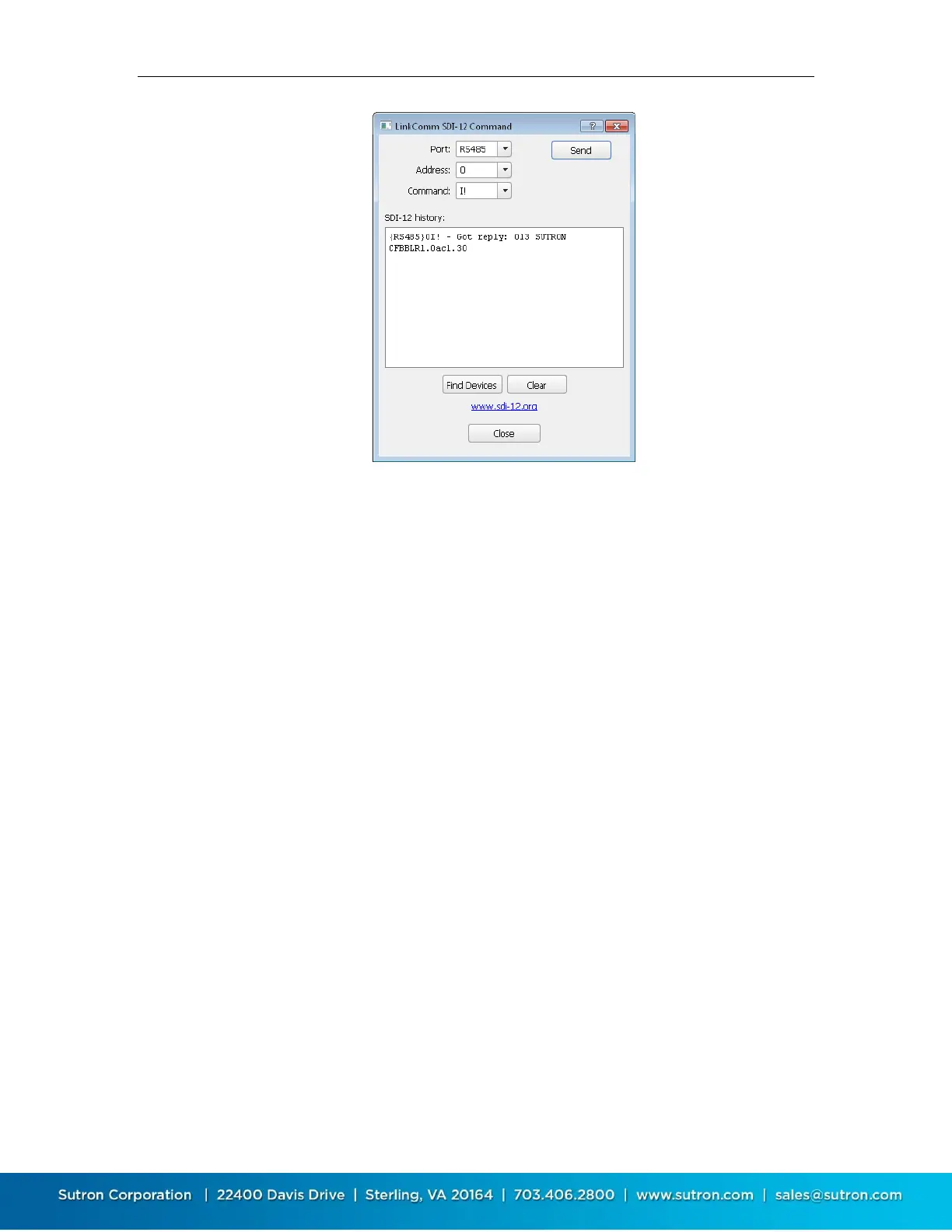
To send a command to an SDI-12 device, enter the Address and Command fields, and then press
the Send button. Be sure to select the proper port. The results of the command are shown in the
SDI-12 history window.
To have the station look for any and all sensors on the SDI-12 bus, press the Find Devices button.
Information regarding what sensors are found is displayed in the SDI-12 history window.
Press the Clear button to clear the SDI-12 history window.
9.3.4. Measure Type: Analog
Analog measurements involve reading a voltage or current provided by a sensor. Analog sensors
come with instructions that provide information on how to translate the output voltage into
desired units. Translating the analog sensor output into environmental units can be done via
slope and offset for simple sensors, and via equations for non-linear sensors.
Analog measurements are available on select models.
Analog Type
This setting directs the input channel to which the sensor should be connected and the type of
analog measurement to make. These options are available
0-5V A
0-5V B
Diff C
Diff D
4-20 mA
0-5V A and 0-5V B
Connection A: Terminal #32 analog ground and terminal #31 0-5V signal
Connection B: Terminal #30 analog ground and terminal #29 0-5V signal


 To Next Page