Need help?
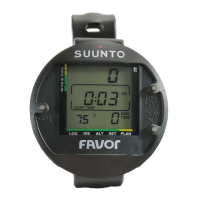
Do you have a question about the Suunto Favor and is the answer not in the manual?
Overview of the dive computer's essential functions and capabilities.
Importance of using auxiliary dive instruments for safety.
Details the three water contacts used for operating the dive computer.
Explains the procedure for activating the dive computer and performing prechecks.
Instructions on how to control the dive computer using its water contacts.
Guide to activating the backlight on specific LUX/LUX S models.
Steps to take before diving, including activation and prechecks.
Information on displaying basic dive data, bar graphs, and indicators.
Details surface interval calculations and post-dive information display.
How to adjust settings for personal preference and high altitude diving.
Explains warning indicators and error modes of the dive computer.
Accessing and understanding data from the dive computer's logbook.
Viewing historical dive data such as max depth and total dives.
Guide to setting personal and altitude adjustments for the computer.
Instructions for setting the current time and date on the dive computer.
Procedures for cleaning and maintaining the dive computer.
How to inspect the battery compartment for leaks and proper function.
Explanation of the dive computer's core functionality and mathematical models.
Detailed specifications including dimensions, depth gauge, and display features.
 General
| Model | Suunto Favor |
|---|---|
| Category | Diving Instrument |
| Type | Dive Computer |
| Maximum Depth | 45 m |
| Display Type | LCD |
| Display | LCD |


 To Next Page