Need help?
Do you have a question about the Suunto zoop novo and is the answer not in the manual?
Defines different types of safety alerts: WARNING, CAUTION, NOTE, TIP.
Advice on understanding the manual before diving.
Covers warnings on trained divers, reading guides, DCS, pacemakers.
Continues safety warnings on pacemakers, skin reactions, backup instruments, and buddy diving.
Emphasizes pre-checks, regular checks, no sharing, and oxygen mix safety.
Warnings on gas verification, dive software use, and USB cable safety.
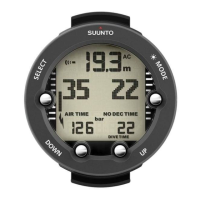
Explains the Suunto Zoop Novo's four main modes and view scrolling.
Explains the icons used by the Suunto Zoop Novo.
Guide to initial setup and configuration of the Suunto Zoop Novo.
Explains automatic dive mode activation and pre-dive checks.
Explains battery voltage factors and low battery warnings.
Details audible and visual alarms for important limits and warnings.
Explains instructional beeps and high priority alarms like PO2 and ceiling breaches.
Details low priority alarms for dive stops and depth.
Continues low priority alarms for safety stops, deepstops, OLF%, and depth.
Details alarms for dive time, depth, and visual indicators.
Guide to using and adjusting the apnea timer for freediving.
How to adjust ventilation, increment times, and repeats.
Step-by-step guide for operating the apnea timer.
Warns about shallow-water blackout risk in breath-hold diving.
Explains the ascent rate display and its importance.
Instructions for backlight and how to add/view dive log bookmarks.
Guide to setting time, date, units, dual time, and alarms.
Guide to setting time, date, and measurement units.
How to set dual time and configure the daily alarm.
How to adjust or switch off the depth alarm.
How to adjust the display contrast.
Explains access and content of dive history and logbook.
Details scuba and free dive history summaries.
Lists and explains the available dive modes.
Steps to switch between different dive modes.
How to adjust settings specific to each dive mode.
Explains Air mode and Nitrox mode for enriched gas mixtures.
Lists settings for Nitrox mode.
Steps to adjust O2 and PO2 values for Nitrox.
How to use the device as a bottom timer.
Lists settings for Gauge mode.
How to use the device for freediving.
How to define depth notifications for freediving.
How to set the surface countdown timer for freediving.
Explains how dives are numbered in a series.
How to plan dives that do not require decompression.
Steps to plan a dive using the dive planning mode.
How to activate and set the dive time alarm.
Steps to configure the dive time alarm.
Explains the error state and algorithm lock indicators.
Discusses factors affecting DCS and how to adjust settings.
Lists personal factors increasing DCS risk.
Explains the three-step personal setting for DCS susceptibility.
Explains altitude adjustments for decompression calculations.
Warning about acclimatization to higher altitudes before diving.
How the device enters power save mode and how to wake it.
Explains safety stops, deepstops, and warnings.
Critical warning about ascending above the ceiling during decompression.
How to turn the deepstop feature on or off.
How to change the sample rate for log data.
How to check software version and battery status.
How to activate and use the stopwatch function.
Information on post-dive surface and no-fly times and warnings.
Warning about flying during the no-fly time countdown.
Overview of the Suunto RGBM decompression model.
Discusses decompression models and diver safety.
Explains how altitude affects diving and requires setting adjustments.
Warning about correct altitude setting for decompression calculation.
Explains oxygen exposure calculations and OLF% display.
Warning about reaching maximum oxygen limit and taking action.
How to turn tones on/off and how water contact activates dive mode.
General guidelines for handling, cleaning, and maintaining the dive computer.
Instructions and warnings regarding battery replacement.
How to install the optional bungee adapter for strap replacement.
Details dimensions, weight, operating conditions, depth, and temperature specs.
Declarations of compliance with CE, EN 13319, FCC, and IC standards.
Explains the product warranty terms, period, exclusions, and limitations.
Lists what is not covered by the limited warranty.
How to obtain warranty service and contact information.
Legal limitations on Suunto's liability.
Copyright notice for the document and product.
Definitions for Altitude dive, Ascent rate, Ascent time, Ceiling, CNS, etc.
 General
| Country of origin | Finland |
|---|


 To Next Page