Need help?
Do you have a question about the Suunto Stinger and is the answer not in the manual?
Lists available modes like Air, Nitrox, Free/Gauge, and user-configurable options for the Suunto Stinger.
Essential safety guidelines for using the dive computer, emphasizing reading the manual and understanding its limitations.
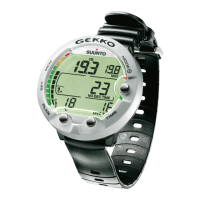
Overview of the Stinger's capabilities as a multipurpose dive computer and sports watch.
Details the functions of each of the four push buttons (M, S, +, -) for navigating modes and settings.
Explains the location and automatic activation function of the water contact sensor on the dive computer.
Describes the functions available in Time Mode, including dual time, calendar clock, and stopwatch.
Explains the primary timekeeping display and how date, seconds, and dual time are shown.
Details how to use the stopwatch for elapsed time, split times, and tracking multiple runners.
General instructions to follow before initiating any dive with the Suunto Stinger dive computer.
Steps to activate the dive computer and perform essential pre-dive checks for readiness.
Information on how to read the battery power indicator and understand low battery warnings.
How to set user-definable functions and personal alarms for dive time and depth.
Guides for presetting time alarms in the Setting Mode.
Guides for presetting dive alarms (time and depth) in the Setting Mode.
Comprehensive guide to scuba diving procedures using the Suunto Stinger.
Instructions for using the Air mode, including dive planning, display settings, and safety stops.
How to use the Planning Mode to calculate no-decompression limits for safe dive preparation.
Customizing display elements such as depth, temperature, and time in the Air mode.
Explanation of recommended and mandatory safety stops during dives and their indications.
Details on performing a recommended safety stop, including countdown and consequences of non-compliance.
Guidance on mandatory safety stops, their triggers, and actions required if violated.
Interpreting the graphical ascent rate indicator and warnings for safe ascents.
Procedures and indications for decompression dives when no-decompression limits are exceeded.
Instructions for diving with EAN, including mode selection and oxygen parameter settings.
Steps to take before diving in EAN mode, focusing on correct oxygen percentage and partial pressure settings.
How to preset displays for oxygen percentage and partial pressure in the EAN mode.
Understanding the oxygen percentage and partial pressure displays while diving with EAN.
Information on the OLF bar graph, CNS%, and OTU% for tracking oxygen toxicity.
Data displayed at the surface after a dive, including surface interval duration and no-flying time.
Details on the surface display information following an Air or EAN dive.
Recommendations on no-flying times after diving from DAN and other authorities.
Guidance for diving at high altitudes and using personal adjustment settings for conservatism.
How to select and configure the correct altitude mode for dive planning at different elevations.
Using Personal Adjustment Mode to account for individual factors influencing decompression risk.
Understanding warning indicators and error modes, including omitted decompression and permanent errors.
Introduction to Free/Gauge modes for freediving and technical diving, including sampling rate settings.
Steps for preparing to dive in Free/Gauge modes, including sampling interval configuration.
Customizing display elements like depth, temperature, and time in Free/Gauge modes.
Details on displays and data for freediving when using the Free/Gauge mode.
How to access and view freediving history, including total dives, longest, and deepest dives.
Explanation of how the Free mode automatically transitions to Gauge mode and its features.
Information displayed on the SURFACE screen after a Free or Gauge dive.
Understanding the various audible beeps and visual alerts from the dive computer.
Step-by-step guide to setting the current time, date, and dual time on the Suunto Stinger.
Instructions for setting a daily alarm, including activation, deactivation, and time setting.
Configuring the dive mode to Air or EAN, including oxygen percentage and partial pressure.
Selecting and setting parameters for Freediving and Gauge modes, including sampling rates.
How to configure depth alarms and dive time alarms within the Setting Mode.
Adjusting altitude settings, personal factors, and display units (metric/imperial).
Accessing and understanding the logbook and dive profile memory for recorded dives.
Reviewing the dive history, which summarizes scuba and free dives.
Connecting the Suunto Stinger to a PC for data transfer, analysis, and setup.
Guidelines for cleaning, protecting, and handling the Suunto Stinger to ensure longevity.
Steps for routine maintenance, including cleaning after dives and avoiding improper cleaning agents.
How to check the unit's water resistance and when to seek professional inspection for leaks.
Explanation of the core operating principles, including no-decompression limits and dive algorithms.
Details on the Suunto Reduced Gradient Bubble Model for predicting gas in tissues and its advantages.
Information on oxygen exposure limits, calculations, and their application in dive planning.
Key technical details including dimensions, weight, depth gauge capabilities, and display resolutions.
 General
| Display | LCD |
|---|---|
| Altitude Adjustment | Yes |
| Backlight | Yes |
| Type | Diving Computer |
| Operating Modes | Air, Nitrox, Gauge |
| Alarms | Audible and visual alarms |
| Operating Temperature | +40°C |
| Storage Temperature | -20°C |
| Dive Time | 0-99 min |
| Battery Life | 1-2 years (depending on usage) |

 To Next Page